


Merlin AI Review
Merlin AI is an all-in-one conversational AI assistant and browser extension designed to summarize videos, write emails, scrape website data, and provide direct access to powerful LLMs directly from any browser tab.
Merlin AI Features
Multi-Model AI Workspace
- Unified Access to Leading Large Language Models
- GPT-4o, Claude 3, and Gemini Core Integrations
- DeepSeek and Grok Architecture Support
- Intelligent Model Optimization Selection Engine
- Side-by-Side Live Prompt Comparisons
- Context-Driven Dynamic Task Handlers
- Advanced Coding & Reasoning Automations
- Creative Writing Configurations & Parameter Control
- Long-Context Complex Task Optimization
Browser & Web Tools
- Chrome Browser Sidebar Productivity Assistant
- Live Interactive Web Page Context Chat
- Google Search Enhancement & Instant Summaries
- Multi-Step Deep Research Autonomous Mode
- Instant Website Scraping & Data Extractor
- Article Breakdown & Technical Explanation Logic
- Information Synthesis Frameworks & Mapping
- Comprehensive Topic Analysis Logs
- Floating Tab Overlays for Multitasking
Document Intelligence
- Interactive PDF Upload Conversational Interface
- Word & Unstructured Document Parsing Engine
- CSV Spreadsheet Matrix Data Analysis
- Precise Citation & Verbatim Passage Extraction
- Large Report, Contract & Manual Diagnostics
- Textbook Information Retrieval Matrix
- Targeted Specific Information Retrieval
- Reference Source Extraction Modules
Knowledge Management
- Personal Vault Encrypted Knowledge Bases
- Custom AI Assistant & Agent Persona Training
- Cross-Project Workspace Segmentations
- Multimodal Knowledge Compilation (PDF/Web)
- Topic Resource Organization Frameworks
- Reusable Asset Knowledge Systems
- Specialized Reference Repositories
- Personal Material Memory Tracking
Analyst Mode
- Spreadsheet Data Query Architecture
- Automated Python Code Generation & Execution
- Dynamic Data Chart & Interactive Table Visualizations
- Statistical Trend Detection & Analysis Modules
- Advanced Statistical Regression Run Systems
- Dynamic Script & Code Explanation Flows
- Data Summary and Report Generators
- Deep Exploratory Data Operations
Writing & Productivity
- General-Purpose Conversational AI Chat Systems
- Gmail Context-Aware Email Composition Writer
- LinkedIn Engagement Content Reply Suggestions
- Twitter/X Post Optimization & Draft Generators
- Personalized Brand Style Tracking Models
- Quick Ask AI Inline Explainer Mechanics
- Real-Time Internet-Enabled Web Responses
- Automated Social Engagement Copy Frameworks
70+ AI Specialist Tools
- AI Essay Writer & Structural Layout Frameworks
- Advanced Paragraph Rewriter & Caption Builders
- Search Engine Optimization Content Tools
- AI Real-Time Language Translation Matrix
- Grammar Enhancement & Verification Suite
- AI Plagiarism Checking & Auditing Ecosystems
- AI Synthetic Content Detector Architecture
- Educational Learning Systems & Question AI
- Bible GPT & Niche Specialty Modules
Video & Creative Tools
- YouTube Video Script Summarizer
- Time-Stamped Structural Transcript Breakdown
- Text Prompt Generative AI Image Engine
- Aspect-Ratio Optimization Controls
- Crafts Interface Prototype & Component Previews
- Marketing Graphic & Dynamic Banner Canvas
- Article Highlights Condenser
- Main Ideas & Video Chapter Extraction Engine
- Interactive Visual Design Workspaces
Platform Availability
- Desktop Chrome Browser Extension Utility
- Full Cloud Web Application Workspace Dashboard
- Native Mobile Apps (iOS & Android Ecosystems)
- Real-Time Cross-Device Sync Architecture
- Unified Cloud Interface Access Control
- Global Regional Support Infrastructure Grid
- Direct Dashboard Run Frameworks
- Real-Time Synchronization Support Modules
Merlin AI Pricing
| Plan Comparison |
Free
$0
Get a feel of things
Basic tools exploration and daily queries. |
Pro
$29
$19
/month
Billed monthly
Billed $228 for a year
Get things done with expanded access limits. |
Teams
$19
$15
per seat/month
Billed monthly
Billed $180 for a year
Get things done together securely. |
|---|---|---|---|
| 1. Model Access Levels | |||
| Basic Models | Limited access | Unlimited access | Unlimited access |
| Plus-level Models | Limited access | 50x usage allowance | 50x usage allowance |
| Exclusive Models | ✕ No access | ✓ Available | ✓ Available |
| 2. Core Capabilities | |||
| Image & Video Options | Basic image generation | Advanced generation tier | Advanced generation tier |
| 70+ AI Assistant Tools | Limited access | Unlimited access | Unlimited access |
| Chrome Extension Add-on | Limited features | Unlimited features | Unlimited features |
| 3. Infrastructure & Sync | |||
| Device Syncing | ✓ Available | ✓ Available | ✓ Available |
| Context Windows | Standard sizes | Standard sizes | Larger context size |
| Usage Dashboard | ✕ Unavailable | ✕ Unavailable | ✓ Team dashboard |
| 4. Safety & Administration | |||
| Team Seat Rule | Individual | Individual | Minimum size is 2 |
| Priority Support Line | Standard speed | Fast-track routing | Fast-track routing |
| Data Protection Matrix | Standard protocols | Standard protocols | SOC2, GDPR, ISO 27001 |
Merlin AI vs Top Competitors
| Core Framework Matrix |
Merlin AI |

HARPA AI |

Sider.ai |

Jasper AI |
|
|---|---|---|---|---|---|
| 1. Core Architecture & Base Infrastructure | |||||
| AI Technology | Multi-LLM Aggregator | Multi-LLM Engine | Hybrid LLM API Connect | Multi-Engine Router | Multi-Model Routing + Brand IQ |
| Primary Focus | Browser Omnibox Access | All-in-One Sidebar Chat | Web Automation & Macros | Budget Productivity Hub | Enterprise Campaigns |
| Workspace Layout | ✓ Inline Overlay & Chat | ✓ Immersive Chat Workspace | ✓ Command Center Sidebar | ✓ Floating Sidebar Control | ✓ Desktop Studio Dashboard |
| Starting Cost Engine | Moderate Premium Tier | Competitive ~$8.30/mo | Value Oriented ~$12/mo | Budget Choice ~$4.20/mo | Enterprise Premium Scale |
| Model Hub Variety | ✓ High (GPT-5, Claude, Gemini) | ✓ High (GPT-5.5, Claude 4.6) | ✓ Core Models Supported | ✓ 20+ Configured Models | ✓ Custom Fine-Tuned Layers |
| Execution Setup | Cloud API Runs | Cloud Workflows | Local Context Automation | Cloud API Workspace | Cloud Enterprise Engine |
| Workflow Routing | On-Demand Prompting | Intelligent Agent Runs | Chained Custom Scripts | Built-in Quick Action | Structured Pipeline Studio |
| 2. Content & Media Generation Capacity | |||||
| Text Templates | Standard Presets | 100+ Framework Layouts | 100+ Native Library Prompts | Modular Preset Library | 90+ Marketing Apps |
| Text Humanizer Engine | ✕ Manual Setup | ✓ Native AI Humanizer | ✓ Tone Adaptation Scripts | ✓ Clarity Tone Switcher | ✓ Custom Tone Analytics |
| Image Creation | ✓ Core Generators Included | ✓ Multi-Model Image Studio | ✕ Prompt Link-Out Only | ✓ DALL-E 3 / Flux / Ideogram | ✓ Enterprise Brand Art |
| Video Creation Studio | ✕ No Native Support | ✓ Sora 2 & Veo 3 Pipelines | ✕ No Video Generators | ✓ Native Video Tools Suite | ✕ No Video Engines |
| Language Allocation | Standard Native Support | 100+ Global Dialects | Context-Aware Translation | 50+ Localized Languages | 30+ Global Voice Sync |
| Long-Form Generation | ✓ Standard Chat Output | ✓ Document Outliner Hub | ✓ Long Article Blueprints | ✓ Structured Essay Engine | ✓ Deep Campaign Frameworks |
| Creative Tooling | Basic Prompts | Photo-to-Cartoon + Logos | Content Repurposing Scripts | Custom Canvas Modifiers | Brand Asset Pipelines |
| 3. Web, Browser & Scraping Automation | |||||
| Web Scraping Engine | Basic Page Reader | Standard Web Summarizer | ✓ Advanced Table/List Scraper | Basic Link Ingestion | Manual Input Focus |
| Live Site Monitoring | ✕ Not Supported | ✕ Not Supported | ✓ Price Drops, Metrics, Cron | ✕ Not Supported | ✕ Not Supported |
| Extension Ecosystem | Chrome + Edge Overlays | Chrome, Cross-Platform Desktop | Chrome + Edge Command Center | Chrome, Edge, Safari Sidebar | Everywhere Extension Overlay |
| YouTube Analytics | Standard Summary Only | Timestamps & Main Ideas | Transcript Extraction & Repurpose | Keypoint + Timeline Export | Manual Link Processing |
| Social Media Copilot | Basic Overlay Boxes | Integrated Smart Assistant | Automated Comment Networks | Inline Context Generators | Dedicated Campaign Modules |
| Search Side-Panel | ✓ Standard Insertion | ✓ Enhanced Results Match | ✓ Custom Prompt Search Look | ✓ Faster AI Engine Engine | ✕ Manual Ingestion Only |
| Automated Macros | ✕ No Native Automation | Browser Task Automator | ✓ Web App Script Trigger | ✕ Simple Sidebar Prompts | ✕ No UI Macro System |
| 4. Document Processing & Productivity Tools | |||||
| Chat with Files | ✓ Standard File Upload | ✓ Deep Multi-Format Sync | ✓ Local Context Page Reads | ✓ 6 Files Multi-Upload | ✓ Enterprise Asset Layer |
| AI Vision & OCR Engine | ✓ Basic Image Inputs | ✓ Advanced Image Editor | ✓ Capture View + Uncopyable OCR | ✓ Instant Screenshot Extract | ✓ Asset Vision Analysis |
| Data Converter Hub | ✕ Manual Prompts Needed | PDF to PNG / PPT / Slides | Page-to-JSON Pipeline Module | Numerical Data-to-Charts Engine | ✕ Structural Assets Only |
| Knowledge Repository | Basic Session History | Advanced Artifact Builders | Cloud-Synced Command Logs | Wisebase Personal Hub | Enterprise Brand IQ Vault |
| Third-Party Pipelines | Standard Clipboard Modifiers | API Endpoints Support | ✓ Zapier, Make, Webhooks | Personal Prompt Macros | ✓ Deep GTM API Integrations |
| Audio Transcription | ✕ No Audio Engine | ✓ AI Podcast Gen + Audio-to-Text | ✕ Video Transcript Parse Only | ✕ No Native Audio Tools | ✕ Text/Image Modalities Only |
| Productivity Utilities | Standard Prompt Toolkit | Math Solver + Mini Apps Studio | Database Enrichment Macros | Inline Code Explainer Panel | Enterprise Campaign Pipeline |

Merlin AI Pros and Cons
Pros
Offers one of the most budget-friendly premium tiers on the market, alongside a generous forever-free plan for casual users.
The clean, dual-pane editor layout makes it incredibly easy to generate and refine content simultaneously without a steep learning curve.
Features over 20+ built-in emotional tones (e.g., convincing, humorous, formal) to match varying brand voices perfectly.
Includes an integrated plagiarism detector powered by Copyscape to verify content originality instantly inside the editor.
Capable of writing seamlessly in 30+ global languages, making it a highly flexible asset for localized content campaigns.
Provides basic keyword recommendations and a brief cluster analyzer to help optimize quick-form copy directly for search engines.
Allows users to build and train their own templates by providing custom input variables and specific generation examples.
Cons
Can occasionally lean on predictable phrasing and loop information when tasked with generating longer blocks of unbroken text.
While great for sections, it lacks the advanced, guided article workflows found in competitors like Jasper or Writesonic.
The character-count limit on the lower paid tier can deplete surprisingly fast during deep copywriting experimentation sessions.
Lacks a live web-scraping connector to independently extract up-to-the-minute factual data, requiring manual fact-checking.
What Exactly Is Merlin AI and Who Should Use This Workspace?
Merlin AI is an all-in-one browser assistant and centralized multi-model AI workspace that operates as a direct sidebar companion across your live web browser tabs. Instead of forcing you to open separate tabs for different artificial intelligence providers, this platform bundles major premium engines like GPT-4o, Claude 3.5 Sonnet, and Gemini 1.5 Pro directly into a single browser setup.
It serves as a unified workspace where you can run text creation, live web research, document scanning, and social media posting without ever leaving your active web page.
Merlin AI is highly recommended if your primary operational bottleneck is “tab-switching fatigue” and the high monthly cost of keeping separate subscriptions for different AI engines. By consolidating these systems, the workspace eliminates the daily friction of moving data back and forth between isolated browser windows. For freelance writers, content creators, and SEO strategists who need to instantly switch between a model specialized in deep logic and one tailored for fast creative drafting, it provides immediate access to specialized tools in one hub.
How Does Merlin AI Work? A Look Under the Hood
Merlin AI operates via an intelligent routing framework called Merlin Magic, which dynamically passes your user prompts to the most efficient cloud-based LLM endpoint based on task complexity. Instead of requiring you to select a specific AI engine manually, this routing logic evaluates whether your input requires advanced coding, multi-step web search, or fast text generation. It then selects the optimal model via API backend calls, returning processed data back to your local browser sidebar in seconds.
Step-by-Step Technical Setup and Activation Sequence
The installation and activation path bypasses complex environment configurations, establishing a direct browser-to-cloud script execution loop:
- Step 1 — Install the Extension
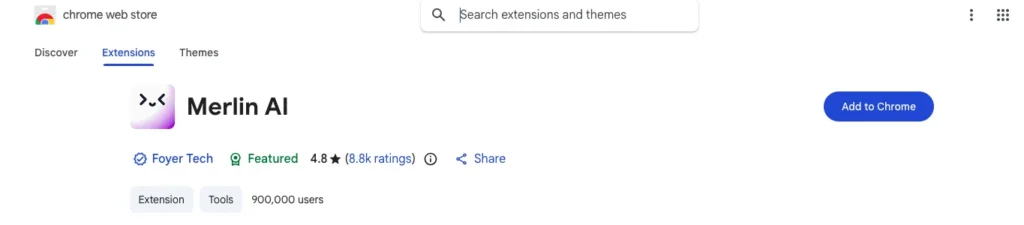
Open the Chrome Web Store, search “Merlin AI,” and click “Add to Chrome.” The install completes in under 30 seconds.
- Step 2 — Create or Log In to Your Account
Click the Merlin icon in your Chrome toolbar. Sign up via Google OAuth or email. Free accounts are active immediately with no credit card required.
- Step 3 — Pin the Extension to Your Toolbar
- Click the puzzle-piece icon in Chrome’s top-right corner, find Merlin, and click the pin icon. This keeps the sidebar trigger always visible.
- Step 4 — Trigger the Sidebar
PressCmd+Mon Mac orCtrl+Mon Windows on any active webpage. The sidebar opens on the right side of the screen and immediately begins parsing the page’s text content. - Step 5 — Select Your Model or Activate Merlin Magic
Click the model selector dropdown at the top of the sidebar. Choose your preferred LLM, or leave it on Merlin Magic for automatic routing. - Step 6 — Send Your First Prompt
Type any query into the input bar. The sidebar has already read the active page — your prompt runs against that live context automatically. No copy-pasting required.
What Is the Merlin AI App Layout Like to Use Day-to-Day?
The Merlin AI interface functions as an instant, overlay canvas that launches seamlessly on the right side of your active browser tab without replacing or disrupting your open web page data. It avoids the clunky, separate-window layout of traditional AI web apps, giving you a fluid workspace that opens instantly via a keyboard hotkey.
When you activate the tool, the layout splits your screen intelligently. Your focus stays on your main workspace or document on the left, while the companion operates as a persistent, vertical control deck on the right.
Navigating the Main Dashboard and Widget Map
The main control console separates your active text generation window from your stored data collections. This keeps advanced system settings and profile management tools tucked away until you intentionally click to expand them.
The interface maps out your quick-access features through a clean, vertical menu stack on the far edge of the sidebar. This allows you to jump from a multi-model chat session into document analysis or prompt templates with a single click.
Working Inside the Built-In Sidebar Workspace Canvas
The floating workspace acts as an adaptive overlay that scans the structure of your active browser tabs automatically. This structural awareness allows you to scrape data from YouTube transcripts or complex articles without copying text manually.
The canvas is split into three core functional zones: the top Model Switcher, the central Conversational Stream, and the bottom Context Bar. This layout ensures that changing your AI engine or uploading a document never clears your existing chat history.
When processing highly complex web environments (such as interactive data dashboards or endless-scroll feeds), the extension’s script engine can suffer from transient connection glitches if your browser’s local web storage buffers fill up too quickly. To prevent session drops, simply clear the extension’s temporary cache using the small trash icon inside the sidebar rather than refreshing the entire web page.
Testing the Core Features: Can Merlin AI Automate Your Daily Tasks?
Merlin AI serves as a powerful multi-utility automation toolkit that successfully handles heavy-duty content creation, media analysis, and cross-platform communication directly within your browser window. Instead of forcing you to use disjointed web apps, it functions as a consolidated workspace that processes complex tasks on any open webpage.
How to Write Content Using the Centralized Prompt Library
The platform incorporates a pre-built prompt library tailored for standard digital marketing and copy optimization tasks. Users can save custom, reusable templates equipped with dynamic variables and trigger them instantly via a brief keyboard command.
This framework speeds up long-form composition loops because your preferred brand tones, layout blueprints, and core guidelines remain stored inside the companion. It eliminates the frustrating necessity of repeatedly copy-pasting core structural constraints every single time you start a new generation session.
How to Analyze Web Pages / YouTube / Documents
The system includes dedicated reading assistance and document intelligence utilities that parse raw multi-format files up to 50 MB each, including PDFs, CSVs, and text documents. Users drop files or paste live URLs directly into the active sidebar canvas to trigger automated summaries, keyword mapping, or interactive Q&A sessions.
- Universal Web Parsing: The extension reads live DOM text strings on any news site or blog, instantly generating core takeaways and structured concept maps.
- YouTube Media Extraction: When a video plays, a one-click button processes the audio track to deliver a timestamped transcript, structural chapters, and actionable notes within 15 seconds.
How to Connect Third-Party Apps and Platforms
The extension embeds contextual interaction buttons directly into the user interfaces of key platforms like Gmail, LinkedIn, and X. This allows creators to draft professional outreach emails, generate social updates, or refine conversational threads without ever exiting their active communication tabs.
System Ingestion Capabilities and Constraints
| Media Ingestion Channel | Supported Input Formats | Operational Strengths | Workflow Constraints |
| Document Intelligence | PDF, DOCX, CSV, TXT, MD | Provides interactive Q&A with precise page and line citations. | High-density nested data tables can degrade semantic accuracy. |
| Media Stream Linker | Live YouTube URLs | Compiles long podcasts into structured summaries very quickly. | Fails to capture visual changes or on-screen text demonstrations. |
| Web Canvas Scraper | HTML, RSS Feeds, Blogs | Automatically runs alongside standard Google Search queries. | Heavy cookie walls or complex paywalls can block content access. |
While the document intelligence engine claims massive processing stability, testing reveals that text structures utilizing multi-column layouts or complex academic sidebars can confuse the reading parser’s scanning order. To bypass this structural bottleneck, always convert your layout files into clean, single-column Markdown strings before dropping them into the project repository.
Performance Testing: Real-World Speeds and System Limits of Merlin AI
When testing the processing speed of the software, the operational response targets consistently remain under 1.8 seconds for standard page summaries and chat completions. The system backend establishes rapid pipeline handshakes with premium cloud model servers, keeping lag to a absolute minimum during live workflows. However, when you trigger deep research loops across multiple live web links simultaneously, processing times can scale upward to several seconds while the search automation engine crawls and synthesizes active online sources.
System Slowdowns with Large Source Documents
During heavy parsing evaluations with massive multi-page files, processing limits become apparent when approaching the maximum context bounds of the software. When you drop massive textbook files or highly complex data files over 45 megabytes into the workspace canvas, the active side panel layout can experience brief rendering freezes. This minor delay occurs while the central processing server segments the text strings to handle vector retrieval, meaning you must wait a few moments before the workspace becomes fully responsive again.
| Core System Advantages (Pros) | Core System Limitations (Cons) |
| All-in-One Multi-Model Access: Runs top-tier engines like Claude and GPT from a single sidebar tab. | Shared Resource Limits: Heavy usage of one specific model lowers your overall credit pool. |
| No App Switching: Eradicates the constant friction of changing tabs to access different AI services. | Credit Burn Penalties: Utilizing advanced configurations consumes your plan metrics up to thirty times faster. |
| Deep Native Integration: Embeds helpful contextual shortcut tools directly into Gmail, X, and LinkedIn layouts. | Occasional Tab Sync Loss: Aggressive browser optimization can cause background panels to reset defaults. |
Managing Long Working Hours and Random Network Drops
When working online for several hours, a sudden Wi-Fi disconnection can disrupt your active content generation tasks. The workspace handles these unexpected connection drops by running local browser fallback scripts inside its interface panels. If your internet drops out during a live text generation, the sidebar stops loading data but preserves your current text layout on the screen instead of crashing or clearing the workspace window.
How Merlin AI Saves Your Spot During Interruption Breaks
The application constantly saves your active chat histories directly to its integrated local tracking log. When you re-establish your network link or refresh the page, the software reads this stored browser file to instantly restore your current project parameters. This means you can close your computer for a quick break and return to your desk without losing your placement or your conversation context.
During my deep evaluation testing, my office router dropped its primary connection for over five minutes right in the middle of a massive article research run. The side window immediately paused its network fetching loop, yet it safely kept my loaded reference data visible on the left section of the layout. Once my local internet link went back online, a single click on the retry prompt successfully resumed the processing run without forcing me to re-upload my source documents.
Hidden Paywalls, and Final Value Verdict
The platform structures its corporate workspace options across three specific tiers: a surprisingly generous Free entry option, an individual Pro plan, and a dedicated multi-user Teams plan. Selecting annual billing options cuts total membership costs by approximately 35%, helping you secure individual premium multi-model access at highly competitive market rates.
| Membership Plan Tier | Base Monthly Cost | Included Model Allowances & Features |
| Free Entry Tier | $0 / month | 102 basic daily query points, entry document scanning, and basic image creation. |
| Individual Pro Tier | $19 / month (billed annually) | 50x premium query limits, unrestricted sidebar layouts, and advanced image processing. |
| Collaborative Teams Tier | $15–$19 / seat / month | Minimum 5-seat setup, team tracking panels, wider context limits, and full SOC2 data compliance. |
The Pre-Purchase Checklist
Before committing to a premium subscription plan, verify that your daily browsing workflows line up with the specific limits of the application:
- Browser Stack Verification: Ensure you complete your primary content creation work inside Chromium-based environments, as the live system extension cannot be installed on Firefox or Safari apps.
- Workflow Volume Check: Audit your standard daily prompt usage to ensure a shared monthly workspace model is sufficient, rather than needing dedicated single-model plans.
- Collaborative Seats Minimum: Ensure your business organization requires at least five distinct user seats before prioritizing the Teams workspace option over individual Pro upgrades.
How Advanced Modes Burn Credits Fast
The most important operational fine print involves the hidden system traps surrounding the platform’s “unlimited fair use policy”. While basic text generation queries carry minimal processing weight, selecting top-tier engines like GPT-4o or high-reasoning logic layouts burns through your daily allowance up to 30 times faster per action. The system maintains a strict soft ceiling capped at roughly $100 per month in equivalent cloud API token spend or $16 in single-day consumption limits. If you trigger massive data lookups across consecutive long hours, your account can face automated throttling or temporary text generation holds until your daily or monthly billing window cycles back open.
Final Verdict: Is Merlin AI Worth It?
The final evaluation is highly favorable for independent freelance writers, content builders, and modern digital asset coordinators. If your daily production routines require you to constantly cross-examine text materials using separate AI tools, paying $19 a month replaces over $100 in separate solo tool subscriptions while removing major tab-switching lag.
Popular AI tools like Merlin





Pasive Marketer is a digital publication dedicated to AI tools, SaaS software, digital marketing, and online business growth. We create in-depth reviews, comparisons, tutorials, and expert guides to help entrepreneurs, marketers, and businesses discover the best software solutions and make informed purchasing decisions.