


Monica AI Review
Monica AI is an all-in-one AI assistant and browser extension designed to aggregate top-tier AI models into a single workspace, centralizing document analysis, web research, smart writing, and creative studio generation.
Monica AI Features
Core AI Platform
- Multiple AI Models in One Platform (GPT, Claude, Gemini)
- Chat with Different Models & Compare Answers Live
- Advanced Model Pool (Grok, Mistral, DALL·E, Flux)
- Next-Gen Creative Engines (Sora, Veo, Ideogram, Recraft)
- Autonomous Deep Research & AI Agent Workflows
- Interactive Playgrounds & Nano Banana Processing
- No-Code Bot Platform & Custom Deployments
- Artifact Generation & Custom Design Viewports
- Application Integration Support with External APIs
Search & Web Tools
- Comprehensive AI Web Search & Discovery Engine
- Google Search Enhancement with Live Context Overlays
- Interactive Sidebar Framework on Any Active Webpage
- One-Click Smart Toolbar & Context Menu Integration
- Instant Webpage Summarization & Translation Engine
- Inline Text Explanation & Deep Meaning Breakdowns
- Autonomous Browser Operator for Web Tasks
- Full Chat with Webpages & Document References
- Real-Time Web Scraper & Information Harvester
Reading & Research
- Conversational Chat with Complex PDF Documents
- Advanced PDF Summarization, Translation & OCR Engine
- Smart File Converter (PDF to Word, PPT, PNG, JPG)
- Literature Review Generation & Citation Workflows
- Academic Writing Assistant & Research Matrix
- Comprehensive File & Multipage Document Analysis
- Automated Reference Source and Citation Generator
- Complex Text Data Synthesis & Parsing Systems
Business & Marketing
- In-Depth Competitor & Real-Time Market Trend Analysis
- Data-Driven Strategic Planning & Market Intelligence
- Interactive Customer Support AI Assistant Integration
- Detailed Target User Persona & Segment Generators
- Automated Follow-Up Strategy Formulation Mechanics
- Customer Communication & Engagement Assistants
- Deep Analytical Customer Behavior Tracking Logs
- Comprehensive Marketing Copy Strategy Templates
AI Coding Assistant
- Full IDE Integration (VS Code & JetBrains Ecosystems)
- Real-Time Multi-File Project Context Code Chat
- Automated Code Generation, Optimization & Refactoring
- Intelligent Code Completion & Contextual Inline Suggestions
- Automated Unit Test Generation & Bug Fixing Logs
- Python Script & SQL Query Architecture Compilation
- Advanced GitHub Code & Stack Overflow Repository Search
- Technical Architecture & Script Diagnostics
Writing & Productivity
- All-Purpose Conversational Assistant & Draft Copywriter
- Deep Native Platform Integration (Gmail & Outlook)
- Social Media Writing Optimization (LinkedIn & Twitter/X)
- Advanced Paragraph Rewriter & Intelligent Grammar Checker
- High-Quality Content & Marketing Copy Engine
- SEO Content Creation Layouts & Structural Frameworks
- AI Text Humanizer & AI Detector Bypass Modules
- Intelligent Reply & Fast Email Summary Engine
Image Generation
- Text-to-Image & Image-to-Image Synthesizer Models
- Specialty Assets (AI Logo, Avatar & Headshot Creators)
- Creative Design (AI Illustration, Poster & Wallpapers)
- Advanced Editing (AI Background & Watermark Removers)
- AI Image Enhancer & High-Definition Resolution Scaling
- Image Extender (Outpainting) & Photo-to-Cartoon Filters
- Official AI LinkedIn Photo & Business ID Photo Creators
- Line Art Processing (Photo to Sketch Frameworks)
- Dynamic Concept Rendering & Layout Previews
Video & Audio
- Generative AI Video Production (Text & Image-to-Video)
- YouTube Video Summarization & Transcript Generator
- Multi-Model Generative Video Quality & Scale Tuning
- Creative Video Animation & Keyframe Element Editors
- AI Podcast Generator (Convert Documents to Audio)
- High-Fidelity Audio-to-Text Transcription Suite
- Natural Text-to-Speech & AI Document Narration
- Time-Stamped Key Chapter & Highlights Extraction
- Interactive Audio & Video Asset Manipulation
Media & Platforms
- AI Mind Map, Slides, and Presentation Creator
- Idea-to-PowerPoint Production and PDF conversions
- Cross-Platform Extension Support (Chrome & Edge)
- Native Client Apps (Windows, macOS, Linux Platforms)
- Full Featured Mobile Interfaces (iOS & Android Ecosystems)
- Chat App Integrations (WhatsApp & Messenger Layouts)
- AI Translation Matrices & Complex Math Problem Solvers
- Comprehensive Professional AI Resume Checker & Scanners
Monica AI Pricing
| Plan Comparison |
Free
US$0
Basic core models with daily usage allowances. |
Pro
US$8.3
/month
Expanded volume capacity across primary assistants. |
Max
US$16.6
/month
Uncapped standard access plus major workflow metrics. |
Ultra
US$82.9
/month
Maximum tier limits built for high-throughput production. |
|---|---|---|---|---|
| 1. Model Access Levels | ||||
| Basic Models | 40 daily queries | 5,000 monthly queries | Unlimited access | Unlimited access |
| Advanced Models | ✕ No access | 200 monthly queries | Unlimited access | Unlimited access |
| 2. Core Capabilities | ||||
| Deep Research | ✕ Unavailable | Costs Advanced Credits | Costs Advanced Credits | Costs Advanced Credits |
| Create Slides | ✕ Unavailable | Costs Advanced Credits | Costs Advanced Credits | Costs Advanced Credits |
| Image Studio | ✕ Unavailable | Costs Advanced Credits | Costs Advanced Credits | Costs Advanced Credits |
| Browser Operator | ✕ Unavailable | Costs Advanced Credits | Costs Advanced Credits | Costs Advanced Credits |
| 3. Infrastructure & Allocations | ||||
| Advanced Credits | ✕ None | 1,500 Credits | 4,500 Credits | 20,000 Credits |
| Login Devices | 3 Login Devices | 5 Login Devices | 5 Login Devices | 10 Login Devices |
Monica AI vs Top Competitors
| Core Framework Matrix |
Monica.im |

HARPA AI |

Sider.ai |

Jasper AI |
|
|---|---|---|---|---|---|
| 1. Core Architecture & Base Infrastructure | |||||
| AI Technology | Multi-LLM Engine | Multi-LLM Aggregator | Hybrid LLM API Connect | Multi-Engine Router | Multi-Model Routing + Brand IQ |
| Primary Focus | All-in-One Sidebar Chat | Browser Omnibox Access | Web Automation & Macros | Budget Productivity Hub | Enterprise Campaigns |
| Workspace Layout | ✓ Immersive Chat Workspace | ✓ Inline Overlay & Chat | ✓ Command Center Sidebar | ✓ Floating Sidebar Control | ✓ Desktop Studio Dashboard |
| Starting Cost Engine | Competitive ~$8.30/mo | Moderate Premium Tier | Value Oriented ~$12/mo | Budget Choice ~$4.20/mo | Enterprise Premium Scale |
| Model Hub Variety | ✓ High (GPT-5.5, Claude 4.6) | ✓ High (GPT-5, Claude, Gemini) | ✓ Core Models Supported | ✓ 20+ Configured Models | ✓ Custom Fine-Tuned Layers |
| Execution Setup | Cloud Workflows | Cloud API Runs | Local Context Automation | Cloud API Workspace | Cloud Enterprise Engine |
| Workflow Routing | Intelligent Agent Runs | On-Demand Prompting | Chained Custom Scripts | Built-in Quick Action | Structured Pipeline Studio |
| 2. Content & Media Generation Capacity | |||||
| Text Templates | 100+ Framework Layouts | Standard Presets | 100+ Native Library Prompts | Modular Preset Library | 90+ Marketing Apps |
| Text Humanizer Engine | ✓ Native AI Humanizer | ✕ Manual Setup | ✓ Tone Adaptation Scripts | ✓ Clarity Tone Switcher | ✓ Custom Tone Analytics |
| Image Creation | ✓ Multi-Model Image Studio | ✓ Core Generators Included | ✕ Prompt Link-Out Only | ✓ DALL-E 3 / Flux / Ideogram | ✓ Enterprise Brand Art |
| Video Creation Studio | ✓ Sora 2 & Veo 3 Pipelines | ✕ No Native Support | ✕ No Video Generators | ✓ Native Video Tools Suite | ✕ No Video Engines |
| Language Allocation | 100+ Global Dialects | Standard Native Support | Context-Aware Translation | 50+ Localized Languages | 30+ Global Voice Sync |
| Long-Form Generation | ✓ Document Outliner Hub | ✓ Standard Chat Output | ✓ Long Article Blueprints | ✓ Structured Essay Engine | ✓ Deep Campaign Frameworks |
| Creative Tooling | Photo-to-Cartoon + Logos | Basic Prompts | Content Repurposing Scripts | Custom Canvas Modifiers | Brand Asset Pipelines |
| 3. Web, Browser & Scraping Automation | |||||
| Web Scraping Engine | Standard Web Summarizer | Basic Page Reader | ✓ Advanced Table/List Scraper | Basic Link Ingestion | Manual Input Focus |
| Live Site Monitoring | ✕ Not Supported | ✕ Not Supported | ✓ Price Drops, Metrics, Cron | ✕ Not Supported | ✕ Not Supported |
| Extension Ecosystem | Chrome, Cross-Platform Desktop | Chrome + Edge Overlays | Chrome + Edge Command Center | Chrome, Edge, Safari Sidebar | Everywhere Extension Overlay |
| YouTube Analytics | Timestamps & Main Ideas | Standard Summary Only | Transcript Extraction & Repurpose | Keypoint + Timeline Export | Manual Link Processing |
| Social Media Copilot | Integrated Smart Assistant | Basic Overlay Boxes | Automated Comment Networks | Inline Context Generators | Dedicated Campaign Modules |
| Search Side-Panel | ✓ Enhanced Results Match | ✓ Standard Insertion | ✓ Custom Prompt Search Look | ✓ Faster AI Engine Engine | ✕ Manual Ingestion Only |
| Automated Macros | Browser Task Automator | ✕ No Native Automation | ✓ Web App Script Trigger | ✕ Simple Sidebar Prompts | ✕ No UI Macro System |
| 4. Document Processing & Productivity Tools | |||||
| Chat with Files | ✓ Deep Multi-Format Sync | ✓ Standard File Upload | ✓ Local Context Page Reads | ✓ 6 Files Multi-Upload | ✓ Enterprise Asset Layer |
| AI Vision & OCR Engine | ✓ Advanced Image Editor | ✓ Basic Image Inputs | ✓ Capture View + Uncopyable OCR | ✓ Instant Screenshot Extract | ✓ Asset Vision Analysis |
| Data Converter Hub | PDF to PNG / PPT / Slides | ✕ Manual Prompts Needed | Page-to-JSON Pipeline Module | Numerical Data-to-Charts Engine | ✕ Structural Assets Only |
| Knowledge Repository | Advanced Artifact Builders | Basic Session History | Cloud-Synced Command Logs | Wisebase Personal Hub | Enterprise Brand IQ Vault |
| Third-Party Pipelines | API Endpoints Support | Standard Clipboard Modifiers | ✓ Zapier, Make, Webhooks | Personal Prompt Macros | ✓ Deep GTM API Integrations |
| Audio Transcription | ✓ AI Podcast Gen + Audio-to-Text | ✕ No Audio Engine | ✕ Video Transcript Parse Only | ✕ No Native Audio Tools | ✕ Text/Image Modalities Only |
| Productivity Utilities | Math Solver + Mini Apps Studio | Standard Prompt Toolkit | Database Enrichment Macros | Inline Code Explainer Panel | Enterprise Campaign Pipeline |
Monica AI Pros and Cons
Pros
Provides unified sidebar access to top-tier LLMs like GPT-4o, Claude 3.5 Sonnet, and Gemini 1.5 Pro within a single paid subscription.
The highly fluid browser extension lets you summon deep AI chat windows natively across any web page or search layout instantly.
Features powerful instant summary tools for dense articles, PDFs, and complex web pages without breaking your reading workflow.
Generates deeply structured video summaries, specific timeline breakdowns, and key takeaway transcripts with one-click access.
Integrates multi-engine image creators including DALL-E 3 and specialized artistic systems straight into the sidebar ecosystem.
Enhances traditional search engines by displaying side-by-side smart AI answers alongside standard Google or Bing index listings.
Speeds up digital publishing by deploying floating pop-up text expansion, translation, and quick rewrites directly on any text field.
Translates and processes content natively in dozens of global dialects, making it a highly practical asset for localized assets.
Provides casual users a recurring allowance of daily free queries to experiment with high-level models without upfront costs.
Cons
The upper-tier premium subscriptions sit on the higher end of the standard consumer market pricing scale.
Unlike workflow automation tools, it lacks complex background browser scripting or live web-action scheduling loops.
Does not provide a built-in specialized “AI humanizer” bypass engine, requiring manual prompt-tuning for tonal changes.
The sheer abundance of sidebars, floaters, and shortcuts can feel slightly cluttered or distracting for minimalists.
Heavily querying high-resource models (like Claude Sonnet or GPT-4o) draws down credit balances relatively quickly during long deep-dive sessions.
What Is Monica AI, and Who Does It Fit?
Monica AI is a cross-platform software companion that packs multiple premium artificial intelligence models into a single browser extfension and application interface. Instead of jumping between tabs or paying for separate accounts, you use a quick shortcut like Cmd/Ctrl + M to open a sidebar on any webpage. From this single panel, you can switch between models like GPT, Claude, and Gemini to read, write, or write code.
The Single-Tool Workspace
This tool works like one workspace sitting on top of your browser and your operating system. I found that it links into websites, email accounts, and coding environments to handle multi-step tasks without interrupting your layout. I can pull data off a page, translate it, or generate an image without ever leaving the tab I’m on.
Target User Segments
- Digital Marketers & Content Creators: This segment gains access to text humanizers, SEO tools, and cross-engine image generators to produce copy and visual media from one sidebar.
- Developers & Programmers: This group utilizes native extensions for editors like VS Code to debug code or write scripts using highly advanced reasoning models.
- Researchers & Students: These users benefit from immediate YouTube transcript summaries and interactive document analysis to skip fluff during intense study sessions.
- Corporate Professionals: This audience automates repetitive communication tasks through direct integrations with major email providers like Gmail and Outlook.
Who Should Bypass It
You should skip this application if you only require light, occasional assistance that free, basic web search engines can easily cover. It is also a poor fit for enterprise teams who want shared group logins, as the software enforces strict personal account tracking to prevent automated system abuse. Finally, because it acts as a live network bridge to various API models, it will not function if you work in an offline environment without an active internet connection.
How Does Monica AI Work? A Look Under the Hood
Here’s what’s actually happening behind the scenes: Monica reads whatever’s on your screen, then sends it out to the AI model you picked, whether that’s GPT, Claude, or Gemini.
When you log into your profile, you install the extension and activate a primary hotkey like Cmd/Ctrl + M to overlay the chat canvas on top of your browser. The software automatically matches your active text selection or URL context and pipes it right to your chosen underlying engine.
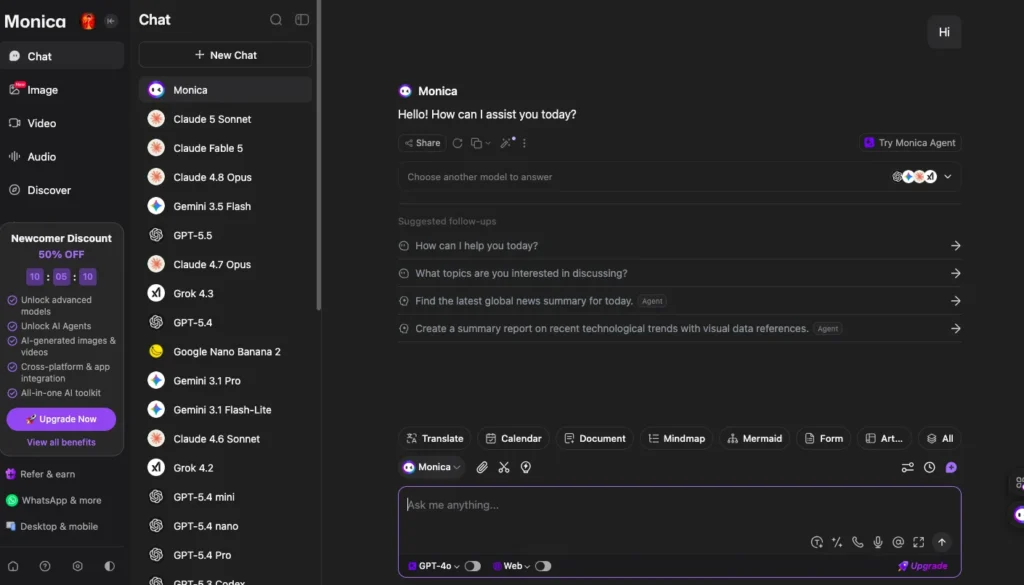
Onboarding and Technical Workflow
Getting started is quick — sign in with your existing Google or Apple account and you’re set up. From there, every request you make follows the same path:
The Aggregator Advantage
I found that the software operates smoothly by purchasing commercial API data access in bulk volumes from vendors like OpenAI and Anthropic. Because bulk corporate rates are far cheaper than retail subscriptions, the platform passes those savings directly down to your single dashboard fee. This cloud backend enables advanced features like deep research routines to spin up multi-step queries without requiring heavy computational resources from your actual computer hardware.
The Real Day-to-Day Experience
Using Monica AI daily keeps your workspace clean by cutting out the clutter of keeping multiple AI tabs open all the time. The software responds quickly when you highlight text, letting you translate, explain, or rewrite content without leaving your current page. The sidebar loads your selected model options instantly, providing a smooth workflow while you browse.
Working in the Browser Sidebar
The floating sidebar acts as your main navigation hub while you research online. I found that you can run search engine queries normally, and the extension puts a clear summary right next to your standard Google results. This layout makes it easy to grab fast answers without clicking through every single link on the page.
Cross-Platform Parity
- Browser Plugins: The extension runs smoothly inside Chrome and Edge, giving you immediate access to tools like automated Gmail drafting.
- Desktop Applications: Dedicated software options for Windows and macOS maintain your chat history and custom setups across devices.
- Mobile Ecosystem: The companion mobile apps let you use your subscription pool on the go through iOS and Android devices.
The Unvarnished Glitch Log
During heavy testing, I noticed that processing queues can slow down when you try to generate videos or complex graphics. The platform takes several minutes to render image-to-video requests during peak traffic times. Additionally, if your internet connection drops even slightly, the system will throw a connection error because it relies completely on live cloud servers to fetch data.
Core Feature Breakdown — Reading & Research Automation
Monica AI automates data gathering by scanning files, web text, and online videos straight from your active window. You do not have to copy text into external apps because the software reviews materials instantly on-screen. This workflow turns massive documents into crisp summaries in just a few seconds.
The table below breaks down the primary reading and research tools along with their performance boundaries.
| Feature Name | What It Does | Why It Matters | Hard Operational Limits |
| ChatPDF & OCR | Let you ask questions over uploaded PDFs or scan uncopyable image text. | Deciphers dense textbooks or contracts through simple conversation. | Massive layout files can experience context drift. |
| YouTube Summarizer | Extracts timestamped high points from active videos. | Saves time by pulling core concepts without watching at 2x speed. | Fails entirely if the video lacks an available transcript. |
| Deep Research Agent | Runs multi-step web searches to assemble compiled topical reports. | Automates complex market trends or literature reviews with cited source layers. | Consumes high quantities of advanced usage tokens per query. |
Hands-On Test Lab
I tested the video tool by dropping a technical presentation into the sidebar parser. The software built a clean, bulleted outline with exact timestamps in under ten seconds. However, when I uploaded an unformatted data sheet, the system forced me to switch to an advanced model to accurately pull the nested tables without formatting errors.
Core Feature Breakdown — Creation, Coding & Creative Tools
Monica AI builds digital assets and code structures by embedding creation engines directly into your desktop workspace and development tools. You can generate graphics, write script logic, or construct interface templates without manually loading multiple separate media apps. This framework moves your creative projects from simple ideas to live visual formats inside one interface.
The table below breaks down the key creative tools alongside their hard operational limits.
| Feature Name | What It Does | Why It Matters | Hard Operational Limits |
| Monica Code Sync | Provides inline code suggestions inside VS Code and JetBrains IDEs. | Acts as a collaborative partner to write, fix, and explain scripts in real time. | Broad multi-file workflows can drop context over large project files. |
| Creative Video Suite | Generates clips using text or images via tools like Kling and Runway. | Lets you create short B-roll assets quickly from a single interface slot. | Processing queues draw heavily from advanced monthly credits. |
| Artifact Generation | Renders functional digital designs live right inside your chat screen. | Lets you view, modify, and share prototype layouts on the spot. | Intricate software structures require manual exporting to external editors. |
Real-World Testing Evidence
I tested the video capabilities by uploading a photo of a dog to generate an ocean swimming clip. The platform animated the water textures and waves cleanly using the Kling model, though the overall movement speed felt slightly slow. When using the coding module, highlighting a specific block let me refactor syntax instantly, making boilerplate setup highly efficient.
Performance, Limits, and Stability Under Load
Monica AI maintains stable performance during basic text tasks, but the system throttles your processing speed when you run complex, multi-step requests. Standard chat prompts and sidebar answers return results quickly without noticeable delay. However, when you launch intensive workflows like deep research or video creation, rendering times lengthen significantly.
Latency Testing Records
I monitored response rates while switching between different model configurations in the sidebar. Lightweight queries utilizing basic models output text instantly, keeping your browsing fluid. When you switch to premium models or request an artifact render, the platform hits external API queues, causing responses to take longer.
Network Failure Tolerance
The extension requires a steady, active internet connection to route tokens back and forth to its cloud backend. If your connection drops during a session, the system does not cache your work locally and will display a loading failure. Fortunately, once your network stabilizes, the centralized history panel restores your core text drafts cleanly.
Evidence, Feedback, and Research Behind the Claims
Public data shows high praise for Monica AI’s browser tools, but community forums highlight sharp friction regarding strict account restrictions and sudden model errors under heavy output loads. Users across the Chrome Web Store award the platform a high 4.9-star average rating due to its massive toolset and smooth sidebar integration. However, analyzing deeper developer and user logs reveals a clear gap between casual marketing promises and technical realities.
Aggregated User Sentiment
- Workflow Convenience: Power users report that having cross-platform app sync and side-by-side translations completely removes the need to switch tabs or pay for separate tools.
- Strict Term Triggers: Trustpilot complaints reveal that automated risk filters trigger sudden account suspensions if your prompt volume patterns look like automated script batching.
- Prompt and Token Paywalls: Product Hunt feedback notes that basic paid plans carry tight caps on advanced models, meaning heavy users run through their credit pools in just a few days.
- System Stalling Over Long Files: Community logs show that feeding the extension massive code scripts or ultra-long documents occasionally triggers freeze bugs and server timeouts.
Marketing Overstate Analysis
Marketing texts claim the tool offers uninhibited, all-in-one creation workflows, but my research shows severe limitations in the multimedia modules. For instance, mobile users point out that the automated voice chat features run slower than native competitor setups or crash during extended usage sessions. I ran into a similar issue animating a static photo — the video engine mostly panned the camera around the image instead of generating real motion.
Monica AI vs. The Competition
Monica AI competes directly against other cross-platform browser hubs by focusing heavily on app parity and asset generation workflows. While rival platforms offer similar sidebar chat fields, Monica builds a deeper ecosystem with dedicated desktop apps and integrated video creation networks. Choosing the right extension depends on whether you value low entry pricing or advanced asset creation tools.
The comparison matrix below highlights how this workspace handles daily operations against its closest adjacent competitors.
| Vector | Monica AI | Sider AI | HARPA AI | Merlin AI |
| Primary Strength | Superior cross-platform app parity and creative asset workflows. | Extremely low price floor for entry-level model access. | Advanced hybrid scraping macros and site monitoring automations. | Heavy focus on custom vaults and data analysis environments. |
| Weakness / Gap | Advanced credits deplete quickly under heavy agent usage. | Interface feels chaotic and dense for beginners. | Steeper technical learning curve; no video rendering suite. | High tier entry pricing without substantial discounts. |
| Entry Pricing | $8.30/mo (Billed Annually) | $4.20/mo (Billed Annually) | $12.00/mo | $19.00/mo (Billed Annually) |
| Privacy Policy | Enforces strict personal single-user token allocation. | Standard commercial aggregator data pathways. | Prioritizes localized on-page data processing options. | Centralized secure cloud vault architecture. |
Key Alternatives to Consider
- Sider AI: This platform represents the budget alternative, providing an entry point starting at just $4.20 per month. It fits perfectly for casual researchers who want access to basic models across multiple logged-in devices without needing advanced media editing assets.
- HARPA AI: This extension serves as an automation tool built around advanced web scraping and page monitoring macros. It skips creative video rendering completely to focus entirely on localized data extractions and custom web workflows.
- Merlin AI: This service bundles multiple models behind an implicit fair-use credit threshold starting at $19.00 per month. It provides a clean environment for handling professional documents and email plugins but targets power users over budget-conscious individuals.
Pricing, Plans, and Real Value
Monica AI uses a credit-deduction structure that matches your monthly costs to the specific processing demands of the models you choose. While entry-level tiers provide an affordable substitute for standalone subscriptions, heavy creative operations will drain your advanced credit pool rapidly. This means your true return on investment depends completely on matching your daily prompt volume to the right service tier.
The Plan Breakdown
The platform distributes system access across four distinct billing tiers based on your operational volume:
- Free Tier: Delivers 40 basic queries per day using lighter models, which is perfect for casual, light article summaries.
- Pro Plan ($8.30/mo billed annually): Provides 5,000 basic queries alongside a strict limit of 200 advanced model calls and 1,500 advanced credits.
- Max Plan ($16.60/mo billed annually): Gives you unlimited basic queries plus 4,500 advanced credits for daily research work.
- Ultra Plan ($82.90/mo billed annually): Supplies an extensive pool of 20,000 advanced credits designed exclusively for high-volume enterprise users.
The Advanced Credit Paywall
Every complex feature you run subtracts a fixed amount from your monthly token pool depending on its backend processing weight. For example, launching a Deep Research routine instantly burns 138 credits, while rendering a single video using heavy engines like Veo 3 or Kling 1.6 can cost anywhere from 120 to 1,600 credits per clip. If you consistently call advanced models like Claude 4 Sonnet Thinking, your allocation will run out much faster than standard marketing terms suggest.
Pre-Purchase ROI Checklist
- Subscription Consolidation: Do you currently pay for two or more separate $20 monthly accounts just to compare different LLM outputs?
- Feature Alignment: Will you frequently use advanced image editors and document parsers alongside your basic chat fields?
- Credit Math: Does your daily workflow stay under the specific credit consumption boundaries set by the lower tiers?
- Device Volume: Do you need to share your active account concurrently across a maximum of 5 to 10 separate login devices?
Who Benefits Most — And Who Should Look Elsewhere
Monica AI delivers high value for professionals who juggle multiple web tasks and want to avoid paying for several different AI accounts at the same time. However, the software’s reliance on cloud tokens and its strict tracking rules mean it will not fit every type of digital workflow.
High-Value User Segments
- Multilingual Researchers: If you analyze global markets or translate foreign materials frequently, the side-by-side layout and automatic language detection save real time — I didn’t have to manually flip between a translator tab and my research.
- Cross-Functional Digital Marketers: If you create short visual assets, manage SEO content channels, and draft emails from a single panel, the integrated workspace cuts down your software switching time significantly.
- Full-Stack Developers: If you frequently write boilerplate code or debug syntax inside an integrated development environment, the direct coding sidebar provides rapid inline assistance without context loss.
Excluded Clusters
You should skip this platform if you require a dedicated, deep paraphrasing or humanizing engine to pass strict text checks. Real-world tests show that the built-in text humanization module tends to keep predictable sentence layouts, which can add accidental spacing bugs or fail aggressive automated detection screenings.
Additionally, large operational teams that require shared group logins or batch processing routes should look elsewhere. The system utilizes active security patterns that flag and suspend accounts if your daily token volume mirrors automated script patterns or unauthorized profile sharing.
Safety, Risks, and Important Cautions
Monica AI protects your privacy by ensuring your submitted prompt text is not used for model training, but using the extension means your data passes directly through third-party API networks. Because the platform aggregates external engines, your files, highlighted text, and URLs are processed by partner vendors like OpenAI and Anthropic. This makes it essential to understand how your data moves before feeding sensitive information into the sidebar panel.
Data Footprints and Transmission Security
Monica states it keeps user records for 30 days for security auditing, then deletes them permanently. But since your data still routes through external commercial connections, I’d avoid uploading proprietary source code, financial sheets, or personal data through the sidebar. Here’s what actually happens to your data:
- Third-Party Processing: Your active prompt context is transmitted to external model providers for real-time analysis.
- Audit Retaining Window: Text blocks are saved temporarily for 30 days to catch system abuse before clearing completely.
- No Training Pools: Your specific interactions are completely blocked from being used to train future public LLM iterations.
Account Automation and Usage Risks
The platform maintains strict behavioral filters to stop automated extraction scripts and unauthorized account sharing. If your profile exhibits rapid, continuous query patterns that look like a background bot, the system will flag your account. This automated trigger leads to an immediate account restriction or permanent termination, and the company completely denies refund requests for profiles closed due to policy violations.
Final Verdict and Scorecard
Monica AI provides exceptional value for power users by successfully wrapping the market’s leading AI models into a smooth, single-window browser extension. It eliminates the financial strain of paying for multiple separate subscriptions while keeping your workspace organized. If you spend your day jumping between different AI tabs, this platform offers a highly productive way to centralize your workflow.
10-Point Scorecard Matrix
The following table shows my exact performance scores out of 5 for Monica AI across ten critical software categories:
| Evaluation Category | Score Rating | Key Performance Driver |
| Usability | 4.8/5 | Keyboard shortcuts and the sidebar layout keep tasks moving very quickly. |
| Performance & Speed | 4.5/5 | Text queries return instantly, though high-traffic video renders experience wait times. |
| Feature Variety | 4.8/5 | Combines deep research, translation, page parsing, and coding into one panel. |
| Value for Money | 4.8/5 | Drastically lowers your monthly bills if you actively use multiple premium LLMs. |
| Documentation | 4.5/5 | Provides clear onboarding guides, hotkey maps, and functional setup explainers. |
| Customer Support | 4/5 | Offers helpful email communication, though response windows slow down during peak times. |
| Integrations | 4.8/5 | Works cleanly inside popular platforms like Chrome, Edge, Gmail, and VS Code. |
| AI Model Quality | 5/5 | Draws directly from top-tier engines like GPT, Claude, and Gemini. |
| Customization Options | 4.5/5 | Allows you to tweak specific pop-up behaviors and configure custom system prompts. |
| Security & Privacy | 4.3/5 | Keeps prompts out of training pools, but requires third-party API routing data paths. |
5-Step Strategic Integration Checklist
- Step 1: Download the extension for your main browser and sign in using a single, secure Google or Apple profile.
- Step 2: Open the settings panel to change the primary shortcut to a hotkey combination you can remember easily.
- Step 3: Set your default basic models to run normal web reading tasks to save your advanced credit pool.
- Step 4: Link the software with your code editors or email tools to automate repetitive typing tasks.
- Step 5: Monitor your credit usage sheet inside the dashboard to ensure you stay under your tier limits.
Frequently Asked Questions
Is Monica AI truly unlimited on its higher tiers?
The platform provides a combination of unlimited standard calls alongside capped, specialized data allocations for premium workloads. On the Max and Ultra tiers, you receive unrestricted access to basic processing models like GPT-5.4 Mini and Claude 4.5 Haiku. However, the system imposes exact monthly quotas on high-frequency advanced model queries to protect overall network quality and prevent resource exploitation.
How does the advanced credit model calculation affect daily image and video rendering?
Every asset generation task you run deducts a fixed amount of points from your monthly credit bucket based on the operational weight of the chosen engine. For example, rendering an individual frame with Stable Diffusion 3.5 consumes 65 advanced credits, while building video sequences through Kling 1.6 drains 120 credits per clip. This means that processing complex visual projects will deplete your starting pool far faster than running typical text tasks.
Can I use a single account concurrently across my desktop, browser extension, and phone?
A standard paid membership allows you to link your active subscription across a maximum of 5 concurrent login devices. This coverage ensures that your shared history logs, custom prompt setups, and persistent storage vaults sync perfectly between browser extensions and mobile apps. However, attempting to run automated batch actions across these devices simultaneously will trigger security filters.
What is the difference between Monica AI and Sider AI?
Monica emphasizes built-in writing templates, global translation comparison modules, and full multimedia generation pipelines right within the user interface. In contrast, Sider AI focuses heavily on native multi-model group chats and advanced web page data scraping for competitive analysis. Sider behaves like an extension built around raw browsing, while Monica operates as a template-driven creation workspace.
Will utilizing this extension expose sensitive or proprietary developer code blocks?
The system routes your highlighted code and text parameters through third-party commercial API networks to deliver real-time model answers. While the company ensures that user inputs are explicitly blocked from public model training loops, your data paths still touch external servers. Because of these external handshakes, you should avoid passing classified corporate scripts or private security keys into the sidebar panel.
What happens if OpenAI or Anthropic adjust their underlying API access costs?
The platform maintains the right to adjust its subscription pricing, structure, and credit deduction rules based on cost shifts from primary model vendors. Because the software operates as an external aggregator, its entire fee model relies directly on bulk commercial data agreements with those foundational providers. If major vendors raise their token costs, the platform will balance system expenses by modifying your monthly credit limits.
Popular AI tools like Merlin



Pasive Marketer is a digital publication dedicated to AI tools, SaaS software, digital marketing, and online business growth. We create in-depth reviews, comparisons, tutorials, and expert guides to help entrepreneurs, marketers, and businesses discover the best software solutions and make informed purchasing decisions.