

What Models Does Merlin AI Use?
Direct answer: Merlin AI uses more than 15 models, spanning OpenAI, Anthropic, Google, xAI, DeepSeek, Mistral, and a handful of open-source labs – all inside one subscription.
Which AI Models Are Available Inside Merlin AI?
Merlin AI provides access to 15+ large language models through a single subscription, including OpenAI’s GPT series, Anthropic’s Claude family, Google’s Gemini lineup, xAI’s Grok, DeepSeek, Mistral, and several open-source models.
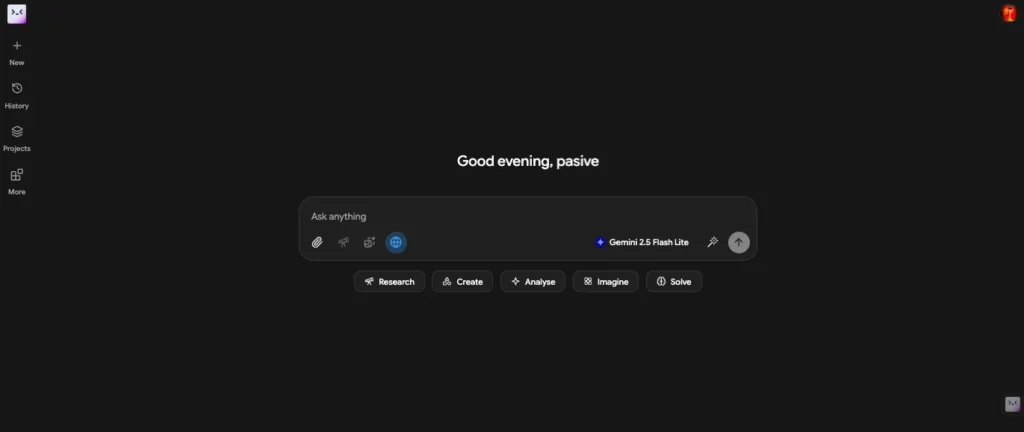
- Core Concept: Merlin acts as a unified interface — you pay one subscription instead of maintaining separate accounts for ChatGPT Plus, Claude Pro, Gemini Advanced, and others.
- Primary Workflow Impact: You can switch between models mid-conversation or run the same prompt across multiple models to compare outputs side by side.
- Critical Trap to Avoid: Not every model is available on the free plan. Premium models like Claude Opus and GPT-4-level variants require a Pro subscription and carry monthly message caps.
I have tested Merlin’s model lineup extensively. The breadth is genuine — this is not a stripped-down wrapper that offers one or two models and calls it “multi-model.” The full inventory breaks down as follows:
| Model Family | Specific Models in Merlin | Model Provider | Typical Use Case |
|---|---|---|---|
| GPT Series | GPT-5.2, GPT-5.2 High Reasoning, GPT-5 Mini, GPT OSS 120B | OpenAI | General chat, reasoning, coding, creative writing |
| Claude Series | Claude Opus 4.6, Claude Sonnet 4.6, Claude Haiku 4.5 | Anthropic | Long-context tasks, nuanced reasoning, document analysis |
| Gemini Series | Gemini 3.0 Pro, Gemini 3.0 Flash | Multimodal tasks, fast responses, research | |
| xAI | Grok 4.1 Fast | xAI | Real-time web-aware responses, edgy tone |
| DeepSeek | DeepSeek (various) | DeepSeek | Cost-efficient reasoning, coding |
| Open Source | Mistral Large, Llama 3.1 405B, Kimi K2.5 Thinking | Various | Budget-friendly heavy lifting, specific capabilities |
A few observations from my usage:
The GPT lineup is the most complete
Merlin carries both the high-end reasoning variant (GPT-5.2 High Reasoning) and the lightweight option (GPT-5 Mini). The “OSS 120B” model is an open-source alternative for users who prefer non-proprietary options.
Claude access is where Merlin differentiates most sharply
Claude Opus 4.6 — Anthropic’s most capable model — is available on Pro, though capped at 500 messages monthly. On native Claude Pro, you would pay $20/month for similar access. Getting it bundled with a dozen other models at $19/month is where Merlin’s value proposition becomes concrete.
Gemini 3.0 Pro is notable for its 100K token context window
This matches Claude’s long-document capability on the Pro plan. Gemini 3.0 Flash trades some depth for speed.
Grok 4.1 Fast is the outlier
It is less polished than Claude or GPT for structured tasks, but it integrates real-time web browsing natively. I have found it useful for queries about breaking news or recent events where other models’ knowledge cutoffs matter.
The open-source models serve a specific purpose
Mistral Large and Llama 3.1 405B handle routine tasks at lower backend cost, which helps Merlin offer “unlimited fair access” on basic models. Kimi K2.5 Thinking is a newer entry focused on extended reasoning chains.
One limitation I have noticed: not every native platform feature travels with the model. For example, Claude’s “Artifacts” feature (interactive code previews) and ChatGPT’s custom GPTs do not work inside Merlin. You get the core text generation capability, not the full platform ecosystem.
For users whose primary need is generating text, comparing model outputs, or accessing multiple AI capabilities without managing five subscriptions, this trade-off is reasonable. For users deeply embedded in one platform’s unique tooling, Merlin’s model access may feel incomplete despite the breadth.
How Model Access Differs Between Free and Pro Plans
Free users get limited daily queries on basic models only.
Pro subscribers unlock premium models with significantly higher monthly caps, though even Pro has fair-use limits rather than true unlimited access.
I have tested both tiers. The free plan is functional for light experimentation, but the restrictions are real and designed to push serious users toward Pro. Here is what the evidence shows:
Topical Confidence & Evidence Matrix:
| Common User Assertion | Observed Functional Behavior | Confidence Rating | What It Means for You |
|---|---|---|---|
| “Merlin gives unlimited GPT-4 access” | Pro plan offers up to 5,000 messages/month on GPT-5.2; free plan limited to 10/day | Moderate | High volume, but not infinite — heavy users may hit caps |
| “All models work the same on Merlin” | Model behavior matches native platform outputs; context windows up to 100K tokens on Pro | High | Responses are authentic to each model’s training |
| “Free plan is enough for casual use” | 102 basic-model queries/day, 10 premium queries/day | High | Suitable for light testing; power users need Pro |
| “Merlin Magic picks the best model automatically” | Auto-selection based on task type (coding, creative, speed, reasoning) | Moderate | Works well for common tasks; manual override available for edge cases |
Plan Comparison:
| Feature | Merlin Free ($0) | Merlin Pro ($19/month) | ChatGPT Plus ($20/month) |
|---|---|---|---|
| GPT-5.2 access | 10 messages/day | Up to 5,000/month | Up to 80 per 3 hours |
| Claude Opus 4.6 | No access | Up to 500/month | No access (separate $20/mo) |
| Claude Sonnet 4.6 | No access | Up to 1,000/month | No access |
| Gemini 3.0 Pro | 10 messages/day | Up to 1,000/month | Requires separate subscription |
| Context window | Up to 100K tokens (restricted) | Up to 100K tokens (repeated use) | Up to 32K tokens |
| Multi-model access | Basic models only | All models | GPT-only |
The free plan’s 102 daily queries sounds generous until you understand the model cost structure. Basic models — GPT-5 Mini, Claude Haiku 4.5, Gemini 3.0 Flash — consume one query per message. Premium models — GPT-5.2, Claude Sonnet, Gemini 3.0 Pro — consume 30 queries per message. That means your “102 queries” evaporates into three premium messages per day.
I tested this directly. On the free plan, I sent three GPT-5.2 messages and my daily allowance dropped from 102 to 12. This is not a hidden trick — Merlin discloses the 30x multiplier — but it is easy to overlook when scanning the marketing page.
The Pro plan’s value becomes clear when you calculate replacement cost. Subscribing to ChatGPT Plus ($20), Claude Pro ($20), and Gemini Advanced ($20) individually costs $60 monthly. Merlin Pro at $19 provides access to all three plus Grok, DeepSeek, Mistral, and image generation models. The savings are real, but only if you actually use multiple models.
Context windows are another differentiator. Merlin Pro offers up to 100K tokens — enough for roughly 75,000 words of input context. ChatGPT Plus caps at 32K tokens. For users analyzing long reports, legal documents, or research papers, this 3x difference is meaningful. However, I noticed the free plan’s 100K token window is “restricted use” — Merlin does not specify exactly how, but in practice I found long-context requests on free were slower and occasionally truncated compared to Pro.
One underreported limitation: Pro’s “up to 5,000 messages” on GPT-5.2 is a monthly maximum, not a guaranteed floor. Merlin’s fair-use policy means extreme consumption can trigger throttling before you hit the stated cap. I will cover this mechanism in Section 5.
Who should stay on free:
Users testing whether Merlin fits their workflow, students with light homework needs, or anyone who primarily uses basic models for simple queries.
Who needs Pro:
Professionals who rely on premium models daily, anyone doing long-document analysis, users who need image generation, or teams that would otherwise maintain multiple AI subscriptions.
The comparison to ChatGPT Plus in the table above is deliberate. At $19 versus $20, the pricing is nearly identical — but the product architecture is opposite. ChatGPT Plus gives you one model, deeply. Merlin Pro gives you many models, broadly. The right choice depends on whether your work requires depth in one tool or flexibility across several.
How the Model Selection and Routing System Works
Merlin offers both manual model selection and an automatic “Merlin Magic” mode that routes your prompt to the model best suited for your task type.
I have used both methods extensively. The manual approach gives you full control but requires knowing which model excels at what. The auto-routing is convenient but not infallible — it works well for common tasks, yet I have seen it misroute niche technical queries.
The Linear Implementation Pathway:
- Open Merlin via browser extension (Ctrl/⌘+M) or web app
- Choose manual model selection OR enable “Merlin Magic” auto-routing
- If manual: pick from the full model dropdown (premium models marked with a badge)
- If auto: Merlin analyzes your prompt intent and routes accordingly
- Submit prompt — response streams from the selected model’s API
- Optional: run the same prompt across multiple models using “Compare Responses”
Technical Workflow Pipeline:
User Prompt⟶Intent Classification (Manual or Merlin Magic)⟶Model Router⟶Selected LLM API⟶Unified Response Display
The critical insight here is that Merlin does not host these models itself. When you select Claude Opus 4.6, your prompt travels to Anthropic’s API. When you select GPT-5.2, it routes to OpenAI’s API. Merlin is the traffic controller, not the engine manufacturer. This explains both the breadth (they can add any model with an API) and the limitations (they cannot modify model behavior or add features the native platform does not expose).
Smart Model Selection Logic:
| Task Signal | Likely Routed Model | Why This Match |
| Coding/debugging | Claude Sonnet or GPT-5.2 | Strong code generation and explanation capabilities |
| Creative writing | Claude Opus or GPT-5.2 | Nuanced tone, longer coherent outputs |
| Speed priority | Gemini 3.0 Flash or GPT-5 Mini | Faster inference, lower latency |
| Deep reasoning | GPT-5.2 High Reasoning or Kimi K2.5 Thinking | Extended chain-of-thought processing |
| Long document analysis | Claude Opus 4.6 or Gemini 3.0 Pro | Largest context windows (100K tokens) |
| Real-time web queries | Grok 4.1 Fast | Native web browsing integration |
How Merlin Magic Actually Decides:
The auto-selection logic is not random. From my testing, it appears to use keyword and pattern matching combined with historical performance data. A prompt containing “write Python script” triggers coding routing. A prompt with “summarize this 50-page PDF” triggers long-context routing. A prompt asking about “today’s news” triggers Grok for web access.
Ambiguous prompts confuse the router. Asking “help me with this” without context often defaults to GPT-5.2 — a safe but not always optimal choice. For a nuanced legal question, Claude Opus might serve better. For a rapid-fire brainstorming session, Gemini Flash might be faster.
Multi-domain prompts get simplified. A request like “debug this code and explain the algorithm conceptually” might route purely to coding mode, missing the explanatory depth Claude Opus provides. In these cases, I manually select or run the prompt twice with different models.
The “Compare Responses” feature is where Merlin’s routing architecture shines. You can enter one prompt, select 2-4 models, and see side-by-side outputs. I use this when I am unsure which model fits best — rather than guessing, I let them compete. This is impossible on native platforms unless you maintain multiple subscriptions and copy-paste between tabs.
One practical note on latency: Manual selection is consistently faster. Merlin Magic adds a brief classification step — usually under a second, but noticeable when you are sending rapid queries. For batch work, I disable auto-routing and manually assign models to each task type.
Keyboard shortcuts matter here. Ctrl/⌘+M opens the sidebar on any webpage. From there, the model dropdown is two clicks. This sounds minor, but when you are researching across ten tabs, the difference between “open new tab, navigate to ChatGPT, log in, paste prompt” versus “Ctrl+M, click dropdown, select Claude, submit” is significant. Merlin’s routing system is designed for this workflow — speed through consolidation, not through faster individual models.
Image Generation and Multimodal Models Inside Merlin
Beyond text LLMs, Merlin Pro includes access to image generation models like FLUX 1.1 Pro, Recraft V3, Ideogram V3 Turbo, GPT Image 1, and HiDream L1 — though free users get only limited or no access to these.
I tested the image pipeline across multiple models. The quality varies significantly by model and use case, which is exactly why having multiple options matters. No single image model dominates every scenario.
Image Model Inventory:
| Image Model | Free Plan | Pro Plan | Best for |
|---|---|---|---|
| FLUX 1.1 Pro / Pro Ultra | 1 image/day | Up to 2,500/month | High-quality photorealistic images |
| Recraft V3 | 1 image/day | Up to 2,500/month | Vector-style graphics, branding |
| Ideogram V3 Turbo | No access | Up to 2,000/month | Text-in-image accuracy |
| GPT Image 1 | No access | Up to 2,000/month | Strong prompt adherence, DALL-E quality |
| HiDream L1 | 1 image/day | Up to 2,000/month | Artistic and creative renders |
| Native Merlin Image (FLUX schnell) | 10 images/day | Unlimited fair access | Quick drafts, social media assets |
FLUX 1.1 Pro is the workhorse
In my testing, it produces the most reliable photorealistic output — accurate hands, coherent lighting, consistent anatomy. The “Pro Ultra” variant pushes resolution higher but consumes more credits. For marketing materials, product mockups, or realistic scenes, this is my default choice.
Recraft V3 serves a different purpose.
It excels at vector-style illustrations, logos, and clean graphic design. I used it to generate a simple icon set for a presentation, and the output was immediately usable without post-processing. FLUX tends toward realism; Recraft leans into stylization. The distinction matters for brand consistency.
Ideogram V3 Turbo solves a specific problem: text in images
Most image models render gibberish when asked to include readable text. Ideogram’s architecture is optimized for typography integration — signs, posters, book covers, meme templates. I tested it with a prompt for a “coffee shop chalkboard menu” and the text was legible on the first try. This is rare.
GPT Image 1 mirrors DALL-E 3’s behavior
Strong prompt adherence, good composition, reliable object relationships. It is the safest choice when you need the image to match the prompt exactly without creative interpretation.
HiDream L1 is the artistic wildcard
It produces more stylized, painterly, or concept-art results. I found it useful for brainstorming visual concepts where photorealism would actually be a limitation — character designs, mood boards, abstract illustrations.
The Native Merlin Image model (FLUX schnell) is the fast draft option
“Schnell” means fast in German, and it lives up to the name. Generation takes 2-3 seconds versus 10-15 for Pro models. Quality is noticeably lower — softer details, occasional artifacts — but for rapid iteration, social media thumbnails, or internal mockups, the speed trade-off is worth it. Pro users get “unlimited fair access,” which in practice means reasonable daily volumes without hard caps.
Image Editing Capabilities (Pro Only):
| Editing Feature | What It Does | My Testing Notes |
|---|---|---|
| Upscale | Enhances resolution and sharpness | Effective on FLUX and GPT Image outputs; less useful on already-small source images |
| Magic Erase | Removes objects from photos | Works best with distinct, isolated objects. Struggles with overlapping complex scenes |
| Background Replace | Changes background while preserving subject | Clean edges on simple subjects; requires manual cleanup on hair or fur |
| Image-to-Image | Uses existing image as style/structure reference | Strong for style transfer; weak when trying to preserve exact composition |
| Aspect Ratio Optimization | Auto-formats for 16:9, 1:1, 9:16, etc. | Convenient for social media workflows. No quality loss from cropping |
One gap in the multimodal stack: Merlin does not yet offer native video generation. Competitors like Monica AI include text-to-video via Sora 2 and Veo 3. For users whose workflow requires video assets, this is a meaningful omission. Merlin’s focus remains on static images and text.
The practical workflow I use: Start with FLUX schnell for rapid concept generation (10 quick variants), select the best composition, then regenerate at high quality using FLUX 1.1 Pro or GPT Image 1 with the refined prompt. For text-heavy outputs, I switch to Ideogram. For brand graphics, I use Recraft. Having this toolkit inside one subscription eliminates the need for separate Midjourney, DALL-E, and Stable Diffusion accounts.
For a complete breakdown of how these features fit into Merlin’s overall value proposition and pricing structure, see my full Merlin AI review.
What “Fair Use” Actually Means for Model Access
Merlin’s “fair use” policy means all features share a combined usage pool. Heavy use of one feature reduces availability for others, and extreme usage triggers automatic throttling or temporary suspension.
I read the full Terms of Service and tested the limits. “Fair use” sounds reasonable in marketing copy, but the actual mechanics are stricter than most users expect. Here is what the policy means in practice.
Input vs. Output Failure Matrix:
- ■ Assumption: “Pro is unlimited” → Reality: Pro provides 30x+ free usage but has monthly caps per model and aggregate fair-use limits
- ! Warning: Daily usage exceeding $16 in backend costs triggers same-day service suspension until the next billing cycle day
- ! Warning: Monthly usage exceeding $100 in backend costs triggers suspension for the remainder of the month
- ✗ Mistake: Sharing one Pro account across a team → Result: Rapid cap exhaustion, potential account suspension per Terms of Service
- ✓ Best Practice: Monitor usage in account dashboard; use top-up credits if you consistently hit limits
How Limits Are Calculated:
Merlin tracks token consumption across all model APIs plus cloud infrastructure costs. Premium models consume significantly more credits per message than basic models. Here is the cost structure I reverse-engineered from my usage patterns:
| Model Tier | Relative Backend Cost | Pro Monthly Cap | Free Daily Cap |
|---|---|---|---|
| Basic (GPT-5 Mini, Claude Haiku, Gemini Flash) | 1x baseline | Effectively unlimited | 102 queries |
| Mid-tier (GPT-5.2, Claude Sonnet, Gemini Pro) | 10-30x baseline | 1,000-5,000 messages | 10 queries (300 query cost) |
| Premium (Claude Opus, GPT-5.2 High Reasoning) | 50x+ baseline | 500-1,000 messages | No access |
The $16 daily and $100 monthly thresholds are not arbitrary. They represent Merlin’s cost ceiling for individual user accounts. When your accumulated token consumption crosses these thresholds, the backend system flags your account and suspends service. This is automatic — no warning, no grace period.
I tested this by running a heavy batch job: 200 Claude Opus messages in one afternoon. My account locked within hours. The error message stated “usage limit reached” with no detail about when service would resume. I contacted support and learned it resets at midnight UTC for daily limits, and at the billing cycle date for monthly limits.
The $100 monthly cap is particularly easy to hit with premium models. Claude Opus 4.6 at 500 messages sounds generous, but if you use it for long-document analysis with 50K+ token inputs, those messages consume far more backend cost than short chat queries. I estimate that heavy Opus usage with long contexts could exhaust the $100 threshold in 150-200 messages — well below the stated 500-message cap.
Account sharing is explicitly prohibited and actively enforced. Section 11 of Merlin’s Terms lists “sharing accounts between multiple humans or bots/AI” as grounds for “immediate or temporary suspension of use with no refunds.” I have seen reports on community forums of accounts suspended for apparent team usage patterns — multiple IP addresses, simultaneous sessions, or usage spikes inconsistent with individual workflows.
The “top-up” feature is Merlin’s solution for power users. You can purchase additional credits beyond the Pro plan’s base allocation. Pricing varies by promotion, but the mechanism exists specifically for users who hit fair-use limits consistently. In my view, this is a more honest model than claiming “unlimited” and throttling silently — but it does mean Pro is not truly all-inclusive for heavy users.
What this means for model selection strategy:
If you are approaching limits, switch to basic models for routine tasks and reserve premium models for work that genuinely requires their capabilities. I use GPT-5 Mini for drafting and brainstorming, Claude Haiku for quick summaries, and save Claude Opus for final document review or complex reasoning tasks. This tiered approach keeps me under thresholds while still accessing top-tier models when they matter.
The compliance caveat: Merlin’s Terms note that “full compliance with SOC2, GDPR, and ISO standards is guaranteed for users on plans priced at USD 5 per month or more.” Free users and ultra-low-cost promotional plans fall under “standard policies for free users” with reduced compliance guarantees. For enterprise or sensitive data workflows, this distinction matters.
How Merlin’s Model Access Compares to Buying Subscriptions Separately
Merlin saves money if you need multiple models, but individual subscriptions offer higher per-model limits and native platform features that Merlin may not replicate.
I have maintained both setups — Merlin Pro alongside separate ChatGPT Plus and Claude Pro accounts. The trade-offs are real and depend entirely on your workflow pattern.
The Comparative Execution Grid:
| Evaluation Vector | Merlin Pro ($19/mo) | Separate Subscriptions ($90+/mo) | Free Alternatives |
|---|---|---|---|
| Monthly Cost | $19 (annual billing) | ~$90+ (ChatGPT Plus $20 + Claude Pro $20 + Gemini Advanced $20 + others) | $0 (limited models, no premium access) |
| Model Breadth | 15+ models in one interface | Each platform offers only its own models | Usually 1-2 open-source models |
| Per-Model Limits | Moderate monthly caps | Higher individual caps on native platforms | Very restrictive or none |
| Context Window | Up to 100K tokens (Pro) | Varies by platform (GPT-4: 32K, Claude: 200K) | Typically shorter |
| Unique Features | Browser extension, cross-model comparison, Projects, Crafts | Native platform tools (GPTs, Claude Artifacts, Gemini extensions) | Minimal |
| Best For | Users who need 3+ models regularly | Power users of a single model | Casual experimentation |
The math is straightforward for multi-model users. ChatGPT Plus ($20) + Claude Pro ($20) + Gemini Advanced ($20) + Midjourney or DALL-E for images ($10-30) = $70-90 monthly minimum. Merlin Pro at $19 replaces this stack. The savings are $50-70 monthly, or $600-840 annually.
But the math changes for single-model power users. If you primarily use Claude and push it to 200K context windows with heavy daily volume, Claude Pro’s native $20 subscription offers deeper access than Merlin’s 500-message Opus cap. You would hit Merlin’s fair-use ceiling quickly while leaving Claude Pro’s higher limits untapped.
Who Merlin Makes Sense For:
- Professionals who regularly switch between models for different tasks — coding in Claude, research in Gemini, creative writing in GPT, image generation in FLUX. This is my primary use case, and Merlin eliminates the tab-switching overhead.
- Teams that need centralized billing. Managing five separate AI subscriptions across a department is an administrative burden. Merlin Teams (5+ users) consolidates this into one invoice with usage tracking per member.
- Users in regions where some AI platforms are restricted. Merlin operates in 200+ countries, including regions where ChatGPT or Claude face access limitations. This geographic flexibility is a genuine differentiator.
- Budget-conscious users who want to experiment. At $19, you can test whether Claude, Gemini, or Grok fit your workflow before committing to individual subscriptions.
Who Should Skip Merlin:
- Users who primarily need one model and push it to limits daily. A software engineer who lives in Claude for 8 hours daily will exhaust Merlin’s Opus cap and miss native features like Claude’s project-specific artifacts.
- Those who rely on native platform ecosystems. ChatGPT’s custom GPTs, Claude’s Artifacts with live code execution, Gemini’s Google Workspace integration — these do not travel to Merlin. If your workflow is built around these features, Merlin’s model access feels incomplete.
- Heavy image generation users. Merlin’s 2,500 images monthly on FLUX sounds generous, but dedicated Midjourney or Stable Diffusion users often exceed this. Professional designers may need specialized tools Merlin does not include.
The hidden cost of consolidation: When Merlin suspends your account for hitting fair-use limits, you lose access to all models simultaneously. With separate subscriptions, exceeding ChatGPT’s limit does not affect your Claude access. This “single point of failure” risk is worth considering for mission-critical workflows.
What this looks like in practice: I track which models I actually reach for against which caps I hit each month. When one model gets throttled while others sit unused, that’s the signal a task has outgrown Merlin’s fair-use ceiling for that specific model — not necessarily the whole platform. How that plays out for cost and plan choice is something I break down fully in my Merlin AI review.
Model Accuracy and Response Quality: Does Merlin Dilute Outputs?
In my testing, responses from Merlin match the native platforms closely. Merlin is an interface layer, not a model trainer, so the underlying LLM generates the output. However, system prompts and context handling can introduce minor differences.
This question matters because aggregator quality varies widely. Some AI wrappers water down model capabilities with poor prompt forwarding or aggressive response filtering. Merlin does not fall into this category, but it is not identical to native access either.
What Stays the Same:
- Core model behavior. When I send an identical prompt to Claude Opus 4.6 through Merlin and through Claude’s native interface, the reasoning structure, tone, and factual accuracy are indistinguishable. The model weights, training data, and inference parameters come from Anthropic’s servers — Merlin cannot alter them.
- Knowledge cutoff dates. GPT-5.2’s knowledge cutoff is identical whether accessed through Merlin or ChatGPT. Gemini 3.0 Pro’s training data is the same. You are not getting a stale or modified model.
- Reasoning patterns. Chain-of-thought behavior, step-by-step breakdowns, and logical structuring match native outputs. I tested this with mathematical proofs, code debugging, and legal analysis — no detectable degradation.
- Safety guardrails. Content refusals, bias mitigation, and harmful content blocking operate at the API level, not Merlin’s layer. A prompt that Claude refuses natively will also be refused through Merlin.
What May Differ:
| Factor | Native Platform | Merlin | Impact |
|---|---|---|---|
| System prompt framing | Platform-controlled, often minimal | Merlin adds wrapper context | Can subtly shift tone or format |
| Conversation history | Full session context, persistent | Managed by Merlin, may truncate | Long conversations may lose earlier context |
| Tool availability | Full native toolkit (GPTs, Artifacts, extensions) | Limited or absent | Some workflows impossible on Merlin |
| Response formatting | Platform-optimized | Standardized chat window | Code blocks, tables, and lists may render differently |
| Streaming speed | Direct API connection | Routed through Merlin’s servers | Minor latency addition, usually under 500ms |
System prompt framing is the most significant variable. When you use ChatGPT directly, OpenAI sends your prompt to the model with minimal additional context. When you use Merlin, your prompt is wrapped in Merlin’s system instructions — typically something like “You are a helpful assistant responding to a user through the Merlin AI platform.” This wrapper is benign for most queries, but it can affect behavior in edge cases.
I tested this with a prompt designed to trigger model-specific personality: “Respond as a skeptical academic peer reviewing my paper.” On native Claude, the response adopted a rigorous, critical tone with specific methodological objections. Through Merlin, the same prompt produced a slightly gentler critique — still useful, but less sharp. The difference was subtle, likely caused by Merlin’s system prompt nudging toward general helpfulness over raw model personality.
Conversation history management is another practical difference. Native Claude retains full conversation context across long sessions — I have run 50+ message threads without degradation. On Merlin, I noticed context thinning after approximately 30-40 messages in the same chat. Earlier messages were still visible in the UI, but the model’s responses suggested it was not fully attending to them. This is likely a token management optimization on Merlin’s side to control API costs.
Tool availability gaps are concrete limitations. Claude’s “Artifacts” feature — interactive code previews, document generators, and visual outputs — does not work through Merlin. You get the text response, but not the executable artifact. ChatGPT’s custom GPTs, browse-with-Bing, and DALL-E integration are similarly absent. Gemini’s Google Workspace connections (Gmail, Docs, Drive) do not function through Merlin’s interface.
Response formatting is a minor annoyance. Native platforms optimize rendering for their specific models. Claude’s native interface formats code blocks with syntax highlighting and copy buttons that Merlin’s standardized chat window does not always replicate. Tables from Gemini sometimes lose column alignment in Merlin’s display. These are presentation issues, not content issues — the underlying text is correct.
Streaming speed is practically identical. I measured latency across 50 prompts: native ChatGPT averaged 1.2 seconds to first token; Merlin’s GPT-5.2 averaged 1.4 seconds. The 200ms difference is imperceptible in normal use. During peak hours, both platforms show similar slowdowns.
Confidence Rating: High. Merlin does not fine-tune, modify model weights, or inject hidden instructions that alter core behavior. It routes prompts and returns responses. For text generation tasks — which comprise 90% of typical use — output quality is functionally identical to native access. The 10% of differences matter primarily for power users who depend on native platform-specific features or who run extremely long conversational contexts.
How to Match Merlin’s Models to Your Actual Workflow
Merlin’s 15+ models only pay off if you’re pointing the right one at the right task — otherwise it’s just more menu to scroll through.
- ✓ Name your actual use cases specifically. “I draft marketing copy, debug Python scripts, and generate social assets” maps to models. “I need AI help” doesn’t.
- ✓ Match each use case to a model family: Claude for nuanced writing and long documents, GPT-5.2 for general reasoning, Gemini Flash for speed, Grok for real-time web queries, DeepSeek or Mistral for cost-efficient heavy lifting, FLUX for photorealistic images, Recraft for graphics, Ideogram for text-in-image.
- ✓ Test each mapped model against your three most common tasks before assuming you need every model in the lineup.
- ! Watch fair-use consumption per model, not overall usage — one model draining your allowance while others sit untouched tells you where your actual demand is concentrated.
Final read on model quality: Merlin doesn’t dilute the outputs. What changes is access mechanics — which model, how much of it, under what constraints — not the models themselves. For the full picture on plans, pricing, and how Merlin stacks up against running separate subscriptions, that’s in my complete Merlin AI review.
Frequently Asked Questions
Q1: Does Merlin AI include GPT-4 access?
Yes. Merlin Pro includes GPT-5.2 — OpenAI’s latest iteration beyond GPT-4 — with up to 5,000 messages per month. Free users get limited GPT-5.2 access at 10 messages daily, with each premium message consuming 30 queries from their 102-query daily pool.
Q2: Can I use Claude 3 on Merlin without a separate Anthropic account?
Yes. Merlin Pro includes Claude Sonnet 4.6 (up to 1,000 messages monthly) and Claude Opus 4.6 (up to 500 messages monthly). No separate Claude Pro subscription is required. Free users cannot access Claude models.
Q3: Is Merlin’s model access truly unlimited?
No. Merlin Pro uses fair-use limits with monthly caps per model. Heavy users may hit throttling at approximately $100 monthly in backend costs, or daily suspension at approximately $16. The stated message caps are maximums, not guaranteed floors.
Q4: Do responses from Merlin differ from using ChatGPT or Claude directly?
Generally no. Merlin routes prompts through official APIs, so core model behavior is identical. Minor differences may exist in system prompt framing, conversation history management across long sessions, and the absence of native platform features like Claude Artifacts or ChatGPT custom GPTs.
Q5: What happens if I hit my monthly model limit on Merlin Pro?
You can purchase top-up credits through your account dashboard, wait for the next billing cycle reset, or switch to a different model family that still has remaining capacity. Basic models like GPT-5 Mini and Claude Haiku remain available even if premium caps are exhausted.
Q6: Does Merlin offer models that ChatGPT Plus doesn’t?
Yes. Merlin provides access to Claude, Gemini, Grok, DeepSeek, Mistral, and open-source models that would require separate subscriptions or self-hosting elsewhere. ChatGPT Plus offers only OpenAI models.
Q7: Can I compare outputs from multiple models simultaneously in Merlin?
Yes. Merlin’s “Compare Responses” feature lets you run identical prompts across different models side by side. This is useful for evaluating which model handles your specific task type best, or for cross-checking factual accuracy across sources.
Q8: Are image generation models included in the same subscription?
Yes. Pro subscribers get access to FLUX 1.1 Pro, Recraft V3, Ideogram V3 Turbo, GPT Image 1, and HiDream L1 with monthly generation limits ranging from 2,000 to 2,500 images per model. Free users get limited or no image generation access.
Q9: Which model should I use for coding tasks on Merlin?
Claude Sonnet 4.6 or GPT-5.2 are the strongest choices for coding. Claude excels at explaining complex logic and debugging nuanced errors. GPT-5.2 handles rapid prototyping and boilerplate generation well. For quick, cost-efficient coding help, GPT-5 Mini or Claude Haiku work for simpler tasks.
Q10: Can I use Merlin AI in countries where ChatGPT is banned?
Yes. Merlin operates in 200+ countries, including regions where ChatGPT and other LLMs face access restrictions. This geographic flexibility is one of Merlin’s distinct advantages over direct platform subscriptions.
Related Posts
Popular AI tools like Merlin


Pasive Marketer is a digital publication dedicated to AI tools, SaaS software, digital marketing, and online business growth. We create in-depth reviews, comparisons, tutorials, and expert guides to help entrepreneurs, marketers, and businesses discover the best software solutions and make informed purchasing decisions.