


Ocoya Review
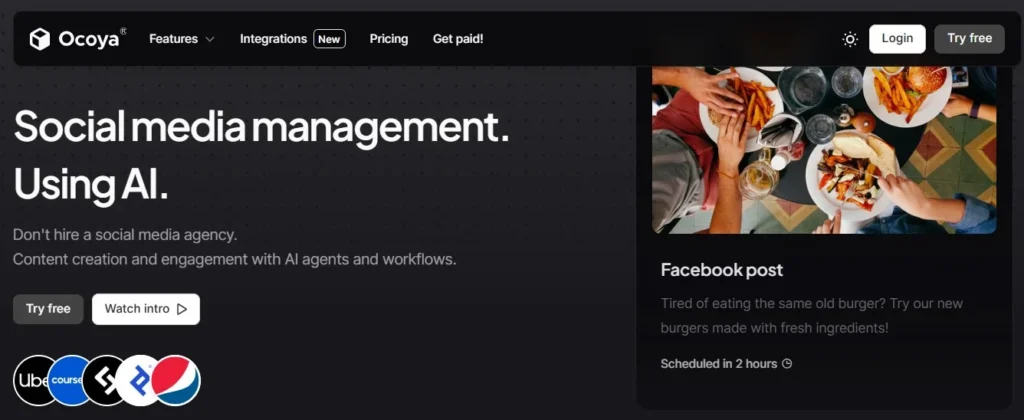
Ocoya is an all-in-one social media management tool that combines AI copywriting, graphic design, and content scheduling into a single fluid platform, letting you manage campaigns in minutes.
Ocoya Features
Travis AI Copywriter
Generate engaging social media marketing content, captions, and descriptions in seconds using AI.
Smart Social Calendar
Plan, visually track, and map out your multi-platform campaigns from a centralized calendar dashboard.
E-Commerce Catalogs
Import active product lines straight from your Shopify or WooCommerce store instantly.
Built-In Graphic Editor
Create eye-catching social design assets within the workspace via Canva or native template tools.
DM & Comment Replies
Automate customer conversations using keywords to trigger quick direct replies and support text.
Team Workspace Rooms
Collaborate smoothly across teams using client approval engines and role-based permissions.
Best-Time Scheduling
Maximize total profile reach by publishing content when your target audience loops online.
AI Hashtag Generator
Instantly pinpoint trending and highly relevant hashtags based on uploaded content assets.
Real-Time Performance
Monitor conversion trajectories, click metrics, and key virality scores inside one hub.
Bulk Post Queues
Organize and upload multiple social posts simultaneously to streamline workflows effortlessly.
AI Blog Summarizer
Convert long blog posts or news write-ups into snackable, bite-sized social copy layouts.
Copy Framework Matrix
Build optimized, high-converting copy variants using configured AIDA and PAS marketing standards.
Global Language Engine
Translate and deploy active brand campaigns cross-channel in various language styles fluidly.
Recurring Campaigns
Set evergreen marketing distribution rule patterns to run automatically across long production tracks.
RSS Feed Syncing
Automate your content pipeline by broadcasting fresh blog feeds to social feeds instantly.
Shared Unified Inbox
Manage every incoming community dialog thread and message profile within a singular dashboard.
Integrated GIF & Media
Access millions of free stock images, visuals, and moving assets right inside the media vault.
Asset Library Storage
Keep active brand graphics, style standards, and shared creative media properties fully organized.
30+ Native Integrations
Seamlessly link profiles across Facebook, Instagram, TikTok, LinkedIn, Pinterest, and X.
Trending Post Ideas
Identify current viral topics and keyword trends to map out high-performing schedules.
Brand Safety Tools
Ensure complete profile governance using secure permissions and filtering options.
Autonomous Rules Engine
Configure adaptive marketing actions and multi-step automated post workflows natively.
Ocoya Pricing
Ocoya Pros and Cons
Pros
Combines content creation, AI copywriting, automated scheduling, and performance analytics inside a single dashboard.
Features a native Canva-like canvas interface and template library to design social graphics without leaving the app.
Generates engaging social media captions, trending hashtags, blog intros, and ad copy in seconds across 26+ languages.
Syncs directly with Shopify, WooCommerce, and BigCommerce to quickly generate promotional posts for your products.
Direct integration with Unsplash, Pexels, and Pixabay providing instant access to millions of high-quality, royalty-free assets.
Includes built-in link optimization (Jub.ai) to shorten links, insert tracking parameters, and monitor click metrics easily.
Keeps separate environments for multiple clients or projects, securing brands from overlapping settings.
Upload CSV spreadsheets to program weeks or months of multi-channel social media posts simultaneously.
Cons
Lower tiers limit standard usage significantly; automated generations consume credits rapidly, forcing manual plan monitoring.
API connections to networks like Instagram or TikTok occasionally drop, requiring quick token reconnections.
Lacks native social listening or deep direct message support, meaning you still must monitor conversations natively.
While the design tool manages image workflows effectively, complex video clipping and timeline modifications are basic.
Quick Verdict: Should You Buy Ocoya?
Yes, you should buy Ocoya if you are a solopreneur, e-commerce dropshipper, or small marketing team that wants to create, write, and schedule content in half the time without paying for three separate subscriptions. No, you should pass on Ocoya if you are a large corporate agency that requires deep brand-listening tools, complex client-approval workflows, or advanced analytics reports.
The Quick Match Matrix
- Buy it if: You want a single workspace where you can design templates, auto-write captions with AI, pull products directly from your Shopify store, and schedule posts across Facebook, Instagram, LinkedIn, TikTok, and X (Twitter).
- Pass on it if: You are an enterprise brand manager who needs native, direct YouTube publishing, Google Business Profile posting without using Zapier workarounds, or fast 24/7 customer support.
Core Performance Scorecard
| Performance Metric | Score | Honest Verdict |
|---|---|---|
| Ease of Use | ⭐⭐⭐⭐☆ (4.5/5) | Extremely clean, modern, and friendly interface. Easy for beginners to master in 10 minutes. |
| Feature Depth | ⭐⭐⭐☆☆ (3.8/5) | Great mix of design and copy tools, but lacks advanced analytics and deep social monitoring. |
| Value for Money | ⭐⭐⭐⭐⭐ (4.8/5) | Exceptional value. Replaces multiple software fees with one affordable plan. |
| Customer Support | ⭐⭐☆☆☆ (2.2/5) | Slow. Mainly relies on automated chat bots. Real human help can take days to reply. |
Want to see how Ocoya compares directly to other top-rated platforms? Use our high-contrast comparison hub to find your perfect social media scheduler.
What Is Ocoya & What Does It Actually Do?
Ocoya is a single web-based workspace that combines graphic design, AI copywriting, and social media scheduling into one dashboard. Instead of using three or four different subscription tools to create and post a single piece of social media content, Ocoya lets you do the entire job in one browser tab without downloading or uploading any files.
If you are running a business or managing social accounts, here is exactly what Ocoya does for you on a practical, day-to-day level:
1. It Replaces Your Graphic Design Software (Like Canva)
You don’t need to design your images in another tab and download them to your computer. Ocoya has a built-in graphic editor (powered by VistaCreate/Crello). You can choose a pre-made template, edit the text, search millions of free stock photos, and even use an AI tool to remove image backgrounds with a single click right inside the post creator.
2. It Replaces Your AI Writing Assistants (Like ChatGPT or Jasper)
You don’t have to struggle with writer’s block or bounce back and forth to an AI writer. Ocoya’s built-in assistant, Travis AI, writes your captions, drafts product descriptions, and finds relevant hashtags for you. You just tell it what your post is about, and it generates ready-to-use copy directly inside your post draft.
3. It Replaces Your Social Media Scheduler (Like Buffer or Hootsuite)
Once your graphic is edited and your text is written, you don’t need to export anything. You simply select which social media profiles you want to publish to (Facebook, Instagram, LinkedIn, TikTok, or Twitter) and schedule a time. Ocoya publishes the post directly using officially approved connections, keeping your accounts safe from shadow-bans.
4. It Automatically Turns Store Products into Social Posts
If you run an e-commerce store (Shopify, WooCommerce, Amazon, Etsy, or eBay), Ocoya links directly to your inventory. You can click on any product in your shop, and Ocoya will instantly pull the product photo, write a promotional caption with Travis AI, add the current price, and generate a shortened checkout link—creating a publish-ready ad in seconds.
Ocoya Pricing Reality and The Credit Trap
| Features |
Bronze
$19/mo
|
Silver
$49/mo
|
Gold 🔥
$99/mo
|
Diamond
$199/mo
|
|---|---|---|---|---|
| Workspaces | 1 | 5 | 20 | Unlimited |
| Users | 1 | 5 | 20 | 50 |
| Social Profiles | 5 | 20 | 50 | 150 |
| Credits | 100 | 500 | 1,500 | Unlimited |
While the pricing page looks simple, you must understand exactly how Ocoya’s Credit System works to avoid hitting a wall.
On Ocoya, Credits are the universal currency used to power all the built-in AI functions. Every time you ask Travis AI to generate a caption, translate text into another language, rewrite a sentence, generate a visual, or remove an image background, you consume your credit balance.
Here is where the “Credit Trap” catches beginners:
- The Math Behind the Math: If you choose the Bronze Plan, you are limited to only 100 credits per month.
- The Reality of Posting: Imagine you publish only 1 post per day across your 5 social profiles. That is 30 posts a month. If you write a caption, generate hashtags, and use the AI to remove a background image for every post, you will consume multiple credits per draft.
- The Lockout: You will easily run out of your 100 credits by day 10. Once you run out of credits, the AI tools are locked. Your all-in-one scheduler suddenly loses its brain, forcing you to go back to external tools (like ChatGPT or Canva) or upgrade your plan mid-month to keep using it.
The Solution: If you plan on using Travis AI daily, the Silver Plan (500 credits) or the Gold Plan (1,500 credits) is highly recommended. Only the Diamond Plan completely removes this bottleneck by offering unlimited AI credits, making it the only truly “set-and-forget” option for heavy content producers.
My Experience Using Ocoya: Core Features Put to the Test
To write an authentic, helpful review, I connected my own brand accounts—including a demo investment consulting business profile named Invest Magnet and my site Legit Marketing Reviews—to run multiple design and publishing tests. Here is how the core features performed.
1. Generating Copy with Travis AI
Ocoya’s built-in writing engine is called Travis AI. It features more than 100 specialized copywriting templates, including popular sales frameworks like AIDA (Attention, Interest, Desire, Action) and PAS (Problem, Agitation, Solution).
- How I tested it: I ran a test to generate a personal bio for our brand page, Legit Marketing Reviews. I provided a brief, one-sentence description of the site: “Legit Marketing Reviews is a review platform sharing all the latest and greatest internet marketing tools available.”
- The Result: Within 10 seconds, Travis AI generated an incredibly accurate, natural-sounding bio. It didn’t sound like robotic AI filler. It correctly highlighted why the site was created, the value it provides, and made the text highly engaging.
- The Critique: It supports 26 different input and output languages. However, if you ask it to generate multiple variations of a caption at once, it occasionally only outputs one. You may need to click “Generate” a couple of times to get the perfect result.
2. The Integrated Design Space & Canva Connection
The image workspace is highly visual. If you do not want to design from scratch, you have three great options: use their native templates, connect your Canva account, or use their built-in stock image search.
- How I tested it: I opened the Graphics Manager and searched for “investment” templates for my Invest Magnet consultant brand. The system pulled up dozens of clean, modern designs. The design engine uses Crello’s editor, which feels just as fast and intuitive as Canva.
- The Result: I edited the text, added custom design objects, and exported the graphic. The process was fast. I also tested their Canva login. It successfully opened my personal Canva folder inside the Ocoya tab, letting me drag and drop my custom designs directly into my post draft.
- The Critique: You can also pull free high-quality graphics from Unsplash, Pexels, and Pixabay, or add GIFs from Giphy. It also supports carousels, meaning you can attach multiple images to a single post. However, the app can feel slightly laggy when you are editing very high-resolution image files inside the browser.
3. Campaign Automation & E-Commerce Integration
This is the ultimate feature for online storefronts. You can link your Shopify, WooCommerce, eBay, Etsy, or Amazon stores directly to your workspace.
- How I tested it: Once connected, you can browse your live store inventory directly from the editor tab.
- The Result: You simply select a product, and Ocoya automatically creates a social post containing the product image, the current price, and a direct checkout link.
- The Critique: It removes the painful task of manually copying and pasting links and uploading product photos. For dropshippers, this feature alone justifies the cost.
4. The Unified Social Calendar
Once your image is ready and your copy is written, you send it to the visual calendar.
- How I tested it: I scheduled a test post to go live on Facebook and Twitter simultaneously.
- The Result: Both posts went live on the exact minute they were scheduled for. They displayed properly on both platforms without any broken formatting.
- The Critique: Ocoya is officially verified and partnered with Meta, LinkedIn, and Twitter, so connection drops are rare. However, some long-promised features like direct, native posting to Google Business Profile (GMB), Pinterest, and YouTube are still in development and require Zapier workarounds.
Where Ocoya Fits Best (and Where It Breaks)
To help you decide if this tool matches your specific setup, let’s look at exactly where this system shines—and where it falls completely flat.
Where It Fits Best (The Sweet Spot)
- Dropshippers and E-Commerce Owners: The native direct integrations with Shopify, WooCommerce, Etsy, and eBay make catalog promotional posts automated and painless.
- Solo Content Creators and Side-Hustlers: If you have limited hours and hate bouncing between 3 browser windows to design, write, and schedule a single post, Ocoya’s “one-tab” layout is a massive life-saver.
- Small Business Owners (SMBs): Perfect for local brands looking to schedule steady weekly updates to Facebook, Instagram, LinkedIn, and Twitter in under an hour.
Where It Breaks (The Friction Points)
- TikTok-Heavy Strategies: The system has experienced recurring API synchronization issues with TikTok video publishing. If your brand lives or dies by video drafts and TikTok-specific community trends, relying on Ocoya’s video API is risky.
- Large Agencies with Multiple Clients: The analytics system is too lightweight. If you need highly detailed audience reports, keyword sentiment metrics, or white-label client approvals, you will be disappointed with the default reporting tier.
- Teams Needing Urgent Help: The support desk can be incredibly slow and is backed by general automated chatbots. If your social queue breaks during a major holiday sales push, waiting days for support to escalate to a developer can be disastrous.
Final thoughts: Is it worth it?
Yes, Ocoya is a highly innovative, beautifully designed platform that successfully solves the “multi-tab fatigue” problem. By combining Crello-style graphic design, Travis AI copywriting, and direct social scheduling, it creates an incredibly fast and enjoyable workflow for content creators.
While the customer support can be slow and some roadmap integrations are still pending, the overall value and time-saving potential make it a highly worthwhile investment for anyone looking to streamline their daily social media workflow.


Pasive Marketer is a digital publication dedicated to AI tools, SaaS software, digital marketing, and online business growth. We create in-depth reviews, comparisons, tutorials, and expert guides to help entrepreneurs, marketers, and businesses discover the best software solutions and make informed purchasing decisions.