
Elai.io Review
An advanced AI video generation platform specializing in script-to-avatar creation for high-end training and explainers.
Elai.io Features
80+ High-Quality Avatars
75+ Languages
450+ AI Voices
Video from Prompt
Voice Cloning
Presentation to Video
Videos from URL
Custom Avatars
AI Script Crafting
Screen Recording
Media Library
Collaboration Tools
Video Templates
Personalization at Scale
Brand Kit Integration
Elai.io Pricing
Elai.io Pros and Cons
Pros
Turns text to video in minutes. Upload a script, pick an avatar, and render. No filming days.
Your team never needs to appear on screen. AI hosts handle the presentation while you focus on the message.
Update a single line in your script and regenerate. Avoid reshooting costs when features change.
Send hundreds of custom videos to leads via CSV automation without hiring a video crew.
Translate content into 70+ languages instantly with voice cloning, reaching international markets overnight.
Cons
Viewers still notice stiff gestures and flat eye contact. High-stakes sales pitches may feel slightly robotic.
Block-based editors limit frame-by-frame control. If the pacing is off, you often must restart the section.
Natural, human-like audio voices usually hide behind premium paywalls and higher subscription tiers.
Elai.io Alternatives

Arcads.ai
AI Video Ads
- AI-powered video ads
- Performance optimization

Tagshop.ai
Shoppable UGC
- Shoppable UGC galleries
- Direct website embedding

Predis.ai
Social Media AI
- AI content scheduler
- Competitor analysis

Synthesia.io
AI Avatar Leader
- Pro-grade AI avatars
- 120+ Languages

MakeUGC.ai
UGC Ads Gen
- TikTok style UGC clips
- No filming required

Pictory.ai
Script to Video
- Blog to video automation
- Auto-caption generation
Kaiber.ai
AI Creative Lab
- Audio-reactive visuals
- Cinematic storyboards

ZenCreator.pro
Automated Content
- Faceless channel growth
- AI-generated scripts

Nextify.ai
Viral Video Engine
- Long-form to short clips
- Dynamic AI captions

Adstellar.ai
AI Ad Architect
- High-ROI ad designs
- Smart copywriting AI
Synthesys.io
AI Audio & Visuals
- Human-like AI voices
- 140+ language support
What is Elai.io?
Elai is an AI video maker that creates talking-head videos from text using realistic digital presenters. You don’t film anything. You type words, pick a face, and the system builds the video in your browser.
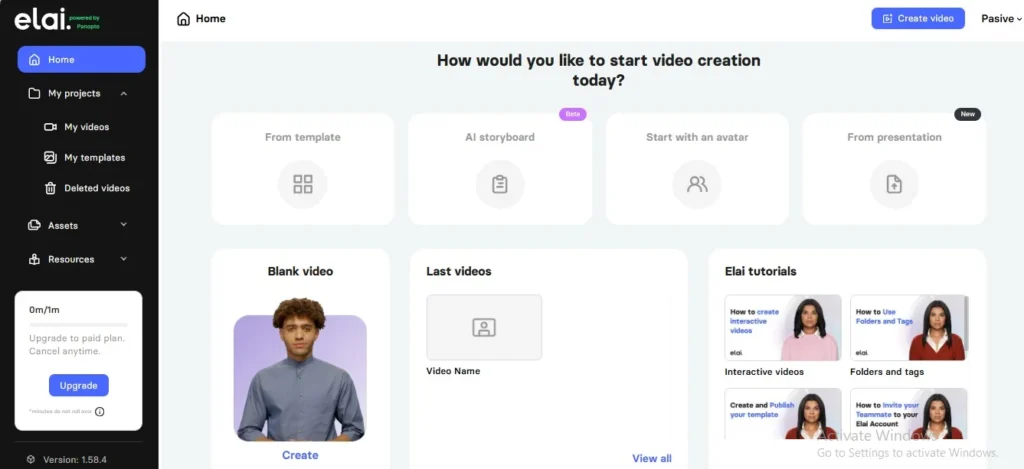
This Platform runs entirely online. No downloads. No waiting for files to render on your laptop. This matters because video editing software usually crashes right before deadlines.
Most users misunderstand this tool. They expect Hollywood results from a text box. The reality is simpler: it replaces Zoom recordings and basic screen captures, not cinematic storytelling
What it does
This platform turns blog posts, PDFs, or raw scripts into videos with AI hosts. You get dozens of avatar options, voices in 75+ languages, and basic slide layouts.
Here’s what actually works:
- Text-to-speech lip sync: The avatar’s mouth matches your words without manual syncing
- URL-to-video: Paste a blog link and it auto-generates a script
- Custom avatars: Upload photos to create digital twins (paid add-on)
Most people chase avatar quantity. Big mistake. One good avatar with perfect lip-sync beats twenty stiff-looking options. The tech still struggles with hand gestures and emotional range, so stick to explainer content rather than dramatic performances.
How It Works
The process feels like filling out a form rather than editing a timeline. select an avatar from the library, write your script in the text box, choose a background template, and hit generate.
The AI handles camera angles, lighting, and voiceover automatically. This saves hours but creates a trap. You can’t nudge the avatar’s hand position or fix a weird head tilt. You trade control for speed.
Rendering happens in the cloud. A two-minute video usually processes in under ten minutes. Compare that to editing software that ties up your computer for an hour.
Main use cases
Elai.io fits specific jobs, not everything.
The sweet spot? Information delivery. If you’re teaching, announcing, or explaining, this tool shines. Skip it for brand stories that need human emotion.
Elai.io Pricing & Hidden Costs
Elai.io starts at $23 per month. Most teams end up paying closer to $80 to get enough video minutes for real work.
The pricing looks simple on the surface. You pick a tier based on how many minutes of video you need each month. But the limits hit fast. You burn through minutes quickly when you render multiple versions of one clip. The Elai.io AI Video Generation Platform charges per minute, not per project. A three-minute video with three variations eats nine minutes from your quota.
Pricing Plans
The jump from Basic to Advanced is steep. You pay almost four times more for just 35 extra minutes. This pricing structure nudges you toward the higher tier fast.
Hidden Costs & Add-ons
Extra minutes cost $2 each if you go over. That adds up fast when you re-render clips to fix avatar lip-sync issues. Premium avatars with better mouth movement cost another $10 per month per avatar. API access requires an Enterprise plan plus extra usage fees. Voice cloning beyond your first voice triggers more charges too.
Most buyers skip the Basic plan after the first month. They realize 15 minutes covers about five short videos. That runs out in one week if you’re testing different scripts for a single campaign.
Which Plan is Best for You?
Solo creators making one video per week can start with Basic. Small teams should skip Basic entirely. The Advanced plan gives you room to make mistakes and re-render without panic. Enterprise only makes sense if you need the Elai.io AI Video Generation Platform plugged into your existing training systems.
Don’t pay annually upfront. Test monthly first. The avatar quality varies by language. You might find the English voices sound great but the Spanish ones fall flat. You don’t want to lock in $800 before you know if the voices match your brand.
Who should buy / use Elai.io?
Skip this tool if you make Super Bowl ads. Grab it if you train new hires weekly.
Elai.io fits teams who trade polish for speed. this Platform works best when viewers care about the message, not the production value. Think safety briefings, software walkthroughs, or monthly company updates. These jobs die in production backlogs. Elai.io kills the backlog instead.
Internal Training Teams
HR and learning departments see the fastest payoff. Mid-size companies pump out compliance videos without hiring videographers. Employees forgive robotic hand gestures when they just need to learn the new firewall rules. One learning manager told me they went from two weeks per video to three hours. That speed matters more than Hollywood lighting.
Budget Content Creators
Solo YouTubers and course makers win here too. If you teach Excel tricks or coding basics, Elai.io lets you publish daily without showing your face. The basic plan costs less than one hour of studio rental. You sacrifice some trust—viewers can spot AI presenters—but the volume makes up for it. Some niches actually prefer the clean, anonymous look.
Global Marketing Operations
Companies juggling translations benefit from the multilingual features. Elai.io clones your script into 80 languages without re-filming. Regional teams use this for product launches across Europe and Asia. The lip sync stays decent in Spanish and German. Mandarin drifts a bit, but it beats subtitle files that nobody reads.
Avoid this if you sell $50,000 consulting packages. High-ticket buyers smell AI-generated content from the first sentence. They want to see your face, not a stock avatar. Use Elai.io for the top of your funnel, not the closing call.
Who should avoid Elai.io?
Skip this tool if you teach physical skills. Cooking channels bomb here. Viewers need to see hand positioning and knife angles. AI avatars wave hands vaguely. They cannot chop an onion or thread a needle. Fitness instructors face the same wall. A digital trainer cannot demonstrate proper squat form or check your posture.
This Platform also hurts early-stage founders. This sounds strange. You would think polish helps. It does not. Your first customers want the scrappy founder in a hoodie. They want to see your messy office and your real dog barking. An AI avatar signals “big corporation.” Early adopters run from that vibe. Wait until you have a team of ten. Then the avatar makes sense.
Three more groups that waste their money:
- Live streamers: Elai.io renders videos. It does not stream. You cannot answer chat questions in real-time. Gamers and Q&A hosts should look elsewhere.
- Perfectionists who hate writing: The platform speeds up filming, not scripting. Bad scripts look worse with perfect lighting. If you ramble in real life, your AI clone rambles too. You still need tight, short sentences.
- Brands needing strict color control: The stock avatars wear fixed outfits. You cannot change the shirt color to match your exact brand colors. Custom avatars cost extra. Small details like this break visual consistency.
My Experience Using Elai.io
Testing this AI video maker took three days. I wanted to see if it could replace my screen recorder for quick tutorials.
The Elai.io Platform promises fast video creation without cameras. I found it delivers speed, but you trade control for convenience.
Setup & Ease of Use
Signing up took two minutes. You verify your email and land straight in the dashboard.
The interface feels crowded. Buttons for avatars, templates, and text blocks fight for space on the left sidebar. I spent ten minutes hunting for the voice speed controls.
Uploading a script works smoothly. You paste text, and the system splits it into scenes automatically. But the auto-splitting often breaks sentences in weird spots. You must manually drag text between slides to fix the pacing.
The real friction starts with avatars. You pick a face from the library, but previewing lip-sync requires rendering a draft. Each test render eats credits. I burned through twenty percent of my trial quota just adjusting timing.
Video Creation Test
I built a two-minute product explainer. The goal was simple: avatar talks while slides show screenshots.
Adding images sounded easy. You drag files into the scene panel. However, the system resizes everything to fit templates. My crisp screenshots turned blurry. I had to edit them outside the tool first.
The CSV bulk feature impressed me. I uploaded a spreadsheet with fifty names to test personalization. The platform generated unique videos for each row overnight. This feature alone justifies the price for sales teams.
But the stock music library disappoints. Every track sounds like elevator music. You will need external audio files for anything modern.
Output Quality
Rendered videos look sharp at 1080p. File sizes stay small, which helps with email attachments.
The avatars still look fake up close. Hand gestures loop every few seconds. Viewers notice the repetition by the second paragraph. For internal training, this works fine. For customer-facing content, it feels cheap.
Voice quality depends entirely on your tier. The basic voices sound like GPS navigation. Premium voices cost extra but actually sound human. Most buyers skip this upgrade and regret it later.
The biggest trade-off? Speed versus authenticity. You can publish in an hour, but viewers sense the AI generation. For high-stakes pitches, record yourself. For weekly updates, Elai.io works.
Final Verdict: Elai.io review
Elai.io fits small teams who need fast training videos without cameras.
It costs less than a video crew. It costs more than basic screen recording. You pay for speed. You lose some human warmth. That trade-off works for internal HR content. It feels stiff for sales videos.
Most teams discover a pattern after three months. They cancel for external content. They keep it only for internal training. Plan for this split from day one.
Don’t pay yearly yet. Start monthly. Test if your audience watches AI videos. Some markets hate them. Others ignore the difference.
Do the math. $23 per month makes ten videos. A freelancer charges $500 for the same work. The savings work if you publish weekly. They fail if you post once per quarter.
Try it for thirty days. Check your watch time. If viewers leave after ten seconds, fix your script. The AI avatar cannot save boring words.
FAQs
Is Elai.io worth the $23/month investment compared to free alternatives in 2026?
Free AI video tools still exist, but they leave watermarks on every export. You cannot remove the logo without paying. Elai.io starts at $23 per month and gives you clean, brand-free videos.
The free tier on HeyGen limits you to one minute per video. That works for tweets, not training modules. Elai.io’s basic plan includes 15 minutes of video generation. You get real value for the price of two coffees.
But check your volume first. If you only need two videos per year, stick with free trials. Pay $23 only if you publish monthly or weekly.
What specific limitations should make businesses avoid Elai.io?
Skip this tool if you need Hollywood-level lip-sync. The mouth movements still look robotic next to Synthesia’s latest models. Viewers notice the difference in close-up shots.
Avoid it if you use rare languages. Elai.io covers 75 languages, but some African and Southeast Asian dialects sound synthetic. Test your specific language before committing.
Also skip it if you want fancy transitions. The editor offers basic cuts and fades. You cannot do split-screen effects or complex animations. For marketing ads that need flash, use HeyGen instead.
Which pricing tier delivers the best ROI for small team learning and development?
Small teams should buy the Advanced plan at $80 per month, not the Basic $23 tier. Here is why.
The Basic plan limits you to one user. If three people need access, you must share login credentials. That breaks security policies at most companies.
The Advanced plan includes three seats. It also unlocks the screen recording feature. You can record your software demo and add an AI avatar in the corner. This saves hours compared to filming yourself.
Do the math. Three freelancers charging $100 per video cost $300. One Advanced subscription costs $80. You break even after making just one video per week.
Does Elai.io integrate with existing LMS platforms for enterprise training?
Yes, but only on the Enterprise plan. The basic and advanced tiers export MP4 files only. You must upload these manually to Canvas, Moodle, or TalentLMS.
Enterprise customers get API access and SCORM compliance. This means completion data flows back to your learning management system automatically. Managers see who watched the video and who skipped it.
Without SCORM, you track views manually. That works for ten employees. It fails for ten thousand.
Should You Buy Elai.io?
Buy it if you create weekly training content and hate being on camera. Skip it if you need cinematic quality or complex motion graphics.
Quick Checklist:
☐ You need more than five videos per month
☐ Your audience watches on phones, not movie screens
☐ You have one person managing video creation, or you pay for the Advanced plan
☐ You checked that your language sounds natural in the preview
Start with a monthly plan. Cancel if you don’t publish within 30 days.
Create AI Videos from Text
Turn your ideas into professional AI videos in minutes. Elai.io lets you create avatar-led videos without cameras, actors, or editing skills.
Get StartedMore AI Tools Reviews



Pasive Marketer is a digital publication dedicated to AI tools, SaaS software, digital marketing, and online business growth. We create in-depth reviews, comparisons, tutorials, and expert guides to help entrepreneurs, marketers, and businesses discover the best software solutions and make informed purchasing decisions.