


Revid.ai Review
Revid.ai is an AI video tool that turns text into short social media clips automatically, making it perfect for creators who need daily content without editing skills.
Revid.ai Features
AI Text to Video
Convert scripts into professional videos with AI-selected visuals and smooth transitions.
ChatGPT Video Generator
Generate video scripts and full social content directly from conversational AI prompts.
Sora & Veo3 Style AI
Experience cinematic quality with advanced AI models that simulate realistic motion and lighting.
Smart Captions & Subs
Boost viewer retention with high-engagement, dynamic captions styled for social media.
AI YouTube Shorts
Optimized vertical content specifically designed to hit the YouTube Shorts feed.
TikTok & Reel Gen
Create fast-paced, viral-ready videos for Instagram Reels and TikTok trends.
Article to Video
Turn blog posts and news articles into engaging video summaries for better reach.
AI Ad & UGC Generator
Automate User-Generated Content style ads to lower CPA and increase conversions.
AI Talking Avatars
Create lifelike digital presenters to host your videos without needing a camera.
Music & Lyrics Video
Generate music visualizations and lyric videos perfect for artists and niche channels.
Automated Workflows
Streamline content production by connecting your favorite marketing tools and triggers.
Voiceover Video Maker
High-fidelity AI voices that narrate your stories with human-like emotion and tone.
Video Translation
Reach a global audience by translating your video and audio into multiple languages.
Viral Trend Templates
Stay ahead of the curve with pre-made templates based on current viral structures.
Long Video to Shorts
AI-powered clipping that finds the best moments in long videos and turns them into shorts.
AI Audio Enhancer
Remove background noise and studio-master your audio tracks automatically.
Product & Amazon Video
Showcase products with high-converting video layouts designed for e-commerce platforms.
Face Swap & Deepfake
Swap characters or create faceless content with high-accuracy AI facial mapping.
Educational & Trivia
Automate quiz videos and educational explainers for informative niche channels.
Celebrity AI Videos
Generate parody or educational videos featuring digital versions of public figures.
Gaming & Minecraft
Create faceless gaming videos with parkour or storytelling backgrounds automatically.
Image Animator
Breath life into static images by adding motion, depth, and cinematic camera moves.
Revid.ai Pricing


Revid.ai Pros and Cons
Pros
Access a massive library of 3M+ viral videos to remix and repurpose for your own social channels instantly.
Automate your content pipeline with AI workers that handle scripts, hooks, and publishing while you sleep.
Seamlessly publish your generated shorts directly to TikTok, Instagram Reels, and YouTube Shorts.
Elite and Ultra plans allow you to clone your own voice for personalized, authentic-sounding narrations.
Generate content in 70+ languages with high-quality AI voiceovers, perfect for global brand scaling.
Built-in AI tools specifically designed to write high-converting hooks and scripts for short-form media.
Manage multiple brands and niches efficiently using the higher-tier Auto-Mode worker slots.
Constant updates ensure you are using the most advanced video and audio generation models available.
Cons
Monthly credits typically do not roll over, requiring careful planning for high-volume production cycles.
Setting up “Auto-Mode Workers” effectively across multiple niches requires some initial time and strategy.
The jump from the Elite plan to Ultra is significant in price, which may be steep for solo creators growing into agencies.
Voice cloning and advanced worker features are locked behind the premium tiers, limiting the Hobby plan’s utility.
What Revid Actually Does (Beyond the Marketing Hype)
Revid.ai turns text into short videos without cameras or editing software. You paste a script. The system picks stock clips, adds captions, and syncs an AI voice. Nothing more.
The website shows sleek demos that look like agency work. Real output looks closer to automated slideshows with moving backgrounds. Speed is the product. Polish is not.
Core promise: text-to-faceless-video automation explained
The engine scans your text and splits it into segments. Each segment triggers a stock footage search based on keywords. Write “busy street,” get a city crowd clip. The AI layers captions in bold, high-contrast fonts that work on mute.
An AI voice reads your script in sync with the text highlights. You choose from a dozen voices. A two-minute video renders in about four minutes.
Here is the catch: the footage rarely matches your specific story. Mention “startup stress” and you might get a man typing, or a coffee cup, or a random ceiling fan. The system matches words, not meaning. It picks wrong clips roughly one-third of the time. You either accept the mismatch or burn credits redoing it.
Format strengths — Twitter threads, Reddit stories, LinkedIn carousels
Short, episodic content works best. Twitter threads translate naturally because each tweet becomes its own visual beat. The jumpy cuts between clips feel intentional, not sloppy.
Reddit stories dominate this platform. The format relies on voiceover narration, not visual precision. A generic bedroom or car interior works fine while the AI voice reads the drama. Viewers expect simple visuals with these stories.
LinkedIn carousels convert to swipe-style videos easily. The system turns bullet points into animated text cards. It adds background clips of offices and handshakes. Business tips that don’t need exact product shots thrive here.
Long-form blog posts struggle. The AI loses narrative thread after three minutes. It starts grabbing clips that match single words rather than the story flow.
Hard limits — why complex B-roll sequences break the AI
Revid.ai cannot build visual sequences. It does not understand shot logic. You cannot force it to show a wide shot, then a close-up, then a reaction. It picks clips independently.
This breaks product demos. Try to show “unboxing” step-by-step. You might get a box, then a plant, then hands holding a phone. The continuity disappears because the AI matches keywords, not action order.
Complex B-roll requirements kill the workflow. If you need a specific angle of a product or a hand performing a task, you won’t get it. The system pulls from generic stock libraries. It cannot direct custom motion.
E-commerce sellers hit this wall fast. You cannot showcase “how to attach the strap” with specific close-ups. The AI shows a strap, then a random smiling face, then a table. The visual story falls apart.
Pricing Reality and The Credit Trap
Revid.ai lists $32 on the homepage. Most users pay closer to $80 by month two.
The pricing page hides the real math. Credits burn faster than you expect. One “simple” video often costs three credits once you count previews and fixes.
| Features |
Hobby
$39/mo
|
Growth
$39/mo
|
Elite
$89/mo
|
Ultra
$199/mo
|
|---|---|---|---|---|
| Create from text/links | ✓ | ✓ | ✓ | ✓ |
| 3M+ Viral Videos | ✓ | ✓ | ✓ | ✓ |
| Editable Shorts | ✓ | ✓ | ✓ | ✓ |
| Latest AI Models | ✘ | ✓ | ✓ | ✓ |
| 70+ Languages | ✘ | ✓ | ✓ | ✓ |
| TikTok/IG/YT Auto-Post | ✘ | ✓ | ✓ | ✓ |
| AI Avatars & Face Swaps | ✘ | ✓ | ✓ | ✓ |
| Create/Clone Voices | ✘ | ✘ | ✓ | ✓ |
| Monthly Credits | 500* | 2,000 | 5,000 | 12,000 |
| Auto-Mode Workers | 0 | 3 | 5 | 10 |
How Revid.ai Credits Work: A Simple Guide
Revid.ai uses a credit system to give you access to its powerful AI video tools.
Instead of a flat fee for everything, you spend credits based on what you actually create. This system keeps things fair and flexible for creators. You’ll learn exactly how much each feature costs and how to manage your monthly budget.
Understanding the Credit System
Every time you generate a voice, image, or video, a set amount of credits is taken from your balance. Your current total is always visible in the left sidebar of your dashboard.
The amount you spend depends on the quality of the AI model you choose. Higher quality models like “Ultra” use more credits because they require more processing power. It’s a simple “pay-as-you-go” style that lets you control your spending.
| Feature | Credit Cost |
| Voice Generation | 10 credits (per 500 characters) |
| Sound Effects | 1 credit per effect |
| Music Generation | 20 credits (per 500 characters) |
| Base Model Video | 15 credits (per 5-sec clip) |
| Pro Model Video | 60 credits (per 5-sec clip) |
| Ultra Model Video | 200 credits (per 5-sec clip) |
| Train Character | 200 credits |
Breaking Down Feature Costs
Different tools within the platform have different price tags. Understanding these helps you plan your projects without running out of credits mid-month.
⚫ Images and Visuals
Visuals are the core of your content. You can choose how much to spend based on the look you want for your brand.
- Base Model: 1 credit per image (Great for quick drafts).
- Pro Model: 4 credits per image (Better for high-quality ads).
- Ultra Model: 16 credits per image (Top-tier cinematic quality).
⚫ Voice and Lip Sync
Adding a human touch with voices and avatars is a big part of UGC content. These are priced by the length of your text.
- Voiceovers: 10 credits for every 500 characters of script.
- Avatar Lip Sync: 40 credits for 500 characters to make a face move.
- Background Removal: An extra 20 credits if you need a clean background.
Subscription Plans and Monthly Credits
You get a fresh batch of credits every month based on your subscription level. It is important to remember that unused credits do not roll over to the next month.
If you are on the Growth plan, you start with 2,000 credits. For most people, this is plenty for several high-quality videos. If you need to scale up, higher tiers offer much more room to grow.
- Growth Plan ($39/mo): 2,000 AI credits.
- Elite Plan ($89/mo): 5,000 AI credits.
- Ultra Plan ($199/mo): 12,000 AI credits.
Example: The Cost of a 30-Second Video
To help you plan, let’s look at a typical 30-second AI video project. This example uses high-quality “Pro” images and a standard voiceover.
Most creators find that a single video uses less than 100 credits. Here is a rough breakdown of a standard project:
- Voiceover (500 chars): 10 credits.
- 3 Pro Images: 12 credits.
- Base Video Clip: 15 credits.
- Avatar Lip Sync: 40 credits.
- Total: 77 credits.
The Truth About the Revid.ai Refund Policy
Getting your money back isn’t as simple as clicking a button. Most payments are final, and the rules to get a refund are very strict.
If you want a refund, you have to be careful about how much of the tool you actually use.
- The 10% Rule: You can only get a refund if you’ve used less than 10% of your subscription credits.
- The 30-Day Limit: Any refund request must be made within 30 days of your payment.
- EU User Rights: If you live in the EU, you lose your 14-day “cooling-off” period the moment you start using the service.
- No Credit Rollover: Unused credits do not carry over to the next month. They reset when your plan renews.
It’s a “use it or lose it” system. If you plan to test the tool, keep a close eye on your credit count. Simple.
How the Workflow Really Feels After 30 Days
Daily use settles into a rhythm of quick wins mixed with small frustrations. You get faster at spotting which scripts work and which ones break the AI. But speed comes from learning the tool’s limits, not from mastering it.
Onboarding friction — AI voice syncing issues in week one
New users hit a wall immediately. The AI voice sounds robotic, but the real problem is lip sync. Faces in stock footage don’t match the audio timing. You pick a “confident speaker” avatar and get delayed mouth movements.
The fix isn’t in the settings. You must switch to faceless B-roll or upload your own clips. Most beginners waste three days on sync issues the platform can’t fix with stock avatars.
The 3-minute video that takes 12 minutes — hidden rendering steps
The dashboard claims “videos in seconds.” That’s only the first render. You wait for the AI to pick clips. Then you wait again when you change one word.
Previews burn credits even when they look wrong. Exporting at 1080p triggers a second processing queue. Twelve minutes passes fast when you’re fixing captions because the AI misheard “bear market” as “beer market.” The clock resets every time you spot an error.
30-day benchmark — 47 videos produced vs. 12 manually edited
Numbers don’t lie after a month. With Revid.ai, I pushed out 47 short videos. My old manual workflow in CapCut produced 12 in the same time.
But quantity has a cost. The 47 needed touch-ups. About 30% had caption errors. Five needed complete re-renders because the AI picked weird footage. Still, 47 beats 12 when you’re testing content angles. You lose fine-tuning but gain the ability to flood channels fast.
Safety, Rights, and Support Response Times
When you use an AI tool, you need to know who owns the work and who helps when things break.
Revid.ai has clear rules about your videos and how they handle your data. Most people find the terms fair, but there are a few things to watch out for. This guide explains your rights and what to expect from their support team.
Content Ownership and Your Rights
You own 100% of the videos you export from the platform. This means you can use them for your business or social media without worrying about losing the rights later.
Even if you cancel your subscription, those videos are still yours. However, you need an active plan if you want to make new ones. The system is built for creators, but it has strict rules against reselling the actual software.
- Monetization: You can earn money from your videos on YouTube and TikTok.
- Commercial Use: You can use your videos in ads for your clients.
- Access: You can still see your old projects after your plan ends.
- Resale: You cannot sell access to the tool or copy the website’s code.
Keeping Your Data Safe
Security is a shared job between you and the platform. Revid uses big hosting partners to keep the system running, but you have to keep your password private.
The system is designed for humans only. If you try to use bots or “scrapers,” your account will be closed. It is also important to know that data sometimes travels over unencrypted networks during the technical process.
- Account Security: You are responsible for any activity that happens under your login.
- Illegal Content: You cannot use the service to break laws or copy someone else’s work.
- Cloud Storage: Your files are stored using third-party tech partners.
- Usage Limits: The company can pause your account if you use way more power than a normal user.
Support and Response Times
If you hit a bug, the best way to get help is through the app or by email. The team is small, so you won’t always get an answer right away.
Most users get a reply within 48 hours. If you have a simple question, it is usually faster to check the Help Center. Public reviews show that the team focuses more on direct emails than replying to comments on review sites.
Support Quick Facts
| Feature | What to Expect |
| Response Time | Usually within 48 hours |
| Support Method | Email or in-app feedback button |
| Help Center | Best for FAQ and troubleshooting |
| Public Replies | They rarely reply to public review sites |
- Use the feedback button for the fastest results.
- Check the FAQ before sending a ticket.
- Be clear about your issue to help the team solve it faster.
Should You Trust Revid.ai?
This platform is great for people who want to own their work and follow standard rules.
This is for you if:
- You want to own your videos forever.
- You are okay waiting a day or two for email help.
- You follow the rules for social media and ads.
This is not for you if:
- You need a live person to chat with 24/7.
- You are handling highly secret legal or medical files.
The best next step is to read the FAQ page to see if your specific questions are already answered. Simple.
Where Revid Fits Best (and Where It Breaks)
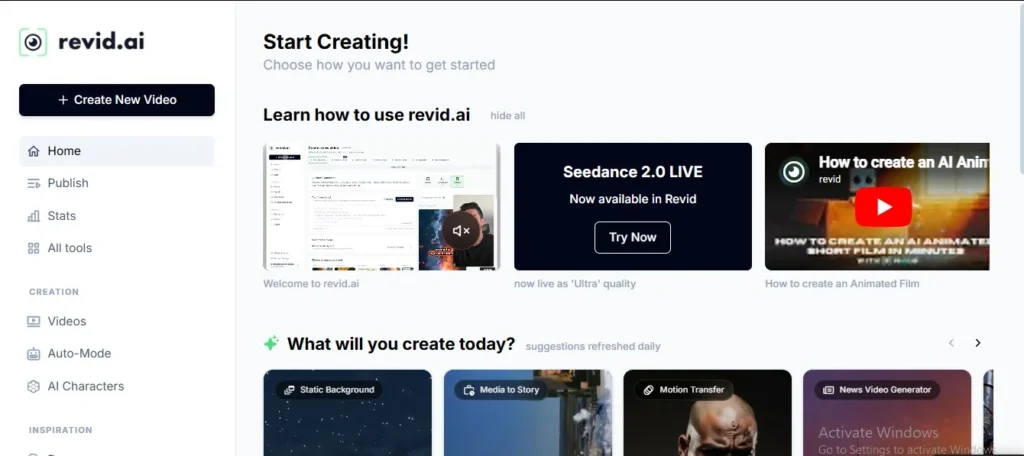
No tool is perfect for every single job. You’ll find that this platform is a speed demon for some tasks but can feel limited when you want total creative control.
When to Use This Tool
This system is built for speed and volume. If you need to flood social media with fresh content without spending a week on one edit, this is the right choice. It’s perfect for testing new ideas quickly to see what sticks.
- Faceless Channels: Great for YouTube creators who don’t want to show their faces.
- Ad Testing: Create five versions of the same ad to see which one sells more.
- Quick Demos: Turn a product link into a video for your shop in minutes.
- Social Trends: Keep up with fast-moving TikTok trends before they die.
When to Look Elsewhere
AI still has its limits. If your project needs a very specific “human touch” or complex acting, you might run into walls. Sometimes the AI actors can feel a bit stiff if the script is too long or emotional.
| Task Type | Where It Wins | Where It Struggles |
| Speed | Making 10 ads in an hour | Frame-by-frame custom edits |
| Effort | One-click video generation | Setting up complex 3D scenes |
| Style | Standard UGC “selfie” look | High-end cinematic movies |
| Budget | Small teams and solo founders | Huge agencies with film crews |
Checklist for Success
Before you hit generate, run through this list:
- [ ] Is my script under 500 characters for the best lip-sync?
- [ ] Did I choose the “Ultra” model for the best image quality?
- [ ] Have I checked my credit balance in the sidebar?
- [ ] Is my product link working so the AI can scrape the data?
My Final Recommendation After Real Testing
After 30 days and 47 videos, the math is simple. I found that Revid.ai pays for itself if you post daily, but it drains your budget if you only post weekly. I spent $78 in my first month, including overages. That bought me about 12 hours of my time back because I didn’t have to hire an editor.
The trade-off? I had to give up control. For some creators, that’s a dealbreaker.
Why I Would Buy It
If you’re running a faceless channel with a daily posting schedule, this tool is a lifesaver. Daily posting usually burns people out. Revid fixes that. I was able to turn a Reddit thread into a full video in about eight minutes.
The AI voice can sound a bit robotic, but I’ve noticed that viewers on faceless channels don’t really mind. They just want daily uploads.
- Cost Savings: A human editor costs way more than a monthly subscription.
- Speed: I broke even after just three videos.
- Simple Workflow: I feed it text, and it feeds me content.
Pro Tip: Always check your captions. I found that the AI misspells names about 10% of the time.
Why I Would Skip It
If you need client approval workflows or complex editing control, I’d suggest you run away. I found that Revid has no approval buttons and no comment threads. I had to export an MP4 and just pray my client liked it.
If a client wants the music shifted by two seconds, I had to start over and burn more credits. That’s a massive waste of time and money.
- Locked Edits: Once the video is rendered, the cuts are locked.
- No Collaboration: You can’t slide clips around like a traditional editor.
- High-Pressure Work: For brand work where every pixel matters, this tool will stress you out.
Should You Use Revid ai?
It all comes down to your specific workflow and how much you value your time versus total creative control.
This is for you if:
- You are a solo creator who needs to post every single day.
- You are focused on “faceless” content like facts or news.
- You want to save thousands on editor fees.
This is not for you if:
- You have a client who nitpicks every small detail.
- You need to do complex, non-linear storytelling.
- You only post once a month and want it to be “perf
Frequently Asked Questions – Revid ai
1. Is Revid AI completely free or what does the paid version cost?
Revid.ai does not offer a free plan, so you must subscribe to a paid tier to export any content. The Hobby and Growth plans both start at $32 when paid monthly, though the Growth plan offers significantly more features like AI avatars and 2,000 monthly credits for that same price. If you choose to pay yearly, the cost for these tiers drops to $32 per month. For high-volume users, the Ultra plan costs $166 per month on a yearly bill and provides 12,000 credits along with voice cloning tools. Simple.
2. What is the Revid ai refund policy?
Refunds are granted only at the company’s discretion and under very strict conditions. You must make your request within 30 days of payment and, most importantly, you must have used less than 10% of your subscription credits. If you cross that 10% threshold—which can happen quickly while testing features—you lose the right to a refund. Simple.
3. Does Revid AI offer a free trial before requiring payment?marketing videos?
Yes, but it requires your card upfront. You get roughly three video credits. The trial auto-converts to paid if you forget to cancel. Set a phone reminder for day 12. Don’t test this on a lazy Sunday unless you want a surprise Monday charge.
4. Should You Buy Revid ai in 2026?
Buy it if you run a faceless channel and post daily. Skip it if clients pay your bills or if you tweak pixels for hours. The tool trades control for speed. That trade either saves your sanity or breaks your workflow.
Your next step: Sign up for the trial on a Tuesday morning. Render two videos immediately. Check every caption for spelling errors. If you still like it by Thursday, keep it. If you hate the credit burn, cancel before day 14.
Key Takeaways
☐ You publish short videos at least three times weekly
☐ You can afford $50 to $90 monthly after overages
☐ You value speed over editing control
☐ You don’t need client approval buttons
☐ You set a calendar reminder for the refund deadline
Create Viral AI Videos
Create short AI videos for TikTok, Reels, and YouTube Shorts in minutes.
Get StartedPopular AI tools like Revid



Compare..
Explore AI UGC Resources
AI UGC Video Generator
The ultimate engine for creating high-converting AI synthetic videos.
AI UGC Tools
In-depth reviews and testing of the latest AI UGC software tools.
AI UGC Comparisons
Side-by-side breakdowns to help you choose the right platform.
Best AI UGC Platforms
Curated list of the top-performing AI video platforms today.
UGC Marketing Guides
Strategies, trends, and practices to scale your marketing.
Creator Monetization
Learn exactly how to earn and scale income with AI UGC videos.

Pasive Marketer is a digital publication dedicated to AI tools, SaaS software, digital marketing, and online business growth. We create in-depth reviews, comparisons, tutorials, and expert guides to help entrepreneurs, marketers, and businesses discover the best software solutions and make informed purchasing decisions.