

SmartUGC.ai Review
SmartUGC AI is an AI video ad generator that turns a script and an actor choice into a finished UGC-style ad in minutes. No camera, no crew, no reshoots.
SmartUGC AI Features
AI Actors & Avatars
- Generate realistic AI actors from text scripts
- No camera, filming, or production crew required
- Photorealistic human presenters
- Create a digital twin of yourself or your team
- Personalized AI brand ambassador
- Consistent appearance across campaigns
- Create UGC-style video ads in minutes
- Choose from a large actor library
- Consistent on-camera branding
- Natural facial expressions and lip-sync
- Fast AI video rendering
- Reusable avatar for unlimited videos
- Brand-focused identity
- Human-like animations
Product in Hand Videos
- AI presenters naturally hold your product
- Upload product images or paste product URLs
- Showcase products without shipping samples
- Generate realistic product demonstrations
- Perfect for ecommerce advertisements
- Create authentic UGC product reviews
- Natural product interactions
AI Video Generation
- Generate complete AI video ads
- Convert scripts into ready-to-publish videos
- Convert URLs into AI videos
- Multiple AI generation engines
- Fast video creation workflow
- Professional-quality outputs
- Scroll-stopping marketing videos
- High-converting advertising content
- Faster content creation
- Streamlined workflow
- AI-assisted video generation
- Fast AI Processing
- Generate videos in minutes
- Rapid rendering
- Optimized workflow
- Minimal waiting time
Scripts & Voice
- Generate marketing scripts with AI
- Brand-focused messaging
- Write engaging ad copy
- Large catalog of AI actors
- AI voiceovers in 25+ languages
- Natural-sounding speech
- Optimize scripts for conversions
- Save time creating video content
- Select actors that match your audience
- Diverse presentation styles
- Multiple demographics available
- Easy actor switching
- Reach global audiences
- Localize marketing campaigns
- Multilingual video advertisements
Images & B-Roll
- Generate product images instantly
- Create marketing visuals
- Produce promotional graphics
- Create scroll-stopping image ads
- Generate cinematic B-roll footage
- Create custom background scenes
- High-quality AI-generated images
- Support advertising campaigns
- Ready-made advertising creatives
- AI-powered product advertisements
- Social media marketing assets
- Fast creative production
- No location shooting required
- High-quality supporting video clips
- Enhance marketing videos
Editing & Export
- Remix existing videos
- Upscale video quality
- Export videos in multiple aspect ratios
- 9:16 vertical videos
- 1:1 square videos
- 16:9 landscape videos
- Trim video clips
- Extend video duration
- Fine-tune AI-generated content
- Improve video outputs
- Optimized for social media
- Cross-platform publishing
- Natural UGC style
- Cinematic video style
- Brand-focused presentation
- Flexible creative options
- One-click style selection
AI Models & Assets
- Actor Swap
- Talking Actor tool
- Seedance 2.0
- Veo 3
- Project organization
- Asset management
- Product in Hand tool
- Ready-made advertising workflows
- Designed specifically for high-converting ads
- Sora Pro
- Grok 1.5
- Multiple generation engines
- Choose the best model for each project
- Upload product images
- Reuse media assets
- Organized content library
Ads & Bulk Creation
- Generate multiple video variations
- Create campaigns faster
- UGC video ad creation
- Ecommerce video ads
- Product promotion videos
- Social media advertisements
- One-click batch production
- Scale advertising content
- Efficient creative testing
- Brand storytelling
- Conversion-focused creatives
- Campaign-ready outputs
Ecommerce & Scaling
- Product showcase videos
- AI product demonstrations
- Multiple subscription plans
- Agency-ready workflows
- One-platform creative workflow
- No filming equipment required
- Online store advertising
- DTC marketing support
- Ecommerce creative automation
- Priority rendering (higher plans)
- High-volume content production
- Support for growing brands
- No actors to hire
- No editing software needed
- Beginner-friendly interface
- AI-powered creative automation
- High-quality commercial outputs
- Designed specifically for performance marketing
SmartUGC AI Pricing
| Plan Comparison |
Spark
US$49
/month
For testing the waters. |
Creator
US$69
/month
For solo founders shipping ads. |
Studio
US$119
/month
Most popular for growing brands. |
Agency
US$249
/month
Scale a whole roster on one plan. |
|---|---|---|---|---|
| Monthly Quotas & Processing | ||||
| Ready-to-run video ads | 5 ads/mo | 10 ads/mo | 20 ads/mo | 50 ads/mo |
| Ad Processing Speed | Back in minutes | Back in minutes | Back in minutes | Back in minutes |
| Priority Rendering (Front of queue) | ✕ No | ✕ No | ✓ Yes | ✓ Yes |
| Spin up variations in one pass | ✓ Included | ✓ Included | ✓ Included | ✓ Included |
| Bulk Creation Flow | ✓ Standard | ✓ Standard | ✓ Standard | ✓ Standard |
| AI Actors & Localization | ||||
| Any actor for your brand | ✓ Full Catalogue | ✓ Full Catalogue | ✓ Full Catalogue | ✓ Full Catalogue |
| Reach customers in their language | ✓ 25+ Languages | ✓ 25+ Languages | ✓ 25+ Languages | ✓ 25+ Languages |
| Be the face of your own ads | ✕ No | ✓ Custom Avatar | ✓ Custom Avatar | ✓ Custom Avatar |
| Multilingual Voice Output | ✓ Included | ✓ Included | ✓ Included | ✓ Included |
| AI Lip-Sync Integration | ✓ Included | ✓ Included | ✓ Included | ✓ Included |
| Advanced Video Capabilities | ||||
| Newest video models included | ✓ Seedance 2.0 + Veo 3 | ✓ Seedance 2.0 + Veo 3 | ✓ Seedance 2.0 + Veo 3 | ✓ Seedance 2.0 + Veo 3 |
| Cinematic B-roll on demand | ✓ Included | ✓ Included | ✓ Included | ✓ Included |
| Your product, held on camera | ✕ No | ✓ Product-in-hand | ✓ Product-in-hand | ✓ Product-in-hand |
| High-Resolution Export | ✓ Included | ✓ Included | ✓ Included | ✓ Included |
| Video Scene Optimization | ✓ Included | ✓ Included | ✓ Included | ✓ Included |
| AI Image Generation | ||||
| Product images in seconds | ✓ Included | ✓ Included | ✓ Included | ✓ Included |
| Scroll-stopping image ads | ✓ Included | ✓ Included | ✓ Included | ✓ Included |
| AI Image Engine | ✓ Active | ✓ Active | ✓ Active | ✓ Active |
| Dynamic Backgrounds | ✓ Included | ✓ Included | ✓ Included | ✓ Included |
| Multi-format Export | ✓ Included | ✓ Included | ✓ Included | ✓ Included |
SmartUGC AI Alternatives
| UGC Framework Matrix |
SmartUGC.ai |
||||
|---|---|---|---|---|---|
| Pricing & Trial Framework | |||||
| Entry Plan Cost | $49/mo | ~$115/mo | $39 – $49/mo | $32/mo | $24 – $29/mo |
| Pricing Setup | 1 Credit = 1 Video | Credits + Video Caps | Metered Steps | Metered Credits | Metered Runtime |
| Active Trial | $1 for 3 Days | None Listed | None Listed | None Listed | Free (Watermarked) |
| Cost Per Video | From $5 / video | ~$11 / video | Variable by meter | Variable by usage | High per-minute cost |
| Failed Renders | ✔ Auto Refund | Not Listed | Deducts credits | Deducts credits | Deducts minutes |
| Credit Rollover | ✔ Yes (On Upgrade) | Not Listed | ✘ No | ✘ No | ✘ No |
| AI Video Engines & Realism | |||||
| Core AI Models | Seedance 2.0 / Veo 3 | Kling 3.0 / Wan 2.2 | Sora 2 / Seedance | Social Gen Logic | Avatar III & IV |
| Primary Design | Organic & Cinematic UGC | Direct Response Ads | Raw Handheld iPhone | Faceless Social Feed | Corporate Studio Look |
| Lip-Sync Depth | Deep Neural Mapping | 92% – 96% Match | 95% – 98% Precision | Standard Social Sync | Zero-Drift Studio Standard |
| Max Resolution | Social-HD Optimized | Social-HD Optimized | 4K Ultra HD | 1080p Social Output | 4K Studio Export |
| Render Velocity | Fast (Few Minutes) | 20-30 Mins (Queue) | 3-5 Mins Pipeline | Instant Social Batch | Standard Processing |
| Kinetics Engine | Natural Facial Ticks | Asymmetric Blinking | Micro-Expression Squints | Basic High Energy | Advanced Body Gestures |
| E-Commerce & Ad Workflows | |||||
| Product In Hand | ✔ Native (From $69) | Custom Prompt Setup | Pro Plan Only ($99+) | Trailer Concept Tool | ✘ Not Supported |
| Custom Avatars | ✔ Included (From $69) | Top Custom Tier Only | Pro Plan Only ($99+) | Instant Phone Clone | 1 on Creator / 5 on Biz |
| URL to Video | ✔ Full Native Scraper | Product Page to Script | ✘ Script-First Only | Link / Review Scraper | ✘ Manual Setup Only |
| Script Writing | Ad-Optimized Converter | AI Hook & Script Gen | Basic Text Flow | Viral Loop Architecture | AI Script Proofreader |
| Image Ads Gen | ✔ Fully Polished Tool | Basic Image Creation | ✘ Not Supported | Screenshot Capture | ✘ Not Supported |
| A/B Testing Variants | One-Pass Creation | Bulk Variations API | Manual Re-renders | High-Volume Batching | Manual Multi-Variant |
| Platform Features & Assets | |||||
| Catalog Access | Full Catalog (All Plans) | Tiered Counts by Plan | 300-500 Vetted Faces | Generic Face Swaps | 700+ Studio Presenters |
| B-Roll Generator | ✔ Bespoke Cinematic | High-Quality B-Roll | Growth Plan Only | Dynamic Stock Match | Standard Asset Library |
| Aspect Ratios | 9:16, 1:1, 16:9 | 9:16 Vertical Focus | 9:16 Vertical Focus | 9:16 Social Loops | Full Canvas & Auto-Crop |
| Built-in Editor | Remix, Trim, Extend, Scale | Simplified Ad Layout | Basic Framework Edits | Timeline Social Editor | Canvas Studio Editor |
| Gaming Feeds | ✘ Not Supported | ✘ Not Supported | ✘ Not Supported | ✔ Minecraft/Subway Loops | ✘ Corporate Neutral |
| Asset Library | Central Content Engine | Campaign Metrics View | Folder-Based Sync | Single Creator Layout | Deep Corporate Brand Kits |
| Audio, Scope & Security | |||||
| Languages | 25+ Ad-Tuned Tones | 35+ to 74 Languages | 50+ Global Dialects | 70+ Social Track Tones | 175+ Broad Options |
| Voice Engine | Natural Speech Systems | ElevenLabs Pro Native | ElevenLabs Standard | Dynamic Voice Engine | Proprietary Voice Cloning |
| API & Developer | Standard Endpoint Access | Bulk Creative API | Limited Deployment | Built-in CLI System | Real-Time Streaming API |
| Data Protection | UK GDPR Shield / No Training | Standard Security Terms | Standard Security Terms | Private Cloud Layer | Full SOC 2 Type II |
| Team Setup | Subscription Based Scaling | Custom Plan Only | Pro Seat Upgrades | Solo Creator Focus | Granular Workspace Roles |
| Voice Clone Cost | Included from $69 plan | Top Custom Plan Only | Pro Plan Custom Layer | Elite Tier Allowance | Creator Tier and Above |




SmartUGC AI Pros and Cons
Pros
Uses a transparent "one credit equals one finished video" model, allowing users to know the exact cost before generating.
Focused specifically on high-converting ad formats like AI Talking Actors, Product-in-Hand, and Custom Avatars.
Offers a $1 trial for 3 days that provides watermark-free, publishable ads, allowing for low-risk quality verification.
Provides access to named, professional-grade AI video models like Seedance 2.0 and Veo 3 on every subscription plan.
Designed for speed with a simple "script, pick actor, generate" process that removes the need for complex editing software.
Features like the full actor catalogue, B-Roll generator, and bulk creation are included in every plan, avoiding feature-gating.
Includes automatic credit refunds for any generation failures, ensuring users only pay for successful outputs.
Extensive support for reaching global audiences with AI voiceovers in over 25 languages.
Unused credits roll over when upgrading plans, supporting growing brands without wasting previous investments.
Cons
Limited to UGC-style video ads; lacks broader, non-video marketing automation tools found in all-in-one platforms.
Does not provide built-in ad management or conversion tracking, requiring users to rely on external platforms.
Advanced features like Product-in-Hand and Custom Avatars require moving up to the $69 Creator plan rather than being in the entry-level tier.
High-quality AI video generation, while rapid, still requires short waiting periods for processing and rendering that may vary by model complexity.
What Is SmartUGC.ai?
SmartUGC AI is an AI tool that turns a script into a finished UGC-style video ad, using an AI actor instead of a real person on camera.
No filming, no creator to hire, no product shipped anywhere. You write or generate a script, pick an actor or your own AI avatar, choose which AI model renders it, and the platform builds the video.
It covers more than just talking-head ads. Product-in-hand shots, AI-generated images, B-roll, and multiple video models are all part of the same platform, not separate tools you'd need to piece together elsewhere.
It's aimed at people who need ad content regularly and don't want a production process attached to it — solo sellers, small ecommerce brands, and agencies running multiple campaigns at once.
My Experience Testing SmartUGC AI
I've been testing SmartUGC since July 7, and my overall take is 4.6 out of 5.
The first thing I noticed signing in is how much is actually packed into this tool. Talking Actor, Product-in-Hand for images and video, an AI Script Writer, four different AI video models, plus extras like Gesture and Actor Swap. It's not a one-trick generator — it's closer to a small toolkit, and most of my testing time went into figuring out which parts were actually worth using.
I started with the four AI models — Sora 2 Pro, Seedance 2.0, Grok 1.5, and Veo 3.1 — running the same script and product image through each one. I picked a duration for each generation without thinking too hard about it going in, and quickly learned the models don't all offer the same options:
- Sora let me choose 4s, 8s, 12s, or 20s with a full aspect ratio selector.
- Seedance offered 10s or 15s, also with aspect ratio control.
- Grok only gave me a duration choice — 6s, 10s, or 15s — with no aspect ratio option at all, and it rendered my video as a square instead of vertical.
- Veo had the opposite problem: I could set aspect ratio, but there was no duration control, so it just gave me whatever length it wanted, which turned out to be 7.2 seconds.
Seedance 2.0 came out as my favorite of the four. Clean lip-sync, natural voice, nothing looked off.
Grok 1.5 was my least favorite — the square-only output was one issue, but the bigger one was that it added spoken lines to my video that I never wrote in the script. That's not a small glitch when you're relying on it for real ad copy.
Past the model comparison, the two features that actually impressed me most were Talking Actor and both Product-in-Hand tools. They're cheap to run — as low as 0.1 credit for the image step — and gave me some of the strongest results out of everything I tried. I chained the two Product-in-Hand tools together: generated a still image of a person holding the product first, then animated that image into video. My first attempt looked flat and a little robotic. I rewrote the prompt with clearer pacing instructions, ran it again, and the second version came out noticeably better — tighter lip-sync, none of the rushed pacing from before.
I also ran into a couple of rough edges worth mentioning honestly. Hitting "Remix" costs a credit, same as a fresh generation — it's not a free retry, so I learned to plan credits around that. And the AI Script Writer, while fast and often well-written, isn't always accurate — one script it wrote for me invented a testing timeline that wasn't true. Good writing, wrong facts.
One thing I did differently for this review: I didn't just trust my own eyes on the results. I ran several of my favorite clips through a second AI review specifically looking for flaws, and it caught things I'd missed on first watch — a few seconds of lip-sync drift, a smile that stayed a little too fixed. I liked using SmartUGC, and I still do. That extra check is exactly why my score landed at 4.6 and not a flat 5.
Compare Models: Sora 2 Pro vs Seedance 2.0 vs Grok 1.5 vs Veo 3.1
Seedance 2.0 gave me the best result, Grok 1.5 the worst. Here's exactly how I tested all four and what came back.
How I Tested Them
I used the same script and the same product image across all four models, with the same duration and aspect ratio settings entered each time: 12 seconds, 9:16 vertical. I didn't rewrite the prompt between models — the only variable was which AI engine rendered it.
What Each One Delivered
None of the four returned identical specs, even with the same request. Two capped out at 10 seconds because that's the longest option they offer inside SmartUGC, not because they ignored my prompt.
|
Model |
Requested |
Delivered |
Aspect Ratio |
Notes |
|---|---|---|---|---|
|
Sora 2 Pro |
12s |
12.1s |
9:16 |
Full control: Allows you to choose both aspect ratio and specific duration. (Note: UI warning states OpenAI will shut this model down in September). |
|
Seedance 2.0 |
10s |
10.1s |
9:16 |
Full control: Fully supports customizing both the aspect ratio and duration selectors. |
|
Grok 1.5 |
10s |
10.0s |
— |
Limited control: Only offers a duration selector; completely lacks aspect ratio or vertical options. |
|
Veo 3.1 |
— |
7.2s |
9:16 |
Limited control: Offers aspect ratio/vertical customization, but completely lacks a duration selector. |
If exact runtime or a vertical frame matters for where you're posting, check the model's available settings before you spend a credit — Sora is your only option for a true 12-second vertical clip.
Lip-Sync, Voice, and Delivery Scores
I ran each clip through a second AI review specifically checking for lip-sync accuracy, voice naturalness, and whether the script was delivered as written.
| Model | Lip-Sync | Voice Naturalness | Line Delivery | Audio Quality |
|---|---|---|---|---|
| Seedance 2.0 | 5/5 | 5/5 | 5/5 | 5/5 |
| Veo 3.1 | 4/5 | 4/5 | 4/5 | 5/5 |
| Sora 2 Pro | 3/5 | 4/5 | 5/5 | 5/5 |
| Grok 1.5 | 2/5 | 3/5 | 2/5 | 4/5 |
Grok's line delivery score is low for a specific reason: it added spoken lines to the video that weren't in my script. That's a bigger problem than a rough lip-sync moment — it means the output can say something you never wrote.
My Pick, and Why
Seedance 2.0 is my model of choice out of the four. It scored highest on every audio and lip-sync category, and it rendered fast. Sora 2 Pro is the one to reach for specifically when you need an exact 12-second vertical clip, since it's the only model that actually delivers that spec. Veo 3.1 is usable but shortens your clip without warning. Grok 1.5 is the one I'd skip — the square-only output and the hallucinated dialogue are two separate real limitations, not one minor complaint.
How to Use SmartUGC — Step-by-Step
Here's exactly how to get from signup to a finished video, broken into the five things you'll actually do on the platform.
How to Create an Account
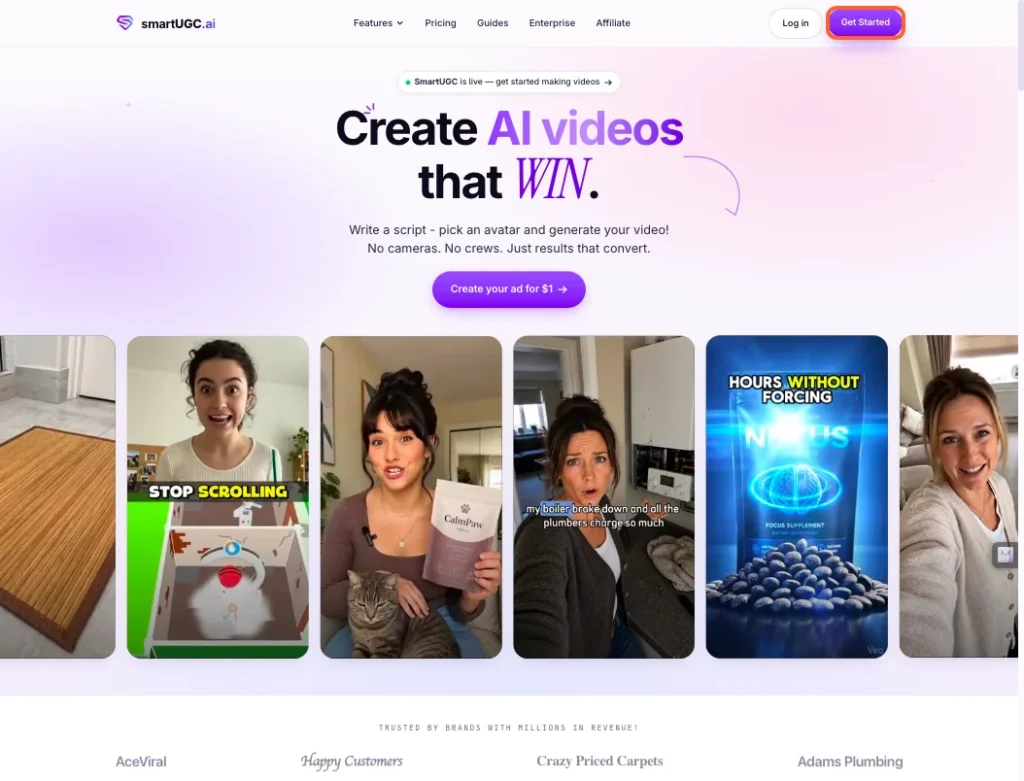
1. Go to smartugc.ai, then click "Get Started" in the top right.
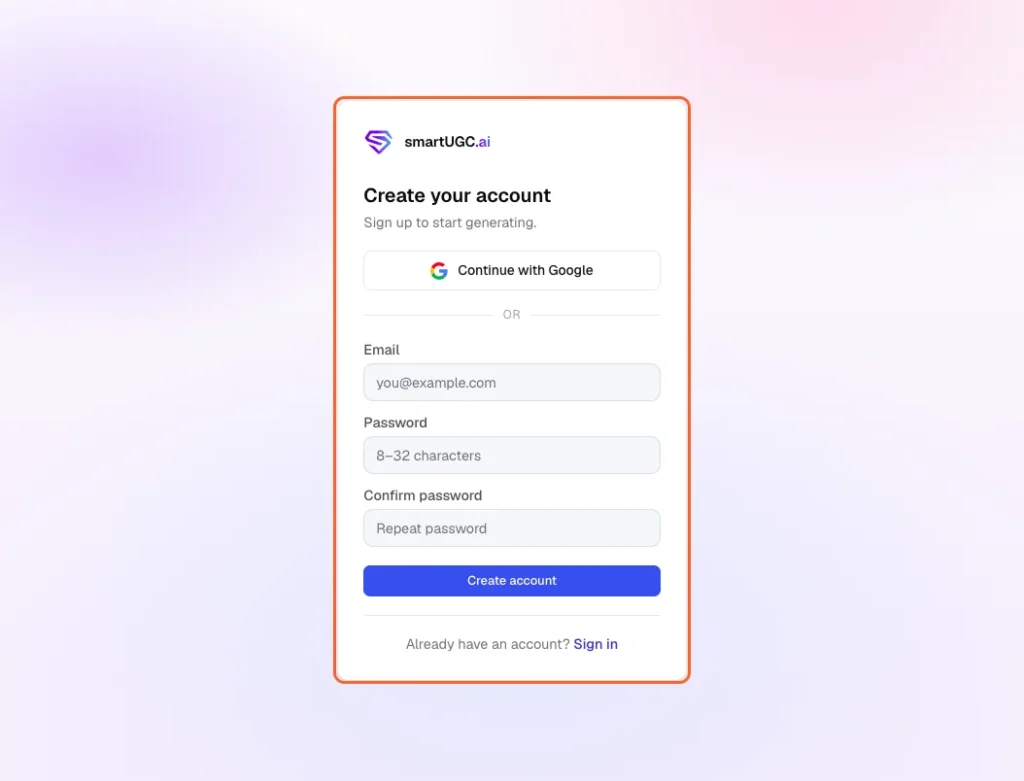
2. Enter your email and password, or click "Continue with Google.
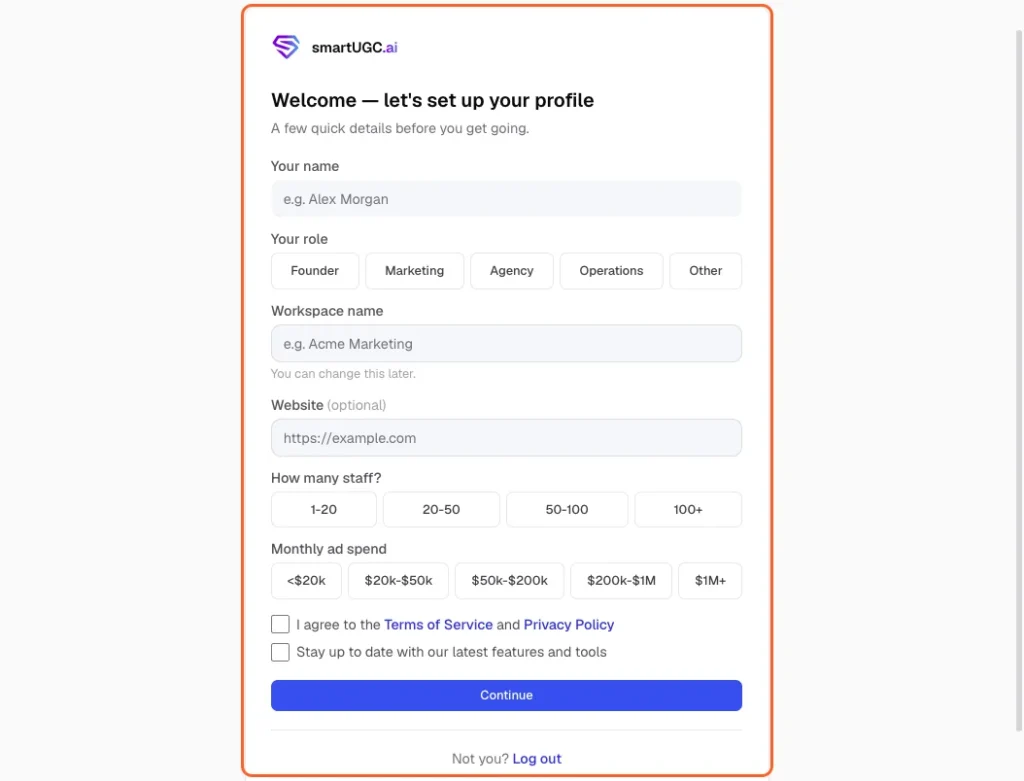
3. Fill in your name, role, workspace name, and a few quick business details, then agree to the Terms of Service and click "Continue.
4. Pick a plan and start the $1 trial. You'll land on your dashboard, ready to start a project.
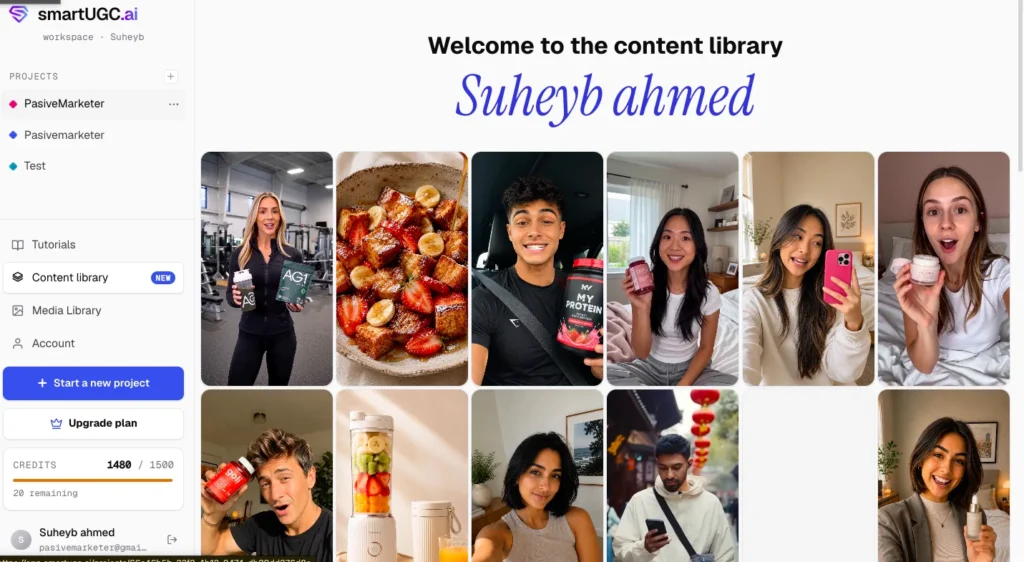
How to Start a New Project (8 Steps)
Step 1. Click "Start a new project" in the left sidebar.
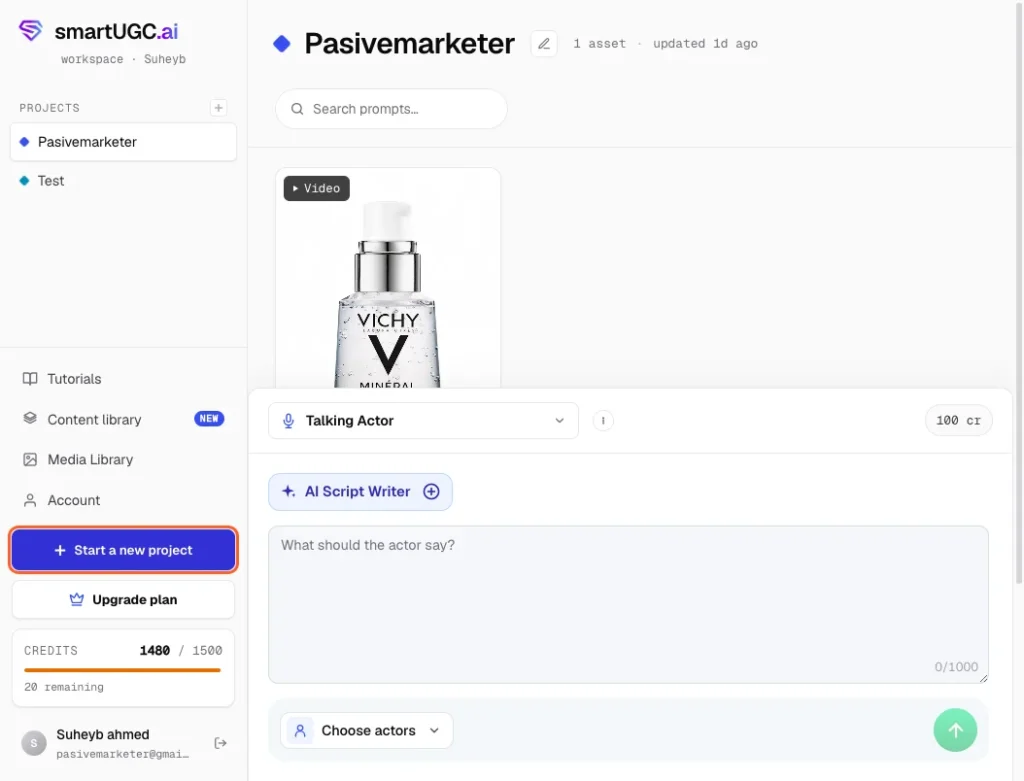
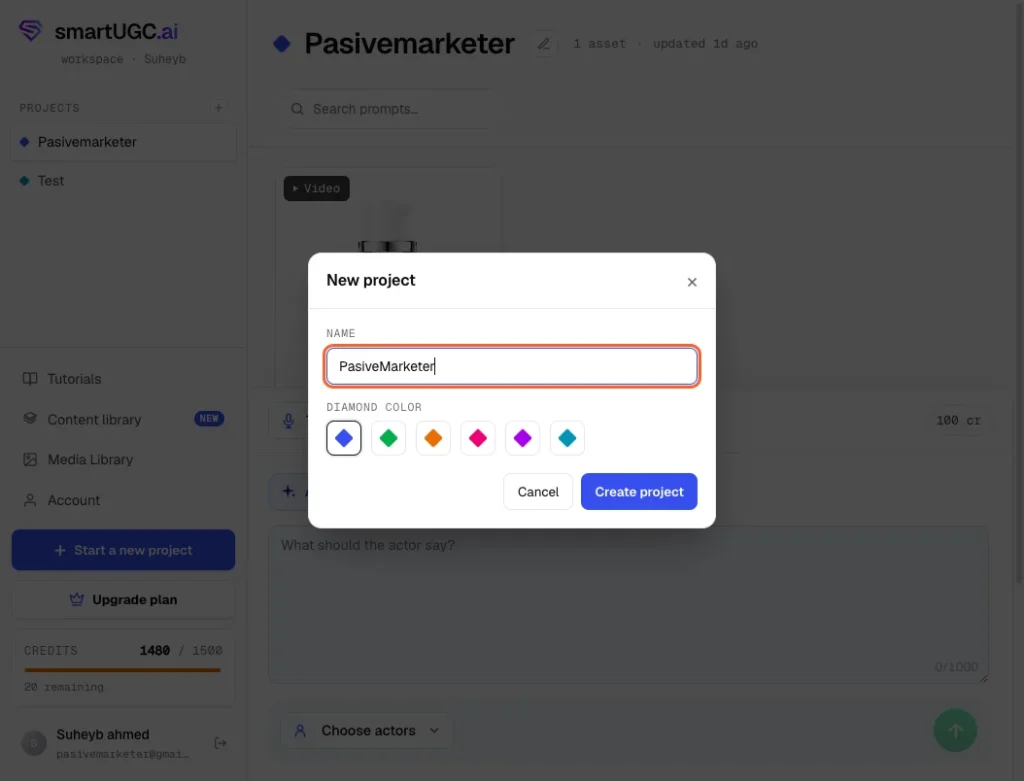
Step 2. Type in a name for your project, then click "Create project.
Step 3. Click the tool dropdown at the top of the panel.
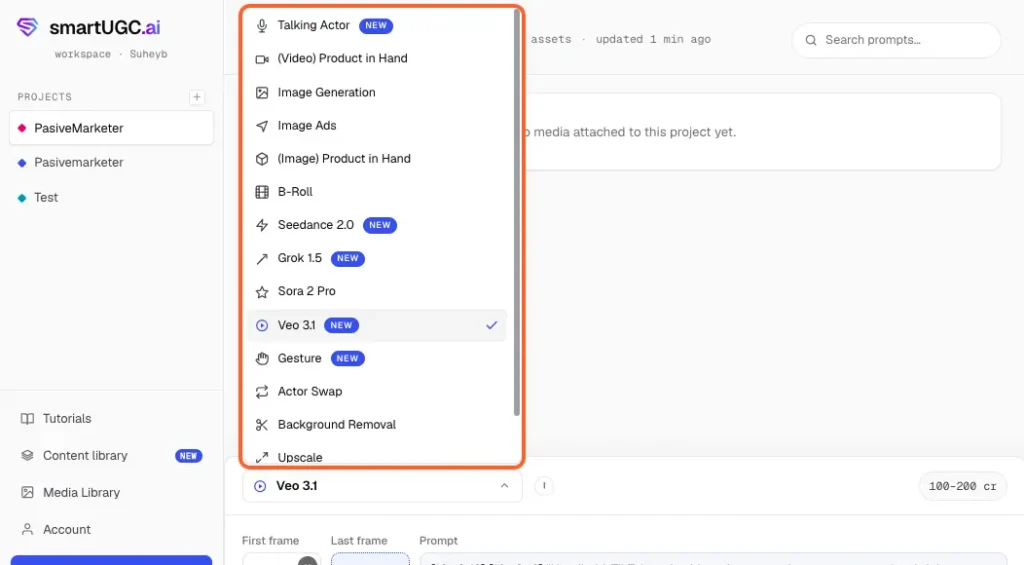
This isn't just a video model picker — it's every tool on the platform in one list: Talking Actor, Video Product in Hand, Image Generation, Image Ads, Image Product in Hand, B-Roll, and the video models themselves (Seedance 2.0, Grok 1.5, Sora 2 Pro, Veo 3.1), plus Gesture, Actor Swap, Background Removal, Upscale, and Subtitles. Pick whichever one matches what you're trying to make.
Step 4. Click "Add" to upload a reference image — your product photo, or a person photo, depending on what you're generating.
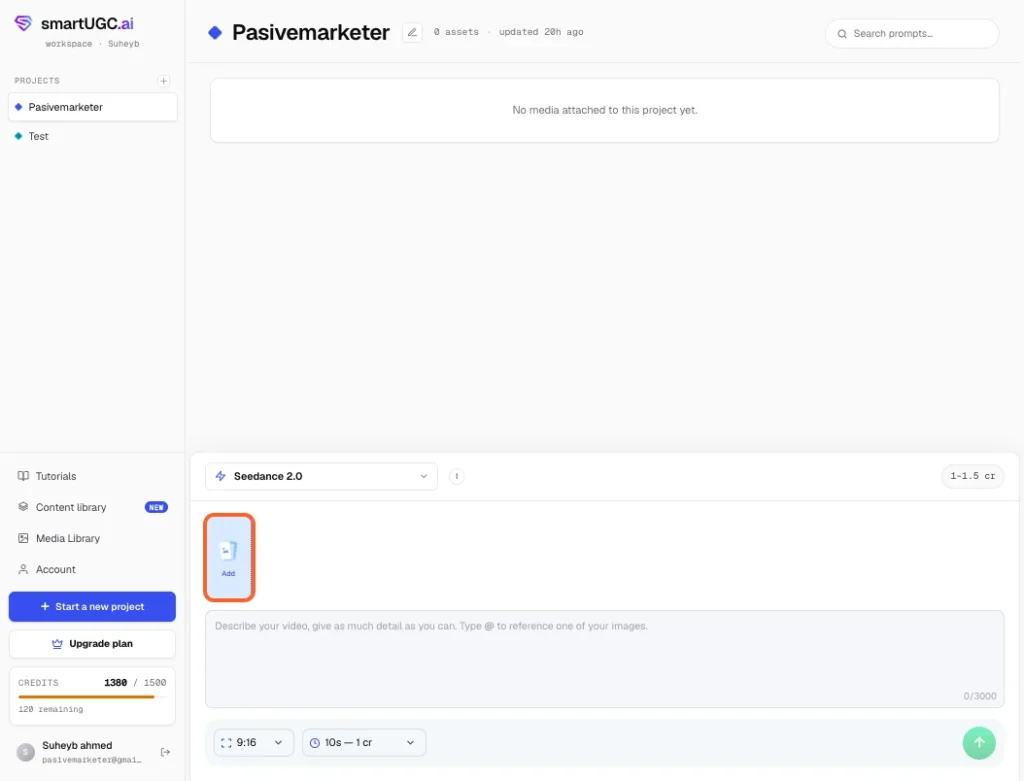
Step 5. Click "Add" to upload a reference image — your product photo, or a person photo, depending on what you're generating.
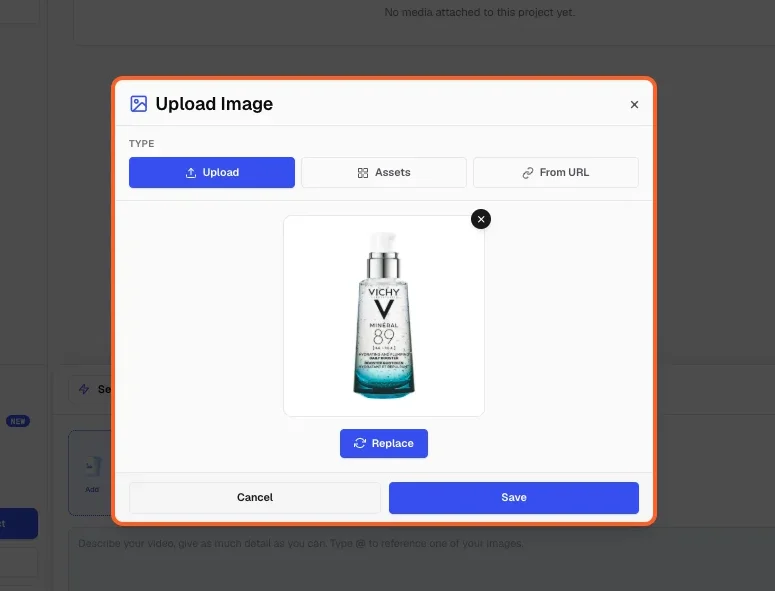
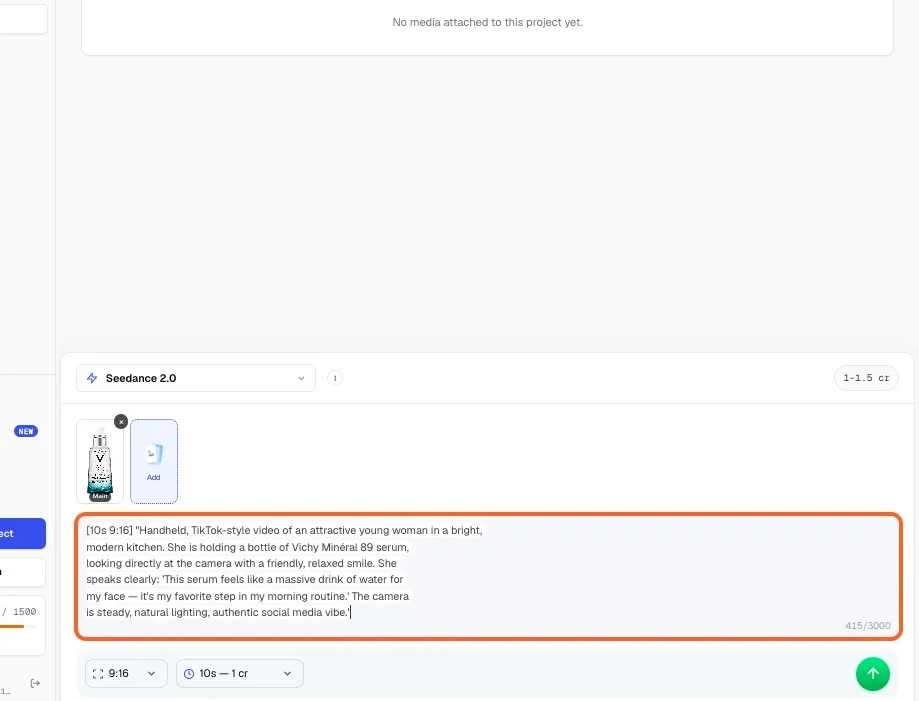
Step 6. Click into the text box and paste or type your script or scene description.
Step 7. At the bottom of the panel, set your aspect ratio and duration.
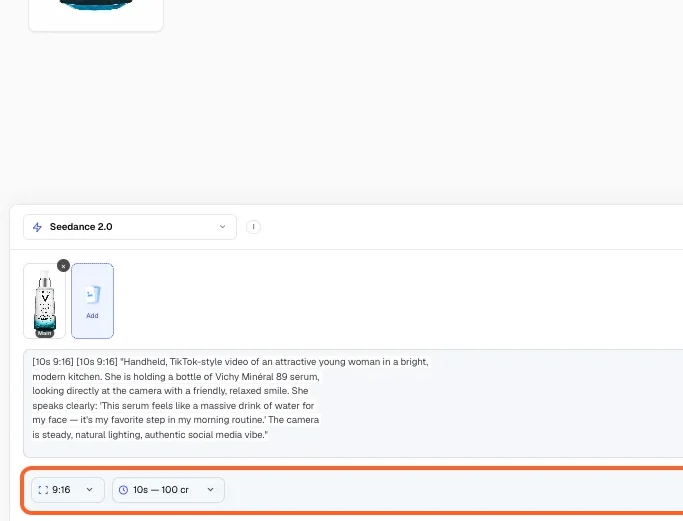
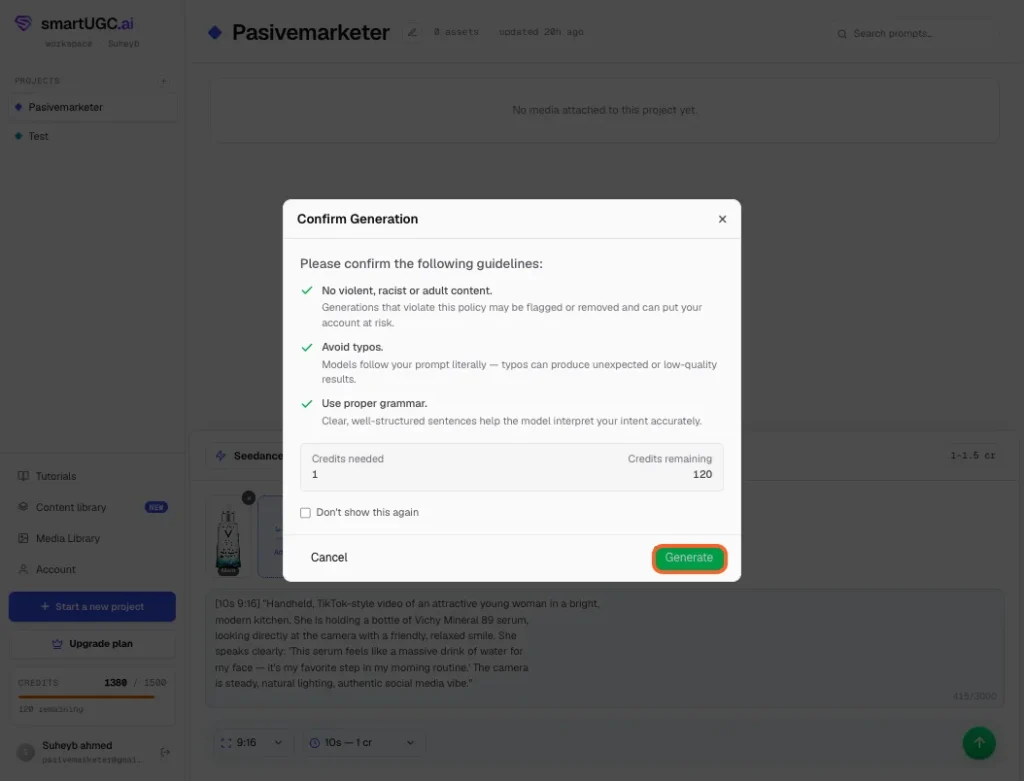
Check what your chosen model actually supports here first — not every model offers every duration or every aspect ratio, and the credit cost changes depending on what you pick. Click the green arrow button to submit.
Step 8. "Confirm Generation" window pops up with SmartUGC's content guidelines — no violent, racist, or adult content, avoid typos, use proper grammar. Check the credit count shown, then click "Generate.
Is SmartUGC Safe to Use?
Yes, your content isn't used to train their models, and your data doesn't sit around indefinitely.
What Data It Collects
Account details, billing information, the prompts and scripts you submit, the videos and images it generates for you, and basic request logs tied to your usage.
Where Your Prompts and Content Actually Go
Your generations don't stay on one server. SmartUGC routes requests through a mix of third-party infrastructure to actually render your videos and voices — including Vertex AI, OpenRouter, fal.ai, and ElevenLabs — plus Cloudflare for infrastructure and Stripe for billing. That's normal for a platform stitching together several AI models rather than building its own from scratch, but it's worth knowing your prompts pass through more than one company's systems before you get a finished video back.
Does It Train on Your Content?
No. According to their privacy policy, your prompts and generated content aren't used to train SmartUGC's own models or any third-party model they route through.
How Long They Keep Your Data
Per their stated policy: about 30 days after you close your account, request logs are kept up to 12 months, and technical logs up to 90 days.
What This Means for You
Don't upload anything you wouldn't want passing through multiple third-party AI services — proprietary product designs, unreleased branding, or anything under an NDA is worth keeping off the platform. For standard product ad content, like the serum bottle I tested with, there's nothing here that should give you pause.
Disclaimer: This section is based on SmartUGC's published privacy policy, not something I independently tested — worth a read yourself before uploading anything sensitive.
Final Verdict
4.6 out of 5. I'd use it again, and I'd point a small brand toward it before most of its competitors.
SmartUGC does one thing and does it well: turn a script into a talking-actor UGC ad without a camera, a creator, or a learning curve. Across four AI models, the Talking Actor tool, and both Product-in-Hand features, most of what I generated was usable, some of it was genuinely impressive, and the one time a result came out flat, a better prompt fixed it in a single try.
It's not flawless. Grok 1.5 looked the most artificial of the four models and once added dialogue I never wrote. The AI Script Writer is fast and often well-structured, but it invented a fact about my own testing without flagging any uncertainty. Neither issue is a dealbreaker — but both mean you watch the full clip and read the full script before you publish anything this tool hands you.
Buy it if: you're a solo seller, small ecommerce brand, or agency that wants finished UGC-style ads fast, without hiring a creator or managing a complicated platform. The pricing is easy to read, the trial is cheap, and Product-in-Hand plus Talking Actor deliver strong results for very little credit cost.
Skip it if: you need bundled ad-platform analytics in the same tool, or you're not willing to review every output before it goes live. This isn't a set-it-and-forget-it tool — it's a fast one that still needs a human checking its work.
Frequently Asked Questions
1. Is SmartUGC worth it?
Yes, for the specific job it does. If you need fast, affordable talking-actor UGC ads without hiring a creator, it delivers - my testing landed at 4.6/5. It's less worth it if you need bundled analytics or a hands-off, zero-review workflow.
2. What's the refund policy?
Failed generations refund the credit automatically, no support ticket needed. Beyond that, check SmartUGC's current terms directly before assuming a refund applies to a completed generation you're just unhappy with.
3. How does the custom avatar process work?
You upload a short reference clip of yourself or a team member, and SmartUGC builds a reusable digital twin from it. It unlocks starting on the $69 Creator plan.
4. What are the product-in-hand requirements?
You need a product image or URL. SmartUGC also offers an image-first workflow — generate a still of a person holding the product, then animate that image into video. Both unlock at the $69 Creator plan.
5. Do credits expire?
They don't expire when you upgrade — unused credits roll over to your new plan. I didn't test what happens to credits if you cancel outright, so don't assume they carry over in that case.
6. Which models actually render the ads?
I tested four: Sora 2 Pro, Seedance 2.0, Grok 1.5, and Veo 3.1. Seedance 2.0 was my strongest performer across lip-sync and voice naturalness; Grok 1.5 was the weakest and once added dialogue that wasn't in my script.
7. What happens if a render fails?
The credit refunds automatically. I didn't hit a failed render myself during testing, so I can't confirm this from firsthand experience — it's what SmartUGC states.
8. How does cancellation and account deletion work?
I didn't test cancellation directly during this review. Check SmartUGC's account settings or support docs for the current process before relying on my word for it.
9. Is there a free trial, and is the trial output usable?
Yes — $1 for the first three days, and the output is watermark-free and publishable immediately, not a locked preview.
Disclosure: SmartUGC gave me free credits to test their platform, and I earn a commission if you sign up through the links in this review. That didn't change my scores — Grok 1.5 still landed at the bottom of my testing, and I called out both Grok and the AI Script Writer for generating content that wasn't accurate. You're getting my real testing results either way.
Popular AI tools like SmartUGC


Pasive Marketer is a digital publication dedicated to AI tools, SaaS software, digital marketing, and online business growth. We create in-depth reviews, comparisons, tutorials, and expert guides to help entrepreneurs, marketers, and businesses discover the best software solutions and make informed purchasing decisions.