

Synthesia.io Review
The world’s #1 AI video communications platform for enterprise training, internal comms, and global dubbing.
Synthesia.io Features
Text-to-Video Conversion
160+ Multilingual Voices
Extensive AI Avatar Library
AI Video Assistant
AI Dubbing & Lip-Sync
1-Click Translation
AI Screen Recorder
Collaboration Workspaces
Custom AI Avatars
Branding Tools
Templates & Scene Editor
Analytics Dashboard
Export Options (SCORM)
Interactive Elements
Security & Compliance
Synthesia.io Pricing
Synthesia.io integrations (48)
 WordPress
 YouTube
 Shopify
 Notion
 Monday
 Excel Add-in
 PowerPoint
 Workato
 Udemy
Udemy zngly
zngly 360Learning
 aNewSpring
 Articulate
 BigCommerce
 Blanc
Blanc ChurnZero
 Coassemble
 Crowdin
 Docebo
 Easygenerator
 Eduflow
 eloomi
 ETU
ETU FlowShare
 HubSpot
 Intercom
 Kaltura
 Kickstarter
 Kumullus
 Lectora
 Make
Make Medium
 Mindstamp
 Mini-Course
 Moodle
 ParkOOroo
 SAP Litmos
 Squarespace
 Stellar Labs
 TalentLMS
 Thinkific
 Thought Industries
 Tolstoy
 Unsplash
 uQualio
 Userpilot
 Vimeo
Vimeo Wisetail


Synthesia.io Pros and Cons
Pros
Access the highest fidelity AI avatars in the industry with micro-expressions and natural body movements.
SOC2 compliant and highly secure, making it the preferred choice for corporate training and internal comms.
Automatically translate videos into 130+ languages with perfect lip-sync, saving thousands in localization costs.
Seamlessly integrate screen recordings with AI avatars to create professional software tutorials in minutes.
Create a digital twin of yourself or your CEO that looks and sounds indistinguishable from the real person.
Cons
The “Starter” and “Creator” plans use a credit system that can feel restrictive for high-volume creators.
Because it’s so popular, some stock avatars are easily recognizable as “AI” by tech-savvy viewers.
Moving from the Creator plan to Enterprise is a significant jump in cost and commitment.
What Synthesia Actually Does
Synthesia.io turns text scripts into videos with AI avatars. You type words. A digital presenter speaks them. The platform helps HR teams ship training content fast without camera crews.
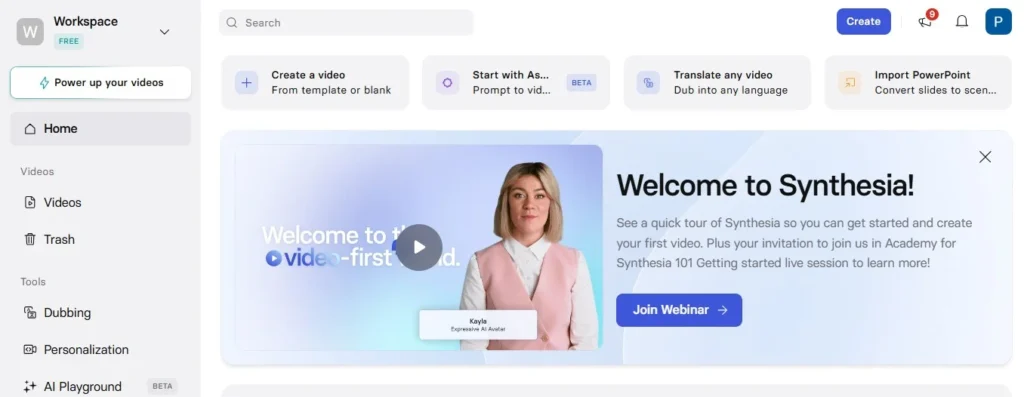
It works best for policy updates, compliance courses, and internal announcements. The system handles 130 languages and lets you swap presenters without reshooting. But the tool has hard edges. It won’t replace your TikTok strategy or sales deck videos in most cases.
The training and comms problem it solves
Traditional training video production takes weeks. You book actors, rent studios, and pray nobody flubs a line during legal review. Synthesia.io cuts this down to an afternoon.
The real win is iteration. When your vacation policy changes, you edit the script and regenerate. The avatar lip-syncs to the new audio automatically. No camera rental. No asking Steve from Accounting to film another take.
This matters most for global teams. One English script becomes fifteen versions for different countries without hiring native speakers. The avatars speak Korean, Spanish, or German with decent accents. It isn’t perfect, but it beats subtitles that half your warehouse staff ignore.
Why it fails for viral marketing content
Marketing teams often buy Synthesia.io hoping to scale social content. They hit a wall fast.
The avatars look corporate. They stand still. They smile politely. This kills the energy needed for TikTok or Instagram Reels where viewers scroll past in two seconds.
The problems stack up quickly:
- The hands clip and float randomly (we covered this earlier)
- The avatars cannot react to comments or ride trending audio
- They stare through the camera like polite robots
- You get polished boredom instead of raw engagement
Viral content needs human messiness. Real creators say “um” and gesture with their hands. Synthesia.io offers perfect, lifeless delivery. That works for compliance training. It kills conversion rates on social ads.
Desktop power vs mobile app limitations
Synthesia.io built the tool for desktop first. The browser editor handles complex scenes, multiple avatars, and screen recording overlays. You need the full screen space to sync slides with speech timing.
The mobile app is basically a viewer. You can watch renders and share links. You cannot edit scripts or swap backgrounds from your phone. This frustrates managers who want to fix a typo while commuting.
Most teams end up stuck at their laptops. The workflow assumes you’re at a desk with time to focus. For field trainers or retail managers between shifts, this creates a bottleneck. They must wait until they’re back at headquarters to push updates live.
The Pricing Reality Most Reviews Skip
Synthesia.io starts at $18 per month for 10 minutes of video. That sounds cheap until you realize one training module eats three minutes, and HR teams rarely make just one video.
Most reviews list the plan tiers and stop there. They don’t mention what happens when you blow through your credits mid-quarter or how the annual lock-in works.
Credit system traps — Overage fees — Billing surprises
The Starter plan gives you 10 minutes per month. Sounds fair. But Synthesia rounds up. A 61-second video costs two minutes of credits. Upload a three-minute script? That’s three minutes gone, even if the avatar speaks fast.
Run out of credits and you hit a wall. You cannot render until you buy more. The overage rate jumps to $3 per minute on personal plans. Enterprise teams get better rates, but they’re locked into annual contracts starting at $22,000. One mid-size company I spoke with got hit with a $4,200 true-up bill because their L&D team forgot to track usage during onboarding season.
The billing page hides this math. You see “unlimited users” and miss the fine print about minute caps.
Cost-per-video math vs traditional production
Traditional training video production costs $3,000 to $8,000 per finished minute when you factor in crew, talent, and editing. Synthesia wins hands-down at that scale.
But here is where the math flips. If you need ten short updates per month, each under 90 seconds, you’re paying $220 monthly for Synthesia.io. That same work costs $500 using a freelance editor on Fiverr, and you own the files forever.
|
Production Type |
Cost for 15 min/month |
Hidden Costs |
|---|---|---|
|
Synthesia Starter |
$216/year |
Overage fees, no API access |
|
Freelance Editor |
~$600/project |
Revision fees, scheduling delays |
|
Traditional Agency |
$15,000+ |
Travel, equipment, reshoots |
The break-even point sits around 20 minutes of video monthly. Below that, you’re renting a Ferrari to pick up groceries.
Annual commitment discounts and nonprofit eligibility
Pay yearly and you save roughly 25%. The Personal plan drops from $216 to $198. Enterprise deals cut deeper, but you must sign 12-month contracts with auto-renew clauses that require 60-day cancellation notice.
Nonprofits get 30% off, but the approval process takes weeks. You need 501(c)(3) paperwork and a minimum six-month commitment. Startups and bootstrapped teams rarely qualify for educational discounts despite thinking they do.
The trap? Annual billing assumes your team size stays flat. Add five seats in month three and you’re paying pro-rated fees at the higher tier rate, often losing the discount you signed up for.
Where the Workflow Actually Slows Down
Synthesia.io moves fast until you hit the edges. The platform promises instant video creation. But real production schedules slip on three friction points most teams miss during the trial.
These bottlenecks won’t show up in the demo. You only feel them when you’re pushing 50 videos a month. You need them to work across different languages and learning systems.
Avatar quality gaps — Non-English degradation — Accent limits
English avatars look sharp. The lip sync matches the words. Switch to German or Japanese and the same avatar suddenly looks like a dubbed movie from the 90s. Mouth movements don’t line up with the sounds. This happens because the AI trains mostly on English speech patterns.
Accents create another hole. A British accent sounds fine. Try Brazilian Portuguese or Thai and the voice gets robotic fast. The emotional range drops to zero. You end up re-recording with human voice actors anyway, which kills the cost savings.
LMS integration friction and SCORM headaches
Exporting to your learning management system sounds simple. It isn’t. SCORM files from Synthesia often break tracking in older LMS versions like Moodle or custom corporate systems. Completion percentages freeze at 80%. The video plays but the system marks it incomplete.
File sizes balloon too. A ten-minute video hits 400MB. Many LMS platforms cap uploads at 200MB. You need to compress the video externally before uploading, which adds an extra step you didn’t plan for.
Render queue delays during business hours
Morning renders in New York or London take forever. Everyone logs on at 9 AM and hits export at the same time. Your “instant” video sits in a queue for 20 minutes. If you need a quick edit before a meeting, you’re stuck waiting.
The Personal plan gets worse treatment during peak hours. Enterprise clients jump the line. Solo creators watch the loading bar while the clock ticks.
Feature Depth That Actually Moves ROI
The advanced tools only pay off if you have technical staff. Most small teams never touch the API. They pay for features they cannot use.
Synthesia.io markets these as time-savers. In practice, two of the three features create extra work. Only the automation tools deliver real cost cuts at scale.
API access and automation potential
Developers can connect Synthesia to your HR system. New hires trigger video creation automatically. No human clicks anything.
But you need a programmer on staff. The documentation exists, but it assumes you know Python or JavaScript. Small L&D teams without IT support cannot use this feature. They still make videos one by one.
The ROI math changes here. If you generate five hundred onboarding videos monthly, the API cuts production costs by eighty percent. Below fifty videos, the setup time erases all savings.
Collaboration tools for distributed teams
Teams can leave comments on specific timestamps. Managers get @mentions when feedback arrives. It looks like Google Docs.
Here is the friction. Reviewers cannot fix a typo themselves. They must write a comment saying “change ‘their’ to ‘there’ at 0:45.” The editor reads the note, finds the timestamp, fixes the word, and re-renders. A five-second fix takes ten minutes of back-and-forth.
The system tracks versions. But version history confuses non-technical reviewers. They click “approve” on the wrong draft by mistake.
The AI script assistant that needs heavy editing
The built-in writer generates text from bullet points. It sounds like a robot reading a textbook. You get phrases like “use our core strengths” and “make teams work better.”
You cannot publish this. You must rewrite every line to sound human. The editing takes longer than writing the script yourself.
Smart teams skip this tool. They write in ChatGPT or Word first. Then they paste clean text into Synthesia. The AI assistant adds an extra step that slows you down.
My Experience Using Synthesia.io
Getting started takes ten minutes, but making something worth publishing eats up an afternoon. I tested Synthesia.io using their basic plan to create a product walkthrough and a training video. The tool delivers on speed for basic tasks, yet the gap between “functional” and “good” requires more hand-holding than the ads suggest.
Setup & Ease of Use
Getting started feels like setting up a social media profile. You check your email, pick an avatar, and open the editor. No tech skills needed.
But here is the hassle they hide: picking a template confuses most users. You see 60+ options that look alike but work differently. Some let you move the camera. Others keep shots static. I chose wrong twice and restarted my project.
Changing how the avatar looks also hits walls. You can swap shirts and backgrounds. You cannot change how the AI moves its hands. Small brands often find their “custom” avatar looks just like their competitor’s.
Video Creation Test
I made a two-minute software tutorial. Writing the script took five minutes. Fixing the pacing took forty.
The editor works like slide software. You type text, add pauses, and put screen recordings between avatar clips. Simple stuff. But the AI rushes through lists unless you add breath marks manually.
I tested the Spanish translation. The lips matched the words, but the voice turned flat. You lose the warm tone that makes the English version work.
Output Quality & Realism
Viewers spot the fake in three seconds. The lighting on the face never matches the background. Shadows fall the wrong way.
The new “Expressive” avatars from late 2025 fix the dead-eye look. These models blink and nod at random. They still cannot show feelings. I tried recording a congrats message for a sales team. It looked like a hostage video.
For screen recordings with corner avatars, the quality works. The AI becomes background noise. Viewers focus on your demo, not the digital face.
Limitations I Found
The basic plan gives you ten minutes of video per month. That vanishes fast. One long tutorial and you hit your limit.
You cannot download files to edit in other programs. You are stuck in their web editor forever. If Synthesia raises prices next year, your whole video library is trapped.
The biggest surprise: no mobile sizing. Videos export in wide screen only. Making vertical clips for Instagram or TikTok requires black bars or other apps. For a tool selling “modern video,” this feels old.
Use-Case Fit: From Enterprise to Solo
Synthesia.io works best for large companies with strict training rules and hundreds of employees. The platform struggles when you need fast, fun content for TikTok or YouTube.
Most buyers pick the wrong plan because they imagine future growth instead of current needs. A solo creator buying the Starter plan wastes money on limits they will hit in week one. An enterprise team trying to use the API without a developer wastes months on setup.
Enterprise L&D and HR teams (perfect fit)
Big companies with training systems get the most value here. Synthesia connects directly to Workday, Cornerstone, and SAP. You can push compliance videos to ten thousand staff without filming a single retake.
Avatar consistency matters most at this scale. Every regional office sees the same digital trainer. The message stays identical whether viewed in Berlin or Bangkok. HR teams save the cost of flying speakers to six countries. The SCORM exports actually work here because these teams have IT staff to handle the technical setup.
Agencies managing corporate training (moderate fit)
Agencies face a tight budget squeeze. They pay roughly $22 per video minute but often charge clients flat project rates. If a client asks for three rounds of revisions, the agency eats the overage fees.
The collaboration tools help distributed teams. Account managers can leave timestamp comments for video editors. But agencies still need post-production staff on payroll. Synthesia speeds up the filming stage, not the editing. You still need someone to check if the German avatar sounds natural or if the lip-sync slipped on frame 240.
Marketing teams and solo creators (poor fit)
This is where cash burns fastest. Marketing teams need quick turnarounds and viral energy. Synthesia renders take four times longer than mobile apps like CapCut. The avatars look too polished and stiff for TikTok. Viewers scroll past corporate talking heads in under two seconds.
Solo creators get the worst deal of all. The Starter plan limits you to ten minutes per month. One ten-minute YouTube video blows your entire budget. You cannot remove the Synthesia watermark without upgrading to Enterprise pricing. Free tools give you more minutes for less money, and competitors like Arcads offer better faces for social ads.
Final Assessment for 2026
Synthesia.io fits teams that outgrew DIY video but lack a full studio budget. It’s a middle-ground tool that charges premium prices for convenience, not creativity. Most companies use it for two to three years. Then the per-video costs stop making sense.
The investment verdict for scaling teams
The math breaks around the fifty-employee mark. At that size, you produce enough training content to burn through starter credits fast. But you haven’t yet built an internal video team to justify buying cameras and hiring editors.
Here’s the trap: annual billing saves you 25%, but it locks you into a credit system that doesn’t flex with your growth. You might buy 120 videos upfront, then need 200 by month eight. Buying more credits mid-year costs more than the plan itself.
The real value isn’t the avatars. It’s the ability to fix errors without refilming. When compliance changes a regulation, you edit the script and re-render in minutes. Traditional video requires booking the speaker again, finding the studio, and spending $3,000 to fix one outdated sentence. That feature alone justifies the price for risk-averse industries like finance and healthcare.
But if you’re growing into a 500-person company, start planning your exit now. Synthesia.io doesn’t offer volume discounts that scale cleanly. Eventually, you pay more for their AI than you would for a junior videographer with a ring light.
Migration path if you outgrow the platform
Leaving Synthesia.io hurts more than canceling a typical SaaS subscription. You can’t download your custom avatars. You can’t export the AI voices you trained. Your entire video library stays in their format unless you download low-res MP4s.
The platform offers SCORM exports for your LMS, but these are just video files. You lose the ability to edit text later. When you migrate to a new system or traditional video production, you start from zero.
Smart teams mitigate this by keeping scripts in Google Docs from day one. They treat Synthesia as a temporary rendering tool, not a permanent archive. When you hit the ceiling—usually around 200 videos per month—you already have the scripts ready for a production team or a different platform.
The jump isn’t technical. It’s organizational. You trade the “edit in five minutes” power for “film once and use forever” stability. Most outgrow Synthesia.io not because it breaks, but because they get tired of paying rent on their own training content.
Frequently Asked Questions – Synthesia.io
1. Is Synthesia worth the investment compared to free AI video tools?
Free tools like CapCut handle one-off social posts fine. You drag, drop, and publish. The hidden cost hits when you need twenty versions of compliance training. Suddenly you spend six hours tweaking avatars instead of six minutes.
Synthesia wins on volume. If you publish fewer than five videos monthly, stick with free options. Once you cross fifteen videos, the labor savings beat the subscription fee. Most teams underestimate manual editing time until they bill those hours.
2. How does Synthesia pricing scale for growing teams in 2026?
It scales linearly, which hurts. Each new member needs a paid seat. There is no unlimited company tier for your whole staff.
The credit system adds another trap. You buy blocks of minutes. Run over your limit during a product launch. You then pay overage fees or wait until next month. Growing teams often hit this wall at around fifty users. At that point, you face five-figure annual commitments with no bulk discount.
3. Which competitor offers better value for UGC-style marketing videos?
Arcads.ai beats Synthesia for user-generated content and sales outreach. Tagshop works better for quick marketing clips with trendy avatars. Synthesia sits at the wrong table for viral content.
If you need authentic, emotional reactions or handheld camera vibes, traditional video or Arcads delivers better ROI. Synthesia excels in boardrooms, not TikTok feeds.
4. Should You Buy Synthesia.io?
Buy it if you lead an HR or L&D team that pumps out compliance training. Skip it if you are a marketing agency chasing viral trends or a solo creator building a brand.
The platform solves one problem perfectly: scaling corporate communication without film crews. It fails at everything else.
Before you swipe the company card, run this test. Record one video in Synthesia. Time how long it takes. Then record the same script on your phone using a simple teleprompter app. If the phone version looks better and took less time, you have your answer.
☐ Use Synthesia only for internal training, never external marketing
☐ Calculate true cost per video including your script writing time
☐ Keep master scripts in Google Docs to avoid vendor lock-in
☐ Wait three months before switching to annual billing
☐ Switch to Arcads or traditional video if you need emotional UGC content

Create AI Videos Fast
Create AI avatar videos in minutes without cameras or editing skills.
Get StartedExplore AI UGC Resources
AI UGC Video Generator
The ultimate engine for creating high-converting AI synthetic videos.
AI UGC Tools
In-depth reviews and testing of the latest AI UGC software tools.
AI UGC Comparisons
Side-by-side breakdowns to help you choose the right platform.
Best AI UGC Platforms
Curated list of the top-performing AI video platforms today.
UGC Marketing Guides
Strategies, trends, and practices to scale your marketing.
Creator Monetization
Learn exactly how to earn and scale income with AI UGC videos.
More AI Tools Reviews


Pasive Marketer is a digital publication dedicated to AI tools, SaaS software, digital marketing, and online business growth. We create in-depth reviews, comparisons, tutorials, and expert guides to help entrepreneurs, marketers, and businesses discover the best software solutions and make informed purchasing decisions.